A data API is a programmatic interface that fetches and returns structured, real-time information from upstream sources on demand, rather than serving a static database dump. By 2025, 82% of organizations had adopted some level of an API-first approach, while 25% operated as fully API-first organizations, according to Postman's 2025 API report.
You've probably faced the underlying problem already. Your SaaS product shows a job title that changed months ago, a company headcount that no longer matches reality, or an engagement record that's missing because your internal database updates on a slow schedule. Users notice these gaps when they're building prospect lists, matching candidates, or asking an AI agent to act on current professional context.
A B2B data API addresses that problem by accepting an input such as a professional profile URL or company URL, retrieving available public professional data, normalizing it, and returning a predictable response your application can use immediately. The important architectural choice is not just whether data arrives as JSON. It's whether your product needs freshness at request time, or whether a periodically refreshed snapshot is sufficient.
Table of Contents
- Understanding the Core Concept of a Data API
- How Professional Data APIs Work Under the Hood
- Real-World Applications for SaaS and AI Agents
- Real-Time Fetching Versus Cached Data Feeds
- Navigating Rate Limits and Pricing Models
- Compliance and Ethical Data Sourcing Standards
- Criteria for Selecting the Right Data Provider
Understanding the Core Concept of a Data API
Suppose you're building a sales intelligence dashboard. A user opens a lead record and expects the current position, company, location, and firmographic context to appear without exporting a spreadsheet or waiting for a batch job. A data API gives your application an endpoint for making that request programmatically.
The basic flow is straightforward:
- Your application sends a request, usually with an identifier such as a professional profile URL, company URL, or provider-specific record ID.
- The API authenticates the request and validates the input.
- The service fetches information from upstream sources, then maps it into a consistent schema.
- Your application receives structured output, commonly JSON, and stores or displays the fields it needs.
That differs from a static database dump. A dump is a snapshot produced at a particular time. It can be useful for bulk analysis, offline modeling, or a fallback dataset, but it doesn't promise that the record reflects the source of truth when the user asks for it. A live request-time API makes freshness part of the product behavior.
Why API-first architecture matters
APIs became a mainstream software layer during the 2010s as cloud platforms and SaaS products standardized machine-to-machine integration. Postman reported that its user base grew from 25 million in 2023 to over 35 million in 2024, an increase of 10 million users in one year (Postman). That growth doesn't prove that every API is well designed, but it does show how central programmatic interfaces have become to modern product development.
A data API is especially useful when several product features depend on the same information:
- Lead enrichment can request current professional and company attributes during a workflow.
- Talent intelligence can normalize positions, education, skills, and locations into one record.
- Analytics products can pull structured inputs into dashboards without maintaining every upstream connector.
- AI agents can request fresh context before deciding what action to take.
The value comes from moving data access into the application's normal control flow. Instead of asking an operations team to export records, clean columns, and upload a file, the product can fetch the required fields when a user or automated workflow needs them.
Practical rule: Treat a data API as an operational dependency, not just a data source. Its response time, error behavior, schema changes, quotas, and provenance all affect your product.
How Professional Data APIs Work Under the Hood
A professional data API usually exposes purpose-specific endpoints. One endpoint may accept a professional profile URL and return positions, education, skills, locations, and contact fields. Another may accept a company URL and return firmographics such as industry, headcount, headquarters, founding year, and verified domain.
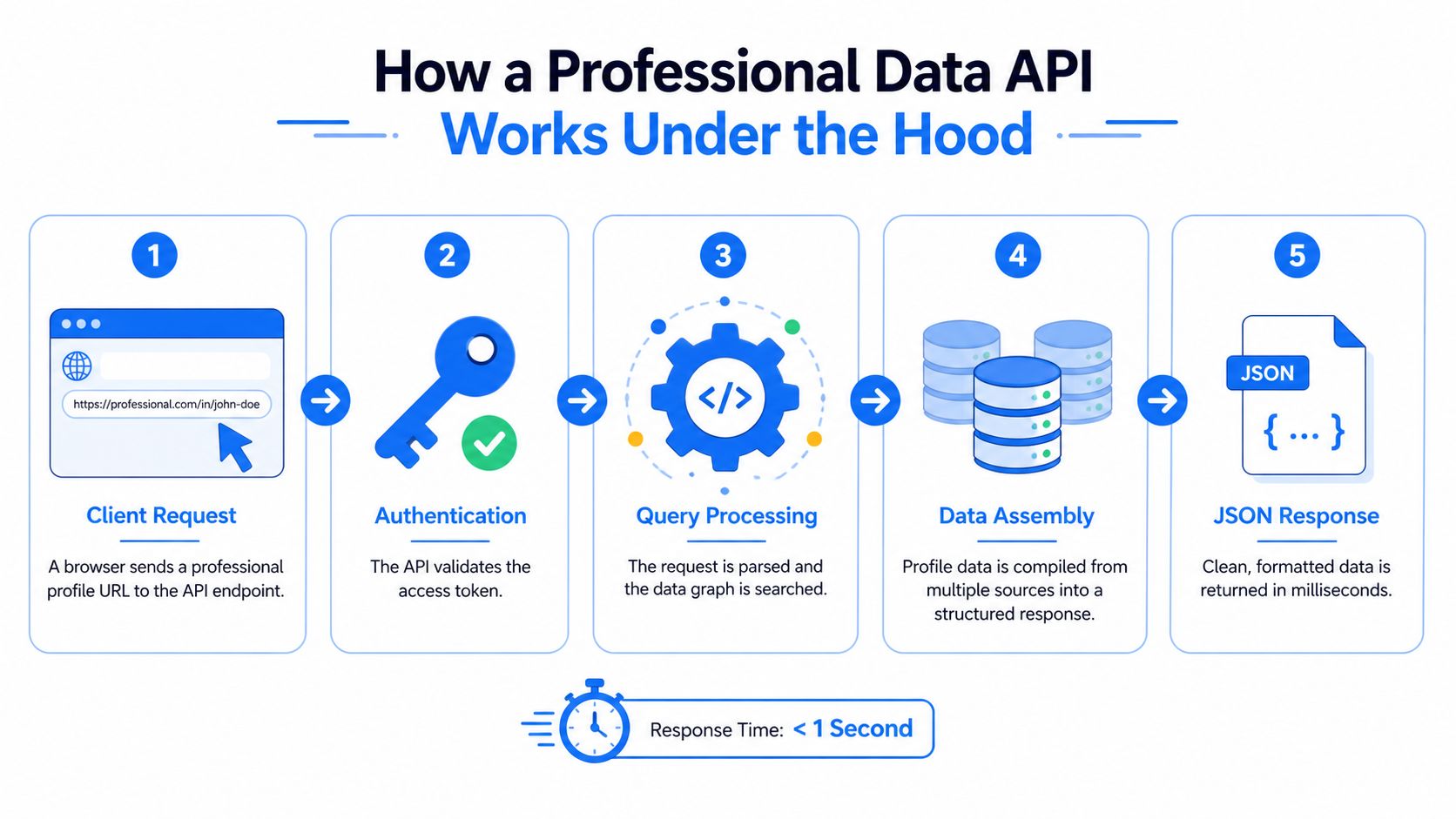
The request lifecycle typically looks like this:
- Client request: Your backend sends an authenticated request to an endpoint.
- Input validation: The provider checks the URL, required parameters, token, and request format.
- Upstream retrieval: The service fetches available information from its source systems.
- Schema assembly: It maps different source representations into a unified response structure.
- Response delivery: Your application receives JSON or an asynchronous job result.
Endpoints, schemas, and response behavior
An endpoint is the access point, but the schema is the contract. A useful schema names fields consistently, distinguishes missing data from empty values, and gives your application enough structure to handle partial responses safely. Before integrating, inspect examples for nested objects, arrays, dates, locations, employment history, and contact fields.
For a practical explanation of structured responses and related API patterns, see this guide to a JSON data API. Your team should also decide whether the endpoint is synchronous or asynchronous.
A synchronous endpoint holds the request open until the provider returns the result. That works well when a user is waiting for an enrichment panel, search result, or profile preview. An asynchronous endpoint accepts the job, returns a tracking reference, and delivers the result later. That model fits high-latency workflows, bulk processing, and agent tasks that already run through a queue.
The key trade-off is latency. In a request-time pass-through design, end-to-end latency equals platform overhead plus upstream response time. A faster application server won't eliminate a slow upstream dependency, so measure the complete path from your service to the provider and back.
A sync-and-cache design changes that equation by polling upstream data on a schedule and serving stored snapshots. Such a design can produce read latency of roughly 10 to 50 milliseconds, but freshness then depends on the sync interval, which may range from minutes to hours (Eurostat API guidance). For volatile professional data, that speed may be a poor exchange if users trust the record to be current.
Real-World Applications for SaaS and AI Agents
A lead enrichment workflow often starts when a user pastes a professional profile URL into a form. Your backend sends the URL to a B2B data API, receives structured fields, maps them to the account model, and displays the result beside the lead. The API sits between the product experience and the upstream data retrieval work, so your team can focus on matching, permissions, and workflow design instead of maintaining every source-specific transformation.

Enrichment without a second database
Real-time enrichment is useful when a record's value depends on current context. A sales tool may need the latest position and company details before routing an account. A recruiting platform may need current work history and skills before showing a candidate match. A talent intelligence product may combine profile attributes with firmographics to support search filters and segmentation.
The architecture works best when you separate retrieval from product state. Store only what your application has a legitimate reason to retain, record when it was obtained, and make clear whether a field is freshly fetched or previously stored. That distinction helps users interpret results and gives engineers a cleaner path for refresh policies.
Context for AI agents
AI agents need structured, bounded inputs. An agent that receives a stable JSON schema can use a professional profile or company record as context for a qualification workflow, account research task, or recruiting action. It can request the data at the point of decision rather than relying on a context store that may have become outdated.
Posts, comments, and reactions can support engagement-oriented workflows when the provider exposes them through separate endpoints. The engineering challenge is to keep the agent's permissions narrow. A tool should return only the fields required for the task, validate the input, and log the request so the team can review what the agent accessed.
The following video provides additional context on how API-driven enrichment can fit into a product workflow.
Consolidating profile, company, and engagement retrieval behind one interface can reduce integration surface area. It also creates a single place to manage authentication, retries, response validation, observability, and compliance controls.
Real-Time Fetching Versus Cached Data Feeds
The decision between a live API and a cached feed is a product decision, not merely a performance optimization. A live pass-through API retrieves information when the client asks for it, transforms the upstream result, and returns it immediately. A cached feed polls the source on a schedule, stores a snapshot, and serves reads from your own infrastructure.
| Feature | Real-Time Data API | Cached Data Feed |
|---|---|---|
| Freshness | Current at request time, subject to upstream availability | Depends on the sync interval |
| Read latency | Includes platform and upstream response time | Can be very low from local storage |
| Infrastructure overhead | Lower storage burden, higher dependency on provider availability | More storage, scheduling, refresh, and reconciliation work |
| Failure behavior | A live dependency can fail during a user request | Existing snapshots can remain available during upstream outages |
| Best fit | Volatile records and actions requiring current context | Repeated reads, offline analysis, and stable reference data |
Where live fetching works
Live fetching makes sense when stale information creates a direct product problem. If a workflow assigns ownership based on a current role, a delayed update can send the task to the wrong person. If an AI agent makes a recommendation using an old company attribute, the user may lose trust in the entire feature.
A live API also reduces the need to build a full synchronization system. You don't need to schedule every refresh, reconcile every changed field, or maintain a large local copy solely to answer occasional requests. You still need resilience, including timeouts, circuit breakers, observability, and a fallback policy.
Where caching wins
Caching is the better choice when many users request the same stable records, when the product must remain useful during provider downtime, or when upstream calls are expensive. It can also protect the provider from duplicate requests caused by repeated page loads.
The problem appears when teams treat a cache as a neutral performance layer. Every cached record has a freshness policy, even if nobody wrote one down. For volatile professional data, periodic snapshots can serve results that look authoritative while no longer matching the upstream source.
A fast answer isn't automatically a reliable answer. Decide what “current enough” means for each field before choosing the storage pattern.
A hybrid design often works well. Fetch on demand for high-value or volatile fields, cache records for a short, explicit period, and use asynchronous refresh for background enrichment. Keep the timestamp and source status with the record so the application can distinguish fresh data from a fallback snapshot.
Navigating Rate Limits and Pricing Models
An external data API can fail even when your code is correct. Providers protect shared infrastructure through quotas, throttling, and workload-specific ceilings. One government API platform documents a default limit of 1,000 requests per API key per hour, and says excess requests can temporarily block the key until the block lifts automatically after an hour (Data.gov API documentation).
That limit changes how you design queues and retries. A client that retries every failure immediately can turn a temporary upstream problem into a quota event. Your integration should classify errors, respect retry guidance, apply exponential backoff, and prevent multiple workers from retrying the same request independently.
Throughput is workload-specific
Providers may assign different limits to different routes because the operational cost varies. One public API reference lists 4,000 requests per minute for delivery promise routes, 300 requests per minute for consultation routes, and 100 requests per minute for asynchronous import routes (OneStock developer documentation).
That pattern is more useful than a single headline throughput number. Ask which endpoint your product will use, whether the limit applies per key, account, tenant, or IP, and whether sustained capacity differs from a short burst. If your customers can trigger parallel enrichment, model the queue rather than testing only one request at a time.
For a related discussion of caching to bypass OpenAI limits, focus on the underlying principle: caching can reduce duplicate work, but it shouldn't hide freshness requirements or violate provider terms. A rate-limit implementation guide can help your team document backoff, queueing, and concurrency behavior.
Pricing can distort architecture
API pricing may combine free access, daily quotas, monthly subscriptions, pay-as-you-go usage, and custom enterprise terms. One documented portal lists a free plan with 1,000 requests per day, a $29 per month plan with 10,000 requests per day, a $49 per month plan with 50,000 requests per day, and a custom enterprise tier (Statistics of the World API documentation).
Those tiers show why you need a cost model before launch. Estimate requests per workflow, duplicate calls, retries, background refreshes, and the percentage of requests that return usable data. Confirm whether failed requests consume credits, whether partial responses are billable, and whether a customer can create sudden concurrent demand.
Use idempotency where the provider supports it, deduplicate identical work, and expose usage metrics to your operations team. A predictable billing model is part of reliability because unexpected consumption can force product restrictions at the worst possible time.
Compliance and Ethical Data Sourcing Standards
Public availability doesn't remove compliance obligations. A SaaS product that handles professional data still needs a lawful purpose, appropriate safeguards, retention rules, access controls, and a process for responding to requests from individuals. GDPR and CCPA analysis should happen before integration, not after the enrichment feature reaches production.
Start with provider diligence. Ask where the data comes from, what permissions support the provider's collection and processing, how the provider handles deletion requests, and whether the response includes source references or provenance metadata. You should also understand whether your company is acting as a controller, processor, or another role under the relevant legal framework.
Build controls into the product
A defensible integration usually includes:
- Purpose limitation: Request fields that support a defined product function, not an unrestricted profile archive.
- Access control: Restrict sensitive fields to roles and workflows that need them.
- Retention rules: Delete or refresh records according to a documented policy.
- Auditability: Log requests, users, tenants, timestamps, and response handling.
- User rights support: Maintain a practical route for correction, deletion, and objection requests.
A provider's public-data policy isn't a substitute for your own assessment. Your product may combine API results with CRM records, user submissions, or behavioral data, creating a different risk profile from the provider's standalone response.
For teams preparing policies and controls, this overview of 2026 compliance strategies offers useful legal context. You should still obtain advice appropriate to your jurisdictions, customer contracts, and use case.
Compliance test: If your team can't explain the source, purpose, retention period, and deletion path for a field, it shouldn't be in the first production release.
Data provenance deserves its own implementation plan. Record what was fetched, when it was fetched, how it was transformed, and which downstream features used it. A practical data provenance guide can help engineers turn those questions into schemas and operational controls.
Criteria for Selecting the Right Data Provider
Choose a provider by testing the workflow your product will run. A polished dashboard demo can hide weak coverage, inconsistent schemas, undocumented quotas, and poor behavior during partial failures. Request representative inputs, inspect edge cases, and test both successful and unsuccessful calls.
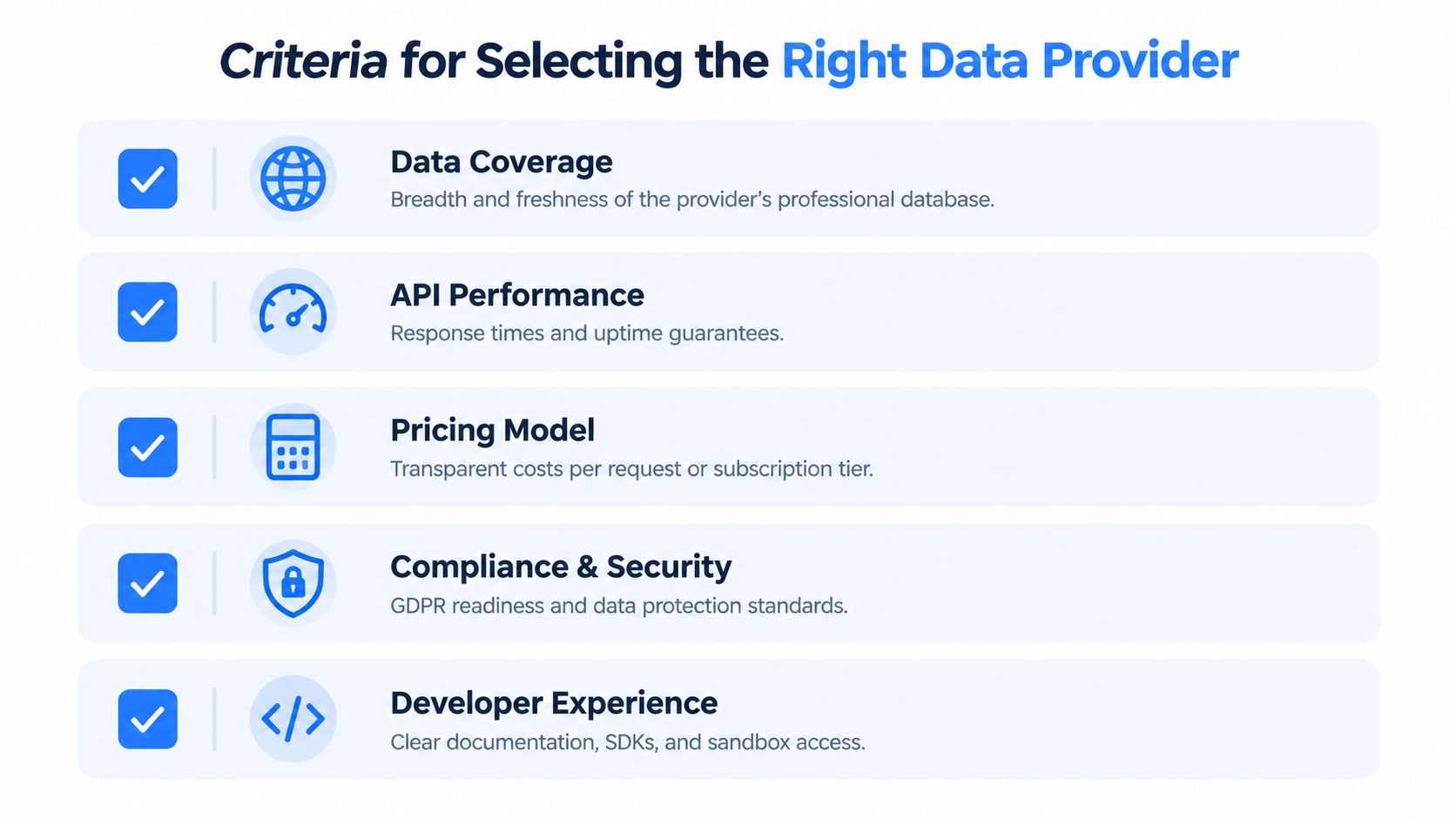
A practical evaluation checklist
Data coverage: Check whether the provider supports the professional profile URLs, company URLs, fields, and engagement objects your product needs. Coverage should include how the API represents unavailable, private, outdated, and ambiguous records.
Performance behavior: Measure complete request latency under realistic concurrency. Don't evaluate only the median. Look at slow responses, timeouts, partial results, asynchronous job behavior, and the provider's process for capacity increases.
Schema consistency: Validate field types, enum values, date formats, nested structures, pagination, and versioning. A broad response is less valuable if your application must write custom parsing rules for every record.
Pricing and limits: Map expected usage to the provider's plans. Confirm quotas, burst behavior, concurrency, retry billing, overage handling, and whether failed requests consume credits.
Compliance and provenance: Request written information about sourcing, lawful processing, deletion requests, security controls, and data residency where relevant. Your legal and security review should receive actual documentation, not only sales assurances.
Developer experience: Read the documentation as if you're integrating without assistance. Look for complete request and response examples, authentication guidance, error codes, SDKs, sandbox access, changelogs, and support escalation.
A provider comparison should also reflect your surrounding stack. If email verification is part of the same enrichment workflow, a focused Mailbeam API comparison guide can help you evaluate that adjacent dependency without confusing contact validation with professional data retrieval.
Fetchin is one example of a real-time B2B data API that turns professional profile and company URLs into structured JSON, with synchronous responses by default and optional asynchronous delivery for higher-latency workflows. Its product documentation describes profile, company, posts, comments, and reactions endpoints, so an engineering team can assess whether that interface matches its specific enrichment or automation workflow.
The right provider is the one whose freshness model, latency profile, quotas, price structure, schema, and compliance evidence fit your product. Start with a narrow endpoint and a representative test set, then measure the operational behavior before committing to a broader dependency.
If your SaaS product needs current professional profile or company data, Fetchin provides a B2B data API that fetches public information and returns structured JSON for enrichment, matching, and AI workflows. Review the available endpoints, test representative URLs, and design your integration around explicit freshness, rate-limit, and compliance requirements before moving into production.