Your SaaS form accepts a professional profile URL, calls an enrichment service, and fills in a lead record before the sales team sees it. The feature works in testing. In production, the person changed roles, the company record still shows an old headquarters, and the API response arrives slowly enough that the user submits the form again. Now your system has duplicate records, contradictory firmographics, and a queue of retries.
That failure usually isn't caused by missing fields. It comes from stale data, unpredictable delivery, weak error handling, or unclear data provenance. A B2B data API becomes part of your product's operating system, so its behavior affects routing, matching, automation, recruiting workflows, and every customer experience built on top of the returned JSON.
A practical evaluation starts with freshness rather than field count. You also need to understand how live fetching differs from cached data, why p50 and p95 latency reveal different problems, how synchronous and asynchronous delivery fit different workflows, and what governance controls engineers must build before enrichment reaches production.
Table of Contents
- Introduction Why Fresh B2B Data Makes or Breaks Products
- What a B2B Data API Is and How It Works
- What a B2B Data API Provides From Profiles to Engagement
- Technical Requirements That Matter in Production
- Live Fetching Versus Cached Data and Sync Versus Async Delivery
- Integration Patterns for Product Teams and Automation
- How to Evaluate and Choose a B2B Data API With Confidence
Introduction Why Fresh B2B Data Makes or Breaks Products
A product team may begin with a simple request: accept a professional profile URL or company URL, retrieve useful context, and show it inside the application. The first version often looks easy. One API call returns a profile, the interface displays a job title, and the CRM receives a company record.
The trouble appears when the workflow meets changing reality. A professional moves to a new employer, an organization changes its domain, or a company updates its public description. If your provider serves an old snapshot, your routing logic can assign the lead to the wrong territory. If the response is slow, your form feels broken even though the upstream request eventually succeeds.
Data decay makes this a system-design problem. Independent coverage estimates that B2B firmographic data decays by 20–30% per year, while another benchmark places contact-data decay at roughly 2% per month, which can leave close to a quarter of records invalid within a year. These figures are discussed in coverage of B2B enrichment API freshness and decay. The exact rate varies by segment, but the engineering conclusion is consistent: a record's age is a product input.
Practical rule: Treat freshness as a measurable property of every field, not as a slogan attached to a vendor plan.
Latency creates a second failure mode. A live lookup on a user-facing path can improve accuracy, but a slow tail still damages lead capture, routing, and agent automation. A cached record may respond quickly, yet push outdated information into downstream systems.
The right mental model combines four questions:
- What does the API return? Profiles, company attributes, engagement signals, or event data.
- How current is each field? Ask when it was detected, when it was last verified, and how often it changes.
- How does delivery behave? Examine percentile latency, rate limits, retries, and asynchronous options.
- Can your team govern the result? Require provenance, lawful-basis review, suppression handling, retention rules, and deletion workflows.
A B2B data API can be a thin lookup service or a major dependency inside your platform. The difference depends on how deliberately you design and evaluate it.
What a B2B Data API Is and How It Works
Think of a professional data API as a live translator. Your application speaks in URLs and parameters. Public professional data appears in many page layouts and naming conventions. The API converts that uneven input into a structured response your software can parse.
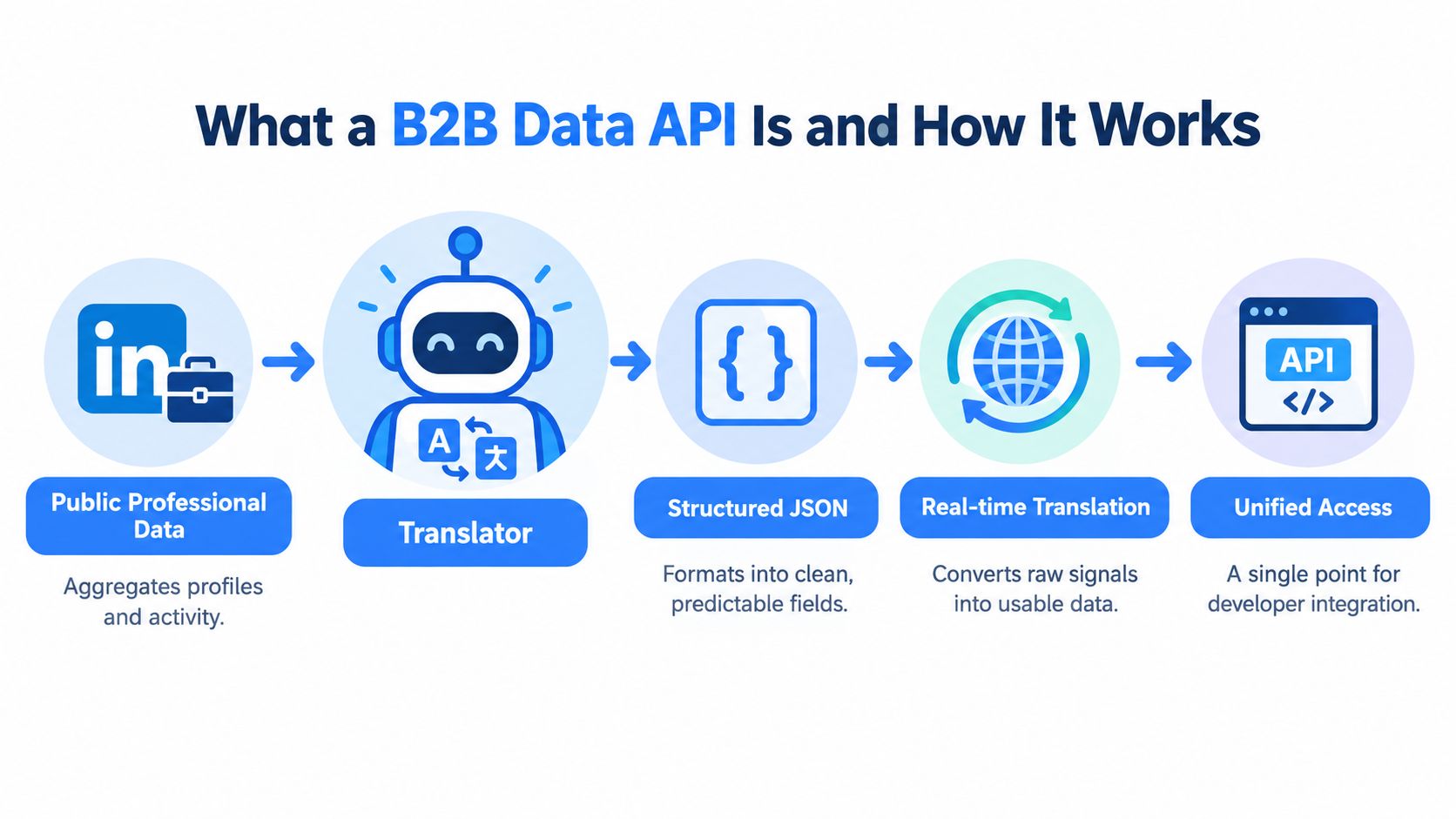
The request and response flow usually follows a straightforward sequence:
- Your product sends an input. That input might be a professional profile URL, a company URL, a domain, or another supported identifier.
- The provider resolves the identifier. It determines which public record corresponds to the input and may normalize the URL.
- The service fetches or retrieves data. A live-fetching system obtains current public page-state information when requested. A snapshot system reads an indexed record.
- The provider maps signals into a schema. Job titles, locations, company relationships, and other attributes become named JSON fields.
- Your application receives a response. Your code can store selected fields, display them, trigger a workflow, or pass them to another service.
The endpoint is the contract between your product and the provider. A well-designed endpoint documents accepted inputs, authentication, response fields, null behavior, status codes, rate limits, and versioning. That detail matters because your code shouldn't need to guess whether a missing value means “not found,” “not collected,” or “temporarily unavailable.”
A consistent schema also reduces integration debt. If one profile response returns location as a string and another returns a nested object, every consumer must add defensive parsing. Typed fields, predictable nesting, and explicit error objects make the API easier for both conventional services and AI automation to use.
The distinction between on-demand fetching and periodic indexing matters most when a workflow depends on recent changes. A cached database can be useful for broad matching and repeated reads. Live retrieval is more appropriate when the product must reflect the current public record at the moment of the request.
The U.S. Census Bureau helped establish the broader expectation that business data should be machine-readable, queryable, and embeddable. Its API documentation exposes annual business datasets covering establishments, sales and receipts, payroll, employees, geography, industry, and owner demographics, with developer documentation and examples available by 2020 and newer data vintages continuing afterward. See the Census Bureau business data API documentation for the public API model.
What a B2B Data API Provides From Profiles to Engagement
The returned data generally falls into three families. Separating them helps product teams map fields to actual features instead of evaluating a provider by an impressive but unhelpful field list.
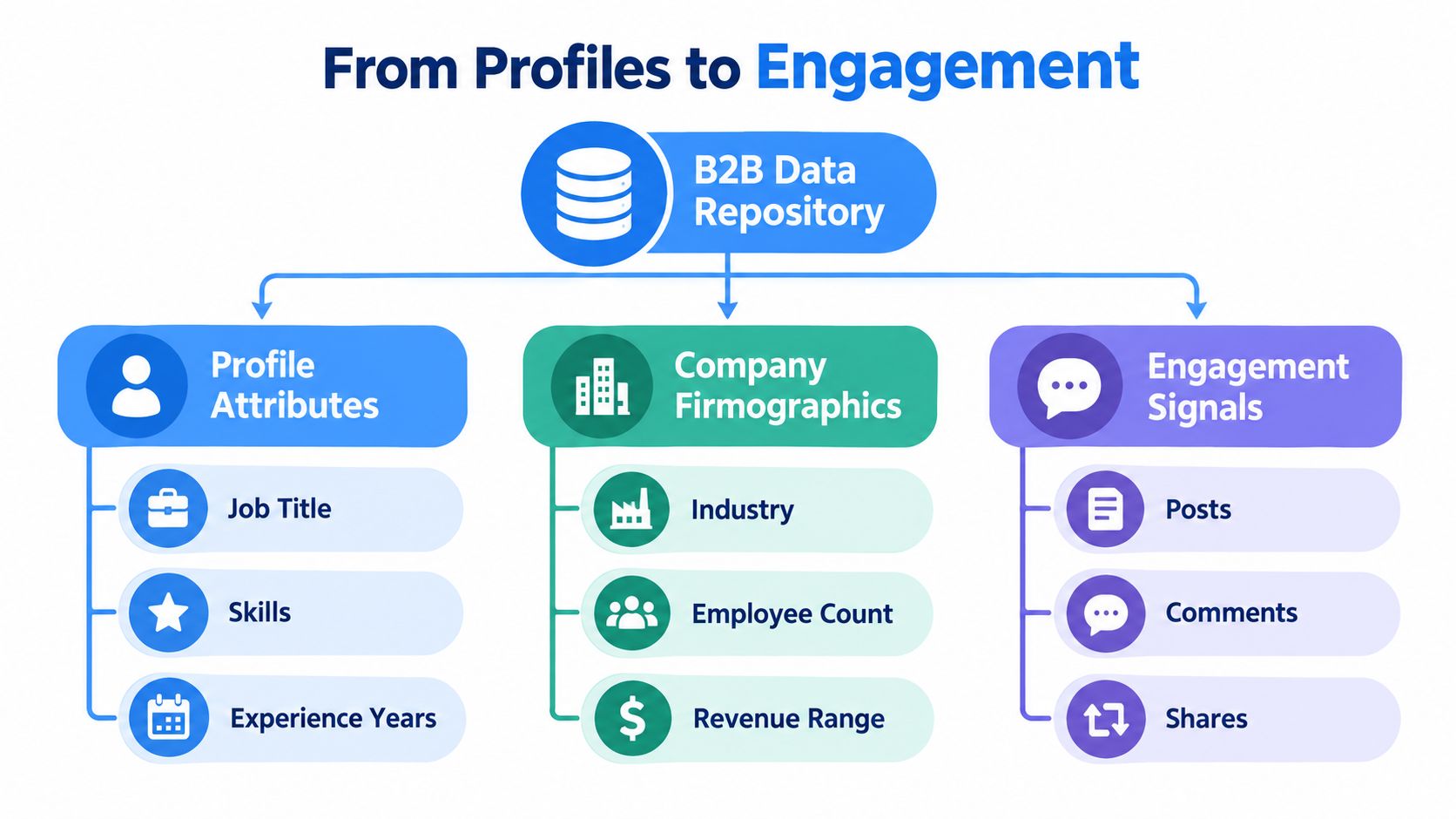
Profile attributes
A profile endpoint may return 100+ attributes, including positions, education, skills, locations, and contact fields. The value isn't the count by itself. The value comes from combining the fields for a defined workflow.
A recruiting product might use job title, experience, skills, and location to improve candidate matching. A sales application might use current position and employer to route a lead. A talent-intelligence tool could compare experience histories against role requirements. Each use case needs different validation rules, and some fields may require stricter privacy review than others.
Company firmographics
Company data supplies the organizational context around a person or account. Useful attributes include industry, headcount, headquarters, founding year, website, verified domain, and revenue range, depending on the provider and source.
These fields support segmentation and routing. A SaaS platform can use industry and employee count to classify an account. A recruiting system can connect a candidate to the right employer record. A market-analysis product can group companies by geography or business category. Teams building this workflow can also review Fetchin's company data API guide for a focused explanation of company-level enrichment.
Engagement signals
Posts, comments, and reactions add a time dimension that static profile fields lack. They can help a product identify recent activity, understand topical relevance, or give an agent context before it recommends an action.
Engagement data needs careful interpretation. A reaction doesn't automatically indicate buying intent, and the absence of a post doesn't prove the absence of interest. Your application should store the signal type, observed time, source reference, and any confidence or provenance metadata the provider supplies.
The strongest product designs combine the families rather than treating them as interchangeable:
- Lead enrichment: Resolve a person and connect the record to current company firmographics.
- Sales routing: Use role, location, industry, and account attributes to choose ownership.
- Talent intelligence: Match skills and experience to company context and hiring needs.
- Automation: Combine a stable company identity with recent engagement signals before triggering a workflow.
Field count remains useful for capability discovery, but it shouldn't be your primary buying criterion. Ask how often each field changes, how the provider measures freshness, and whether the response includes detection timestamps. A smaller set of current, traceable fields can create more value than a larger set copied from an aging snapshot.
Technical Requirements That Matter in Production
A provider can return valuable records and still be a poor production dependency. Your evaluation should test delivery behavior under normal traffic, slow upstream conditions, duplicate requests, and throttling.
Read latency as a distribution
Average latency hides the requests that users remember. Production guidance for real-time B2B enrichment commonly uses roughly 200–500 ms at p50 and under 2 seconds at p95, as described in this B2B data API latency and rate-limit analysis. The p50 describes the middle request. The p95 shows the slower tail that affects a meaningful share of users.
Set separate expectations for interactive enrichment and background processing. A form submission may need a bounded synchronous response. A large historical backfill can tolerate a queue, progress tracking, and eventual completion.
Require a stable contract
A stable JSON schema should define field names, types, nesting, null behavior, versioning, and error formats. Your integration should also preserve the raw response or a normalized audit record, so a later schema change doesn't erase the evidence behind a decision.
Rate limiting needs equal clarity. Look for account-level quotas, endpoint-specific caps, and machine-readable headers such as Retry-After. A public API reference documents a limit of 1 request per second for GDPR endpoints and returns 429 when clients exceed that limit, illustrating how explicit throttling gives software a way to recover safely. The behavior is described in this API rate-limiting reference.
| Requirement | What to Look For | Why It Matters |
|---|---|---|
| Percentile latency | p50 around 200–500 ms and p95 under 2 seconds for synchronous paths | Protects both typical interactions and slow-tail experiences |
| Schema stability | Versioned JSON, documented types, explicit null behavior | Prevents brittle parsers and integration regressions |
| Rate limits | Quotas, endpoint caps, Retry-After, and clear 429 semantics |
Stops retry storms and makes backoff automatable |
| Failure handling | Structured errors, request IDs, timeout guidance, and idempotency support | Helps services retry safely and investigate incidents |
Engineering test: Don't ask only whether an endpoint works. Send repeated valid requests, malformed inputs, throttled requests, and delayed requests, then record the exact response contract.
Live Fetching Versus Cached Data and Sync Versus Async Delivery
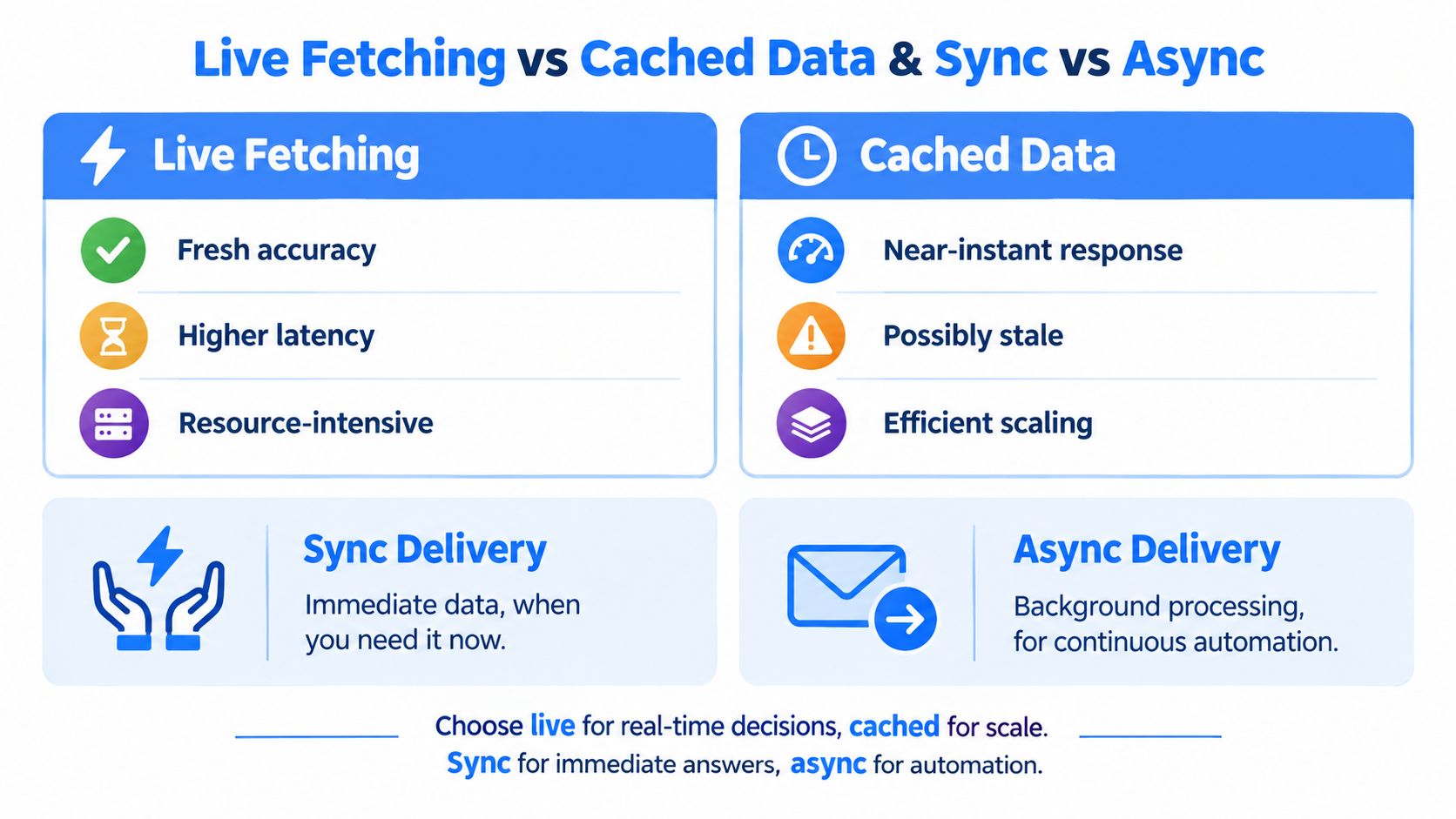
Live fetching and cached delivery solve different problems. Live fetching prioritizes current page-state information at request time, while cached data prioritizes speed, predictable load, and efficient repeated access.
A live call is a good fit when the answer directly affects a user-facing decision. Examples include enriching a newly submitted lead, resolving a professional profile before a match, or checking company context immediately before an agent acts. The tradeoff is resource usage and exposure to upstream latency or temporary failures.
Cached data works well when the workflow reads the same records repeatedly or processes a large account universe. A cache can reduce cost and provide fast responses, but it needs an explicit refresh policy. Without field-level timestamps and revalidation rules, users may mistake an old record for a current one.
Choose delivery by user expectation
Synchronous delivery returns the result in the request cycle. It fits a form, search screen, or agent tool call that needs an immediate answer. Your service should set a timeout, avoid unbounded retries, and show a useful fallback if the provider can't respond.
Asynchronous delivery separates submission from completion. The application accepts a job, tracks its state, and receives the result through polling, a callback, or another push mechanism. This model fits enrichment queues, large backfills, and workflows where fetching can take longer than a user should wait.
A documented rebuild of a geospatial backend reduced a synchronous request model to sub-second performance with p95 around 725 milliseconds by using asynchronous pipelines, as reported in this account of an async API rebuild. The lesson isn't that async is always faster. It shows that separating work from the request path can protect the user experience when processing has multiple stages.
For many products, the practical design is hybrid:
- Fetch live data synchronously for high-value interactive decisions.
- Cache normalized records for repeat reads.
- Revalidate volatile fields when the workflow needs current information.
- Send large or slow jobs through an asynchronous pipeline.
- Preserve timestamps so downstream users can distinguish current data from stored context.
You can compare these delivery choices in a broader synchronous versus asynchronous API guide.
Integration Patterns for Product Teams and Automation
The input-output contract stays simple even as the integration pattern changes. Your service accepts a professional profile URL or company URL, sends it to the B2B data API, and receives structured JSON. The surrounding architecture determines whether that call is safe, repeatable, and economical.
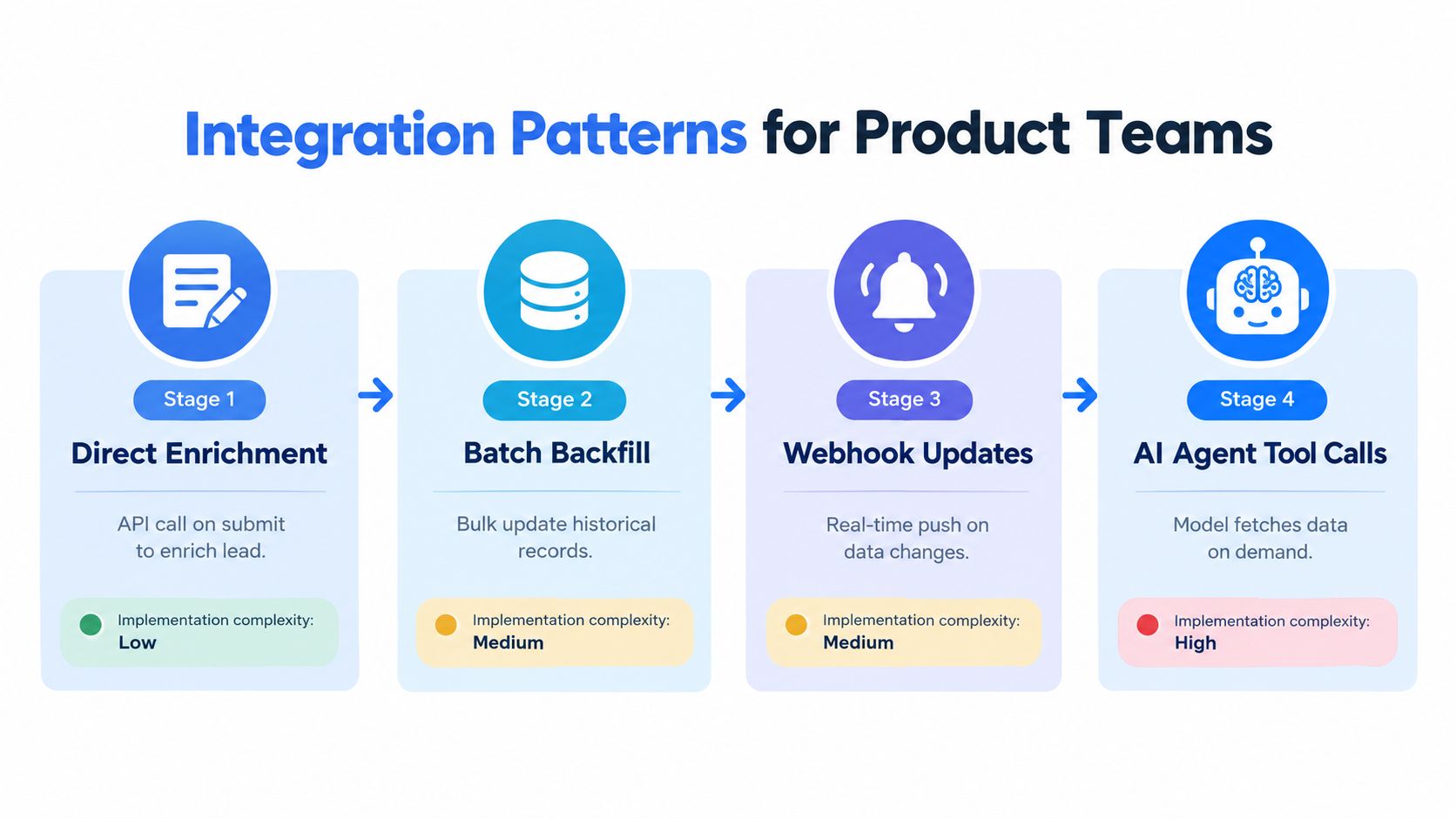
Direct enrichment
On form submission, normalize the URL, create an idempotency key, call the profile or company endpoint, and attach the returned fields to the lead. Store the provider request ID and response timestamp. If the same user submits again, reuse the in-flight or completed result instead of creating another enrichment job.
This pattern has the smallest implementation surface, but it places latency directly in the user journey. Use a clear timeout and a fallback state rather than blocking the entire form on an upstream response.
Batch backfill
A batch process reads historical records, groups compatible requests, and writes normalized results back to your database. It needs checkpointing, resumability, concurrency control, and a policy for records that return no match.
Don't treat a backfill as a one-time cleanup. Store the last successful refresh and the fields that changed, so future runs can target volatile records instead of repeatedly processing everything.
Webhook updates
A webhook lets the provider notify your system when an asynchronous result or supported change is ready. Your receiver should authenticate the message, acknowledge quickly, process idempotently, and retain the event for replay or investigation.
Push delivery reduces polling, but it adds operational responsibilities. You need dead-letter handling, signature validation, event versioning, and a policy for out-of-order notifications.
AI agent tool calls
An agent can invoke the API when it needs company context, a professional record, or engagement information. Give the tool a narrow schema, explicit allowed inputs, bounded timeouts, and a response that includes provenance. The agent should never infer that a missing field is false.
Rate limits shape every pattern. Self-serve access may support 5 requests per second, while dedicated capacity can reach 100 requests per second, according to the publisher's product information. These figures are plan characteristics, not universal API standards, so confirm the limits for your account and implement exponential backoff, concurrency caps, and credit tracking.
Failed requests should have explicit billing semantics. If a provider consumes credits on every attempt, retry storms can become an unexpected cost center. If failures don't consume credits, your retry policy still needs limits, observability, and idempotency.
How to Evaluate and Choose a B2B Data API With Confidence
A confident decision comes from a controlled test, not a field-count comparison. Prepare representative professional profile URLs and company URLs from your actual product workload. Record match status, field accuracy, field age, latency percentiles, error behavior, and cost for each provider.
Test freshness directly
Ask vendors to define freshness at the field level. “Real time” should lead to concrete answers about when a signal was detected, when a record was last checked, and how quickly changes become available. Compare volatile fields such as current position, company domain, and engagement activity separately from slower-moving attributes.
Test production behavior
Measure p50 and p95 latency under realistic concurrency. Verify schema consistency across complete and partial records, then exercise 429 responses, timeouts, malformed inputs, and duplicate requests. Confirm whether the API supplies Retry-After, request IDs, versioned schemas, and a status page.
Pricing also needs a workflow-level review:
- Credit accounting: Determine whether unsuccessful requests consume credits.
- Capacity planning: Ask how dedicated throughput is provisioned and whether higher sustained capacity has a documented timeline.
- Visibility: Require a dashboard or equivalent view for usage, limits, and current pricing.
- Scale fit: Compare per-request, monthly-credit, pay-as-you-go, and enterprise terms against your traffic pattern.
Put governance in the architecture
Compliance isn't a legal paragraph added after integration. Vendors processing personal data should support GDPR and CCPA-aligned controls, including data-processing agreements, lawful-basis review, suppression-list propagation, provenance, and retention workflows. The practical implementation checklist is outlined in this GDPR and CCPA guide for B2B enrichment APIs.
Public professional data and company profile systems should document purpose, lawful basis, access and deletion handling, provenance, encryption, and audit logging. These operational controls are summarized in API-oriented privacy guidance. For teams operating in Europe or California, recent guidance notes that cumulative GDPR fines have exceeded €7.1 billion, and that the CCPA B2B exemption expired in January 2023, bringing more enrichment use cases into regulatory scope. The same compliance checklist explains those developments.
A provider such as Fetchin can fit a product workflow that needs live profile and company URL extraction, structured JSON, synchronous responses, optional asynchronous delivery, and source-linked data handling. Evaluate it with the same test plan as every alternative, focusing on freshness, percentile latency, rate behavior, failure billing, and governance evidence rather than marketing language.
Build a small evaluation harness before committing your product to any B2B data API. Test real inputs, record field freshness and p95 latency, verify suppression and provenance workflows, then review the results with engineering, product, security, and legal stakeholders. When you're ready to compare a live profile and company data workflow, visit Fetchin and assess its API against the production criteria in this guide.