
Only 47% of sales leaders and sellers believed their organization had high-quality data, according to Gartner research cited in a February 2020 report by MaxIQ. That reframes sales intelligence data as a reliability problem, not a competition to collect the most records.
A fast API can return an outdated job title from a public page. A complete-looking profile can belong to the wrong person. Before a field changes a score, assigns an owner or instructs an AI agent, your team needs evidence that it's suitable for that action: a timestamp, a source and a confidence level.
Table of Contents
- What Sales Intelligence Data Includes
- Quality Checks Before Any Automated Action
- Live Fetching Against Indexed Snapshots
- GTM and Product Uses That Pay Off
- Privacy Rules for Public Professional Data
- How to Choose a Data Source
- Pick a Real-Time API When Freshness Matters
What Sales Intelligence Data Includes
Sales intelligence data is the structured picture of a buyer and their company, used to decide who to contact, when, and why. A contact export gives you names and contact details. Intelligence adds the context needed to make a decision.
Say an inbound signup arrives with a name and a work email. Those details alone don't tell your sales team whether the person manages a relevant function, works at a target account or has recently discussed the problem your product solves.
A profile record might establish their current role. A company record supplies industry and headcount. Public activity adds a possible reason to start a conversation, although it doesn't prove that the person wants to buy.
The distinction is easier to see as a hierarchy of decision context.
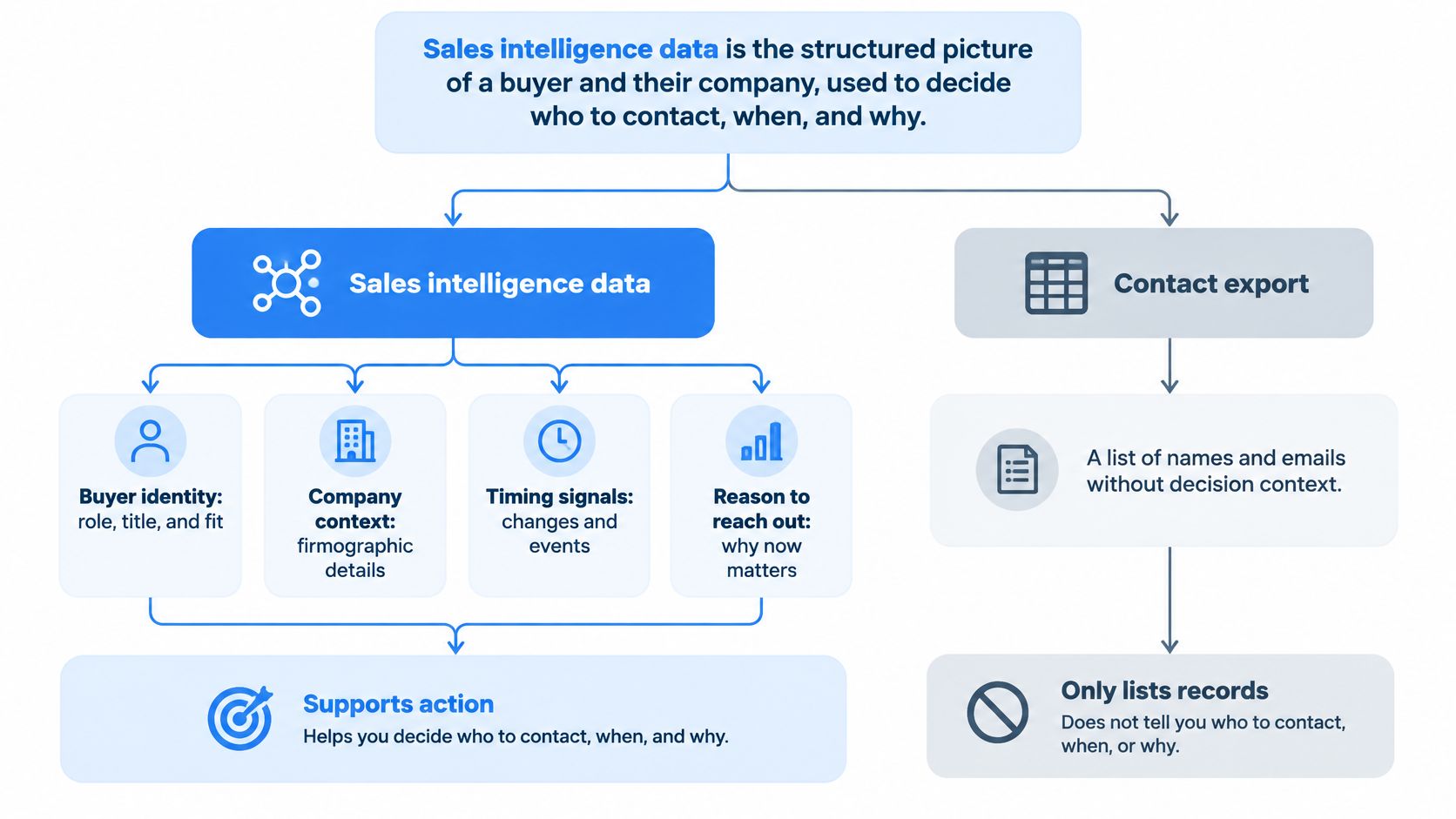
Field families answer different questions
The main families describe the account, the person and their public activity. Identity keys connect those families to the correct records in your systems.
Sales intelligence data families and what they support
| Family | Example fields | Decision it supports | Typical staleness risk |
|---|---|---|---|
| Firmographics | Industry, headcount, headquarters, founding year, verified domain | Account routing and segmentation | Low for founding year, medium for headcount |
| Person attributes | Title, seniority, location, career history, skills | Fit scoring and ownership | High, because roles change often |
| Engagement metrics | Posts, comments, reactions, follower count | Timing of outreach | Very high, because activity is time bound |
| Identity keys | Professional profile URL, company URL, work email, domain | Matching and deduplication | Medium, because URLs persist longer than titles |
These risk labels are working priorities, not universal expiration schedules. A founding year is historical, while headcount describes a changing organization. Your firmographic data model should preserve that distinction instead of treating every company attribute as equally stable.
Person fields need similar care. A career-history entry can remain correct after someone changes employers, while the current-title field becomes unsuitable for routing. Skills may help describe professional experience, but they don't establish purchasing authority.
A CRM stores the relationship, not the whole market
A CRM holds the interactions and records your organization has logged or imported. Sales intelligence adds external context that those records may lack. Neither replaces the other: the CRM knows whether someone requested a demo, while a public profile may help establish whether their employer has changed.
The difference between access and reliability matters. In the figures compiled by SuperOffice, 74% of CRM users said their system provided better access to customer data, yet 47% said data-quality issues significantly affected their satisfaction.
Don't give an entire record a single freshness score. Set requirements for the fields that drive the decision, then validate those fields before allowing automation to act.
Quality Checks Before Any Automated Action
Real-time retrieval is not a quality standard. A newly fetched record can still be wrong, incomplete or unfit for the workflow.
A 2025 BCG survey of 400 U.S. sales representatives and managers found that more than four in five sellers identified inaccurate data and poor integration as obstacles to AI-enabled sales, forcing humans to double-check output. An agent that acts quickly on ambiguous information merely moves the review work downstream.
Treat validation as a gate between retrieval and execution.
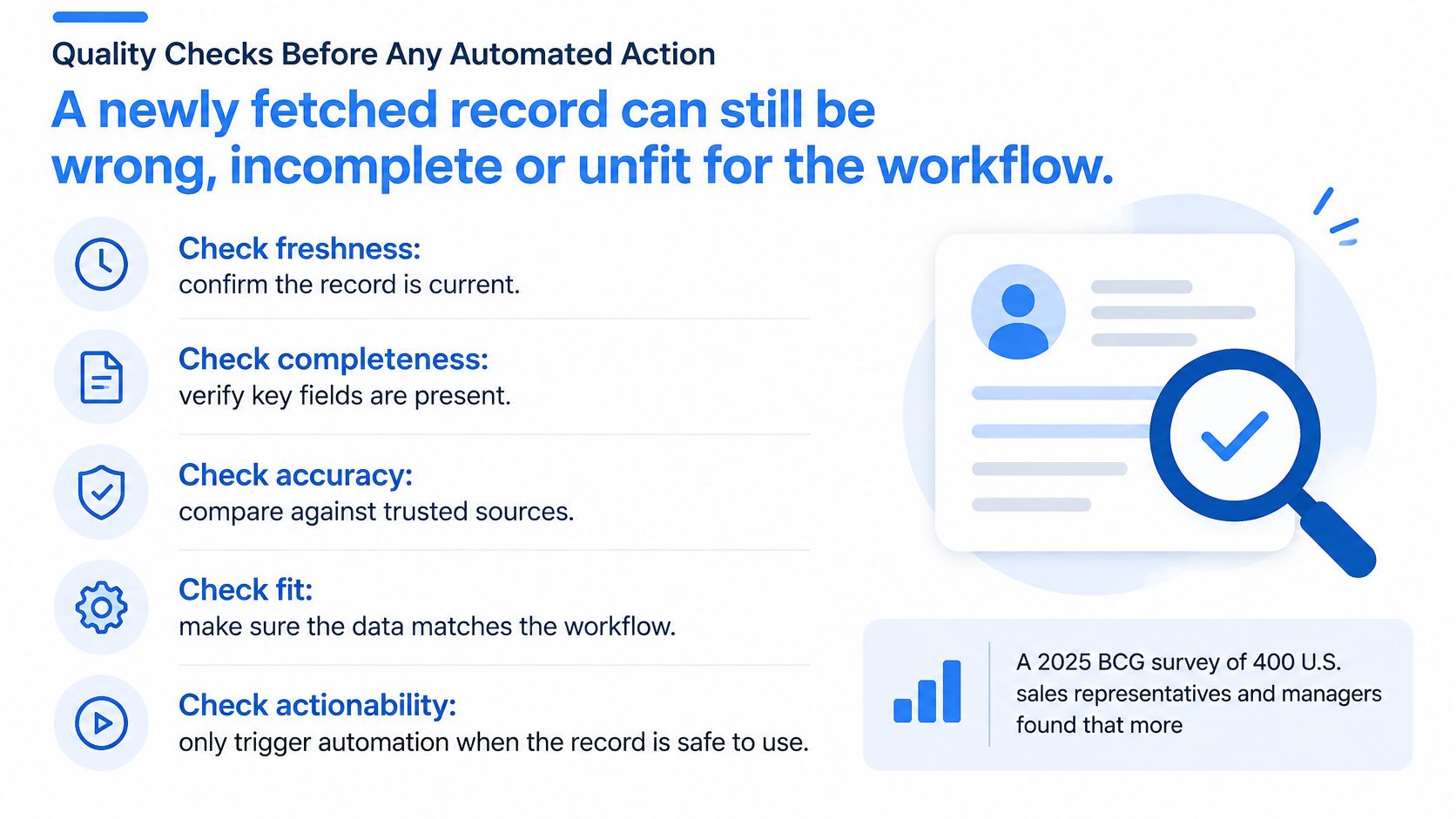
Define a field-level data contract
Keep the field value alongside its source reference, retrieval timestamp, confidence and evidence type. Distinguish an observed title from inferred seniority. If the source provides an update date, retain it separately, because retrieval time doesn't prove when the person last edited the page.
Preserve nulls rather than filling gaps with plausible guesses. A missing employer means unknown, not unemployed. If sources disagree, retain the conflict and apply an explicit precedence rule rather than accepting the last value received.
Field quality metrics for sales intelligence data
| Metric | What it measures | Act when | Hold for review when |
|---|---|---|---|
| Match rate | Inputs that resolve to one person or company | One clear entity | Several possible matches |
| Null rate | Required fields left empty | Required fields present | Title, employer or domain missing |
| Duplicate rate | Same entity stored more than once | One surviving record | Pipeline counts would double |
| Freshness age | Time since the field was retrieved | Inside the threshold for that field | Role or engagement older than its limit |
| Domain consistency | Company URL or domain matches the employer | Domain and employer agree | Domain points at a different company |
| Confidence | Observed fact versus inference | Observed, sourced and current | Inferred or in conflict with another source |
Measure these across batches, then apply record-level gates. Match rate describes how often inputs resolve successfully; a particular action still requires an unambiguous match. Likewise, a low overall null rate doesn't excuse a missing employer on the lead you're about to route.
Set thresholds around consequences
Use stricter freshness limits for active roles and contact fields than for founding year or headquarters. Confidence should reflect evidence quality, not just whether a value exists. An observed field can still be stale or contradicted.
The forecasting stakes are concrete. A Demand Metric study published by Validity found that 95% of organizations used CRM data for forecasting and reporting; nearly three-quarters rating their data good or very good reported accurate or very accurate forecasts, compared with slightly more than one-third rating it poor. That's an association, not proof that enrichment alone improves forecasts.
Automation gate: Act only when identity, required-field completeness, freshness and confidence all satisfy the rule for that use. Otherwise, route the record to review.
Review false matches and missed matches separately. A scorer can tolerate some uncertainty that an autonomous outreach agent shouldn't.
For a complementary walkthrough, use the video alongside your own field contract.
Live Fetching Against Indexed Snapshots
Sourcing is a speed and truth choice, not just a vendor choice. An indexed snapshot is a copy refreshed on a schedule. Live fetching retrieves the current public page state from a professional profile URL or company URL at request time and converts it into structured JSON.
Neither approach guarantees factual accuracy. A live response can faithfully reproduce an outdated page, while a snapshot can remain perfectly useful for a stable historical attribute.
The practical trade-offs look like this.
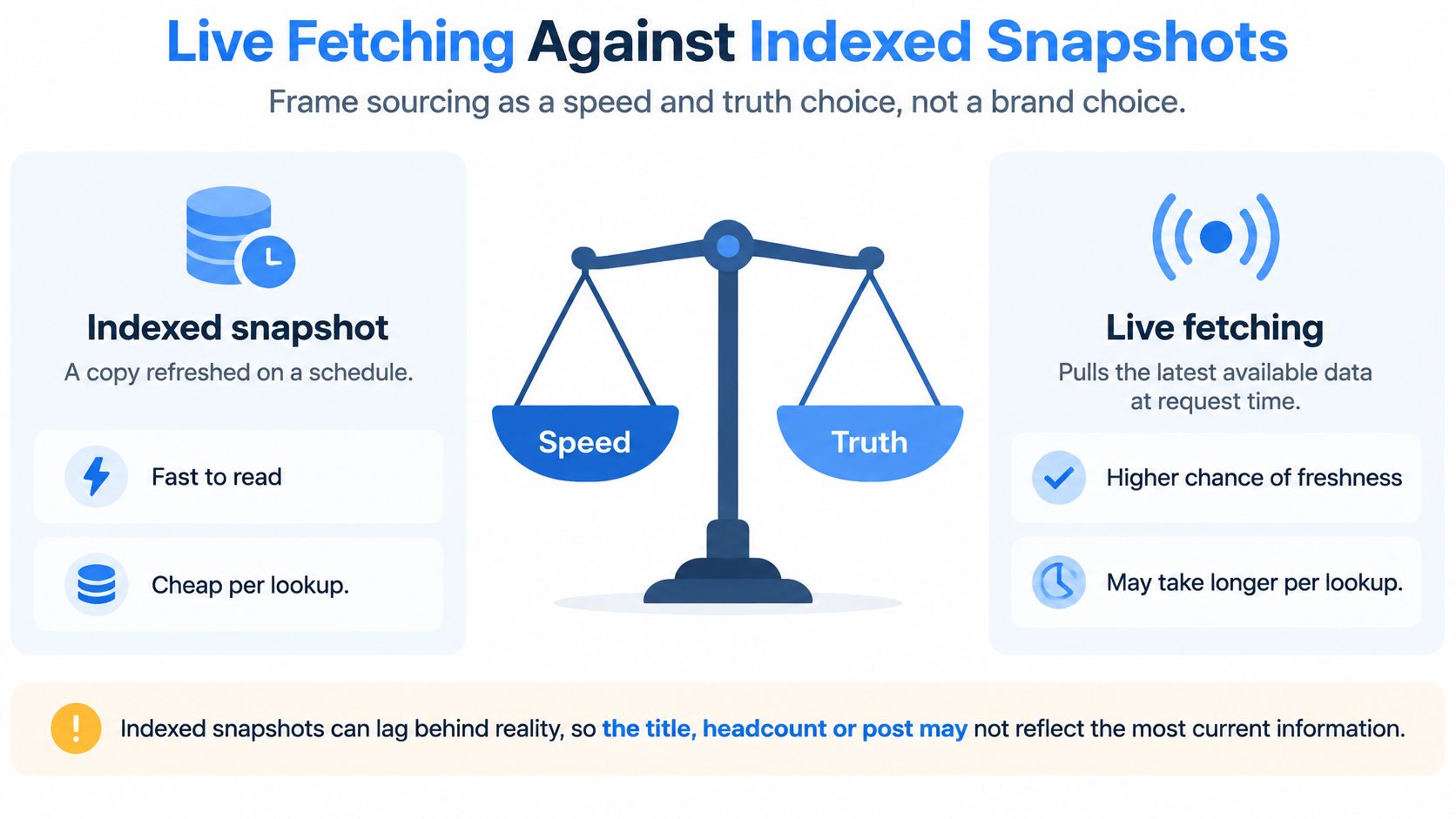
Live fetching versus indexed snapshots
| Pattern | When data is current | Best path | Cost behavior | Main risk |
|---|---|---|---|---|
| Live fetch on each call | At request time from the public page | Sync scoring and routing | Pay per successful call | Latency if the downstream write is slow |
| Indexed snapshot | Last index or export | Stable reference fields | Seat or record license | Stale titles and missed signals |
| Cached fallback | Last successful live fetch | Timeout or provider error | No extra call if cache hits | Acting on yesterday's role |
| Async enrichment | After the first response | Posts, comments, reactions | Batched credits | Queue delay if used for routing |
The cost column describes commercial patterns to evaluate, not universal billing rules. Confirm how each provider treats errors, retries and partial responses.
Separate immediate decisions from richer context
A Harvard Business Review audit of 2,241 U.S. companies, summarized in RevOps CRM benchmarks, found that 37% responded to a web lead within one hour, 23% never responded, and companies responding within an hour were nearly seven times more likely to qualify the lead. Those findings support prioritizing prompt response, not a claim that any particular API causes that improvement.
For an inbound workflow, resolve only what's needed to score and assign the lead synchronously. Apply a timeout budget and use a cached fallback only if its age and evidence meet the action's requirements. Otherwise, send the lead to a review queue without blocking acknowledgment of the inquiry.
Fetch richer posts, comments and reactions asynchronously. A rep doesn't need a full activity history before ownership can be assigned.
Measure the complete path
Track time to first touch, qualification rate and enrichment completion, alongside median latency, slow-tail latency and failures. Include matching, deduplication, CRM writes and notifications in the trace. A quick retrieval doesn't help if the assignment job sits unprocessed.
Use data freshness requirements to decide which fields justify another retrieval. Stable reference fields can stay cached; action-changing fields deserve more attention.
For predictable spending, favor clearly disclosed credit units and unbilled failures over jobs whose retry costs are difficult to inspect. Fetch live where a changed value could alter the next action, and use snapshots where a stable value is sufficient.
GTM and Product Uses That Pay Off
An enrichment workflow earns its place when someone makes a better decision because of it. Start with a specific before-and-after scene, not a general promise to improve productivity.
From an incomplete signup to a qualified lead
A signup arrives with an email and a name. Without context, the sales development representative opens several tabs before deciding whether to follow up.
Profile enrichment adds the current title and employer, while company enrichment supplies headcount and industry. Your scoring logic compares those fields with the ideal customer profile before the lead reaches a human. The rep receives the qualification reason, not just an unexplained score.
From the wrong queue to the right owner
Say a director works at a hypothetical 200-person software firm. An email-domain rule alone might place them in a small-business queue because the account record is incomplete.
Firmographics determine the account segment and territory; person attributes help select the appropriate sales motion. Keep account ownership separate from contact ownership so an enriched title doesn't accidentally override an established customer relationship.
Give the rep the reason for the assignment, such as company segment and relevant role, so they can spot a bad decision before acting.
From a static list to a timely conversation
An account's public posts and comments show its employees discussing a workflow problem. A rep can use that context to ask a relevant question instead of sending a generic pitch.
A reaction isn't proof of purchasing intent. Read the surrounding conversation and distinguish someone describing a business need from someone casually engaging with a topic. For practical guidance on turning account selection into relevant messaging, Outbound Consulting's guide to targeted professional-network outreach for B2B sales provides a useful companion.
From stale sequences to maintained records
A scheduled re-check catches an employer change before the next sequence step. The workflow pauses the old contact path and asks the account owner whether a replacement stakeholder is needed. It shouldn't automatically move confidential account notes to the person's new employer.
Product teams can apply the same building blocks inside customer-facing software. An analytics view can organize public posts by topic, while a recruiting platform can re-check a candidate record before outreach.
Our terms allow customers to display results, combine them with first-party data and pass them within their own product or API, but not resell raw access, build a competing data API or use the data for spam.
Measure the examples against their actual jobs:
- Inbound qualification: Qualification rate, with human acceptance of the scoring reason.
- Routing: Misroute rate and reassignment reasons.
- Signal-based outreach: Reply rate, distinguishing relevant responses from objections.
- Data hygiene: Bounce rate associated with stale roles, plus sequences paused before sending.
Privacy Rules for Public Professional Data
Public doesn't mean unrestricted. A visible profile field still needs a defined purpose, an appropriate retention policy and controls over who receives it. Risk also changes when software uses that field to make a consequential decision.
The California privacy regulator's CCPA statute defines qualifying routes for publicly available information: lawful government records, information a business reasonably believes was lawfully made public by the consumer or widely distributed media, and information disclosed without restriction to a specific audience. It excludes biometric information collected without the consumer's knowledge from that category.
A public job title or company URL may qualify, while a field shared only with a restricted audience doesn't become unrestricted merely because someone can access it. Document why the source qualifies instead of assigning the same legal status to every field.
Preserve the information needed for notice
GDPR Article 14 addresses personal data obtained from someone other than the individual and requires information about categories, purposes, legal basis, recipients, retention, rights and the source, including whether it was publicly accessible. Limited exceptions exist, but they come with conditions and safeguards.
Keep source category and retrieval time with the structured record so your team can explain where information came from. An API's output format doesn't determine whether your processing has an appropriate legal basis.
For implementation planning, use this CCPA and GDPR compliance guide alongside advice suited to your markets and processing purposes.
Turn policy into enforceable controls
Define permitted use at field level. Title and company size might support sales routing; ordinary profile fields shouldn't become inputs for guessing sensitive traits. Don't use public engagement signals to drive employment decisions.
- Minimize collection: Request only the attributes needed for the approved workflow.
- Limit retention: Expire or revalidate changing attributes rather than keeping them indefinitely.
- Honor corrections: Propagate corrected values and deletion requests into downstream systems.
- Maintain suppression: Prevent deleted or opted-out records from being reintroduced by the next enrichment run.
- Apply regional rules: Control processing and sharing according to the relevant jurisdiction.
- Escalate consequential actions: Require human review where an automated decision is difficult to reverse.
A 2025 B2B marketing survey from Demandbase listed privacy and compliance among the leading obstacles to AI and data use, alongside accuracy and integration. Treat governance as part of the workflow design, not a disclaimer attached after deployment.
How to Choose a Data Source
Choose a source against the job you intend to automate first. A broad database can still fail a narrow workflow if it can't resolve your target companies or provide evidence for a current employer.
Write the pass conditions before testing. That prevents an impressive demonstration from replacing the requirements your engineers and revenue team need.
Use a scored checklist rather than a feature tour.
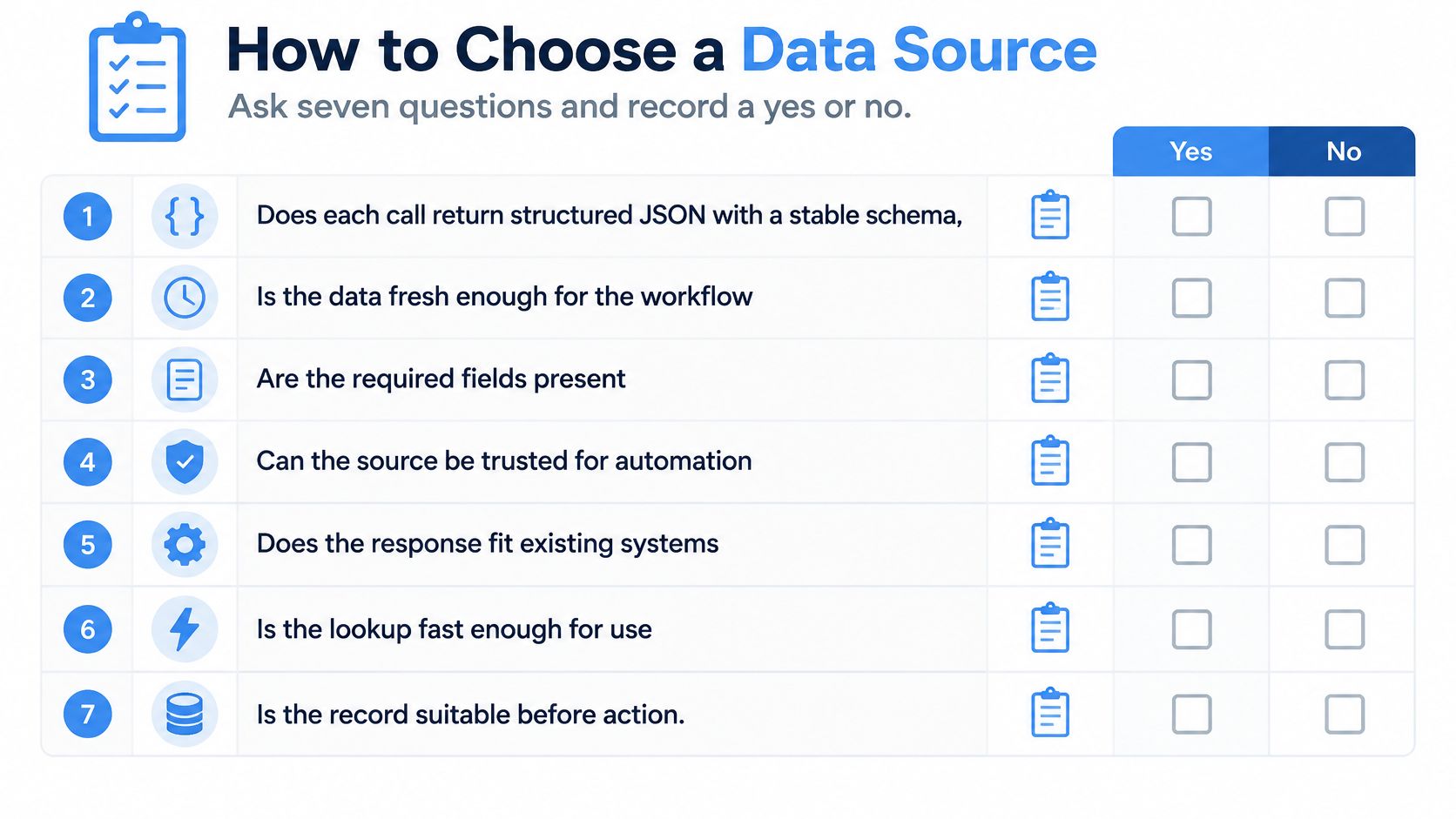
Score the operational questions
Record yes or no for each requirement, with supporting evidence from documentation or a test response.
- Schema: Does the API provide stable JSON for person, company and engagement data through a consistent integration surface?
- Delivery: Can it resolve immediate decisions synchronously and handle heavier retrieval asynchronously?
- Production latency: Can you measure both typical response time and the slow tail under your expected load?
- Failure billing: Are errors, retries and partial results charged clearly?
- Commercial visibility: Can you inspect credit consumption, rate limits and capacity options before committing?
- Provenance: Is collection limited to public professional data, with source and retrieval information preserved?
- Your own sample: Can you test matching and completeness on your profile and company URLs rather than demonstration records?
For engineering context when comparing custom extraction pipelines with managed interfaces, Clearcote Labs' guide to data extraction APIs is a useful supplementary resource. Keep the final evaluation focused on usable records and integration behavior, not merely successful HTTP responses.
Provider checks for sales intelligence data
| Check | Pass looks like | Fail looks like |
|---|---|---|
| Schema | Stable JSON for profile, company and engagement | Custom parsing for every export |
| Latency | Median near one second as a test target, slow tail known | Queue time with no p95 |
| Failed calls | No credit used on errors | Retries billed in full |
| Freshness proof | Retrieval time on every field | Hidden index date |
| Your sample | Match and null rates on a proposed 100-URL test | Vendor demo records only |
| Compliance posture | Public data only, source kept, CCPA and GDPR considered | No provenance and no deletion path |
| Commercial clarity | Credits, rate limit and pricing visible in a dashboard | Seat price with surprise overages |
The latency and sample-size entries are proposed evaluation criteria, not market benchmarks or guarantees. Adjust them to the workflow's consequences and operating constraints.
Run a bounded proof before committing
A practical pilot could run for two weeks using 100 real URLs. Treat that as a proposed test design: include typical records, ambiguous names, changed employers and missing fields rather than selecting only easy matches.
Measure match rate, null rate for title and domain, median and slow-tail latency, and credits spent including errors. Manually label the expected entities so you can detect confidently wrong matches.
Reject hidden refresh dates for freshness-dependent work. Reject export-only delivery when the workflow needs request-time resolution.
Test deletion propagation and failure recovery as well as successful retrieval. Choose the source that passes the first workflow's acceptance rule, not the source advertising the largest record count.
Pick a Real-Time API When Freshness Matters
Choose live fetching when the next decision depends on a title, employer, headcount or public post that may have changed. Stay with the CRM alone when representatives already maintain the required fields and the workflow isn't time sensitive.
Start with inbound qualification. Score signups against your ideal customer profile using current title and company size, then let a human inspect the qualification reason before expanding automation.
Put the first workflow into production carefully
Fetchin is a B2B data API that turns professional profile and company URLs into structured JSON on demand. Its median response is near one second, with approximately 1.5 seconds at the 95th percentile; failed requests don't consume credits. Profile calls return over 100 attributes, company enrichment provides firmographics from a company URL or domain, and posts, comments and reactions are available through the same API.
The free tier includes 1,000 credits for testing, with actual sample consumption determined by the calls you make. Use synchronous delivery for scoring and routing, and asynchronous delivery for heavier engagement retrieval.
If database maintenance is the more immediate problem, schedule re-enrichment to catch job changes before sequences resume. Keep a human override, preserve the decision evidence and expand only after the pilot meets your acceptance criteria.
Fetchin offers on-demand professional and company data for qualification, enrichment and product workflows that depend on current records. Visit Fetchin to test your own profile and company URLs, inspect the returned fields and build a quality-gated workflow before enabling autonomous actions.