Your enrichment pipeline ran overnight without an error. Every record has a job title, an employer and a location, so the dashboard looks complete. Then a salesperson opens the first lead and finds the person left that company two months ago. The record wasn't wrong when you collected it. It became wrong while it sat in storage, and nothing in your system flagged the change. That gap between a value that was once correct and a value that's still correct today is the freshness of data, and it's the part that many organizations never measure.
Table of Contents
- What Data Freshness Means and Why Records Go Stale
- Freshness Targets by Field and Use Case
- Median, P95 and Age of Information Explained
- How to Measure Freshness and Write a Freshness SLA
- Cache Strategies and How They Handle Staleness
- Compliance and Retention for Refreshed Records
- Choose Live Fetch, Cache or Hybrid by Freshness Tier
What Data Freshness Means and Why Records Go Stale
A carton of milk carries a sell by date. That date tells you when the milk was packed and roughly how long it should stay good. It doesn't tell you whether the carton on your shelf today is still fresh, because that depends on what happened after packing. You'd check today's date against the label before you pour.
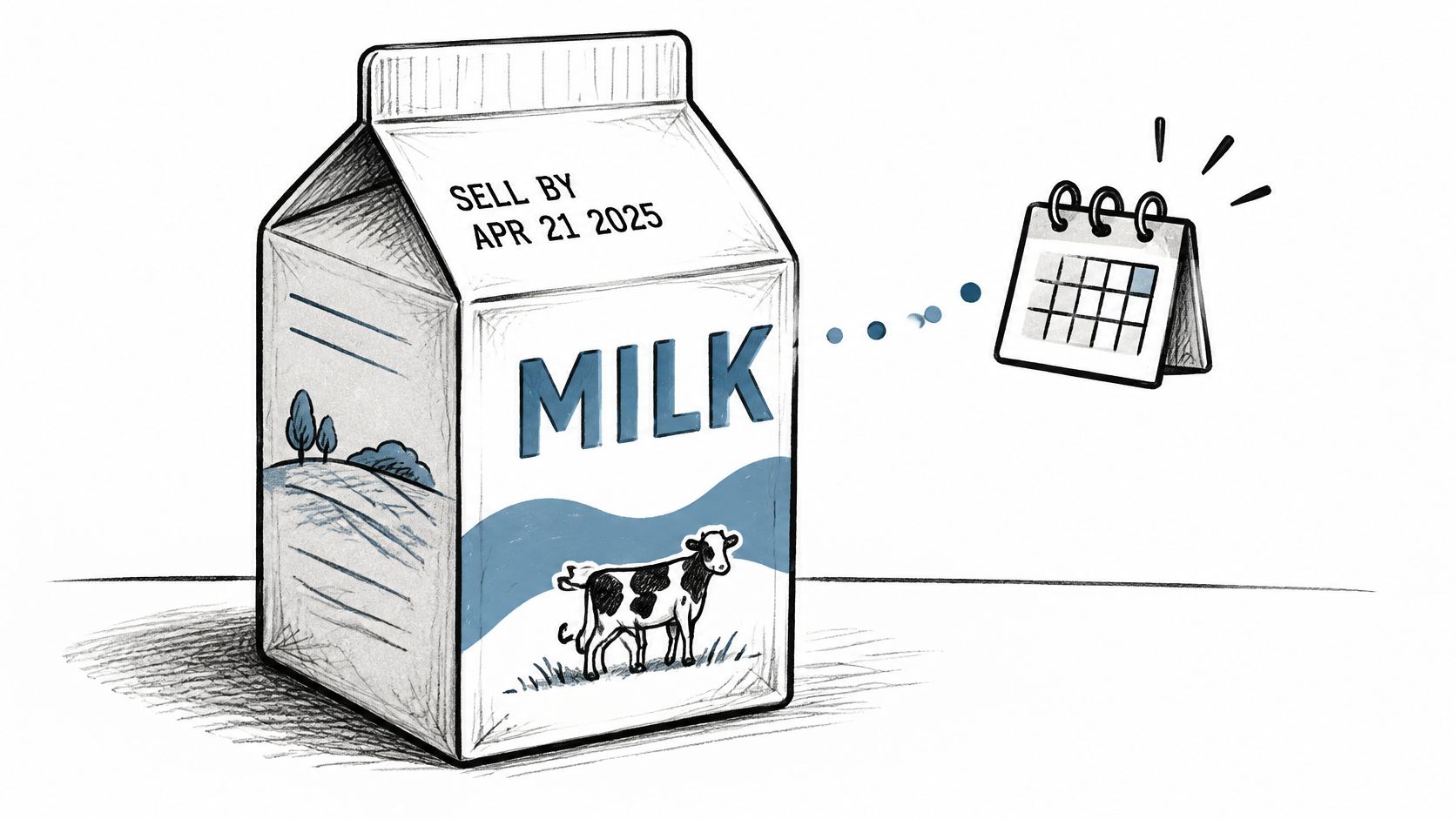
Data works the same way. Data freshness is how closely a stored copy matches the current version in the system of record, the place where the authoritative value lives now. Accuracy is different. A record can be accurate on the day you collect it and wrong a month later, even though nobody typed anything incorrectly. The world changed, and your copy didn't.
How Big the Problem Already Was
This isn't a new problem created by real time products. A review of data quality research cited in a CIRRELT working paper found that Redman's 1998 estimate placed typical database inaccuracy at approximately 1% to 5%. The same review reported that a 2013 survey of 150 financial institutions found most respondents estimated that 10% to 20% of the data used in decision making was erroneous.
Read those numbers carefully. "Erroneous" covers more than staleness. It includes duplication, incompleteness and inconsistency too, so you can't treat the whole figure as a decay rate. What the figures do establish is that data quality problems were already material in enterprise decision systems decades ago, long before anyone expected live answers.
Three ordinary events turn a correct record wrong:
- A contact changes employer: The name, email pattern and title you stored now point at the wrong company.
- A company relocates its headquarters: Territory assignment, timezone logic and location filters all read a place the business left.
- A business closes: Every downstream workflow keeps treating a dead company as a live prospect.
None of these events announces itself to your database. Your record keeps passing schema checks, because the format is fine. Only the meaning has expired. Teams working through this in operational systems often find the same pattern, which is why practical guides on improving CRM data quality for Australian trades stress checking records against reality on a schedule rather than trusting a clean import.
The Three Timestamps That Make Freshness Measurable
You can't manage freshness from a single "last updated" field, because that field rarely says what was updated or where the value came from. Every record needs three separate stamps. Source observed time is when you saw the value at the source. Retrieval time is when your system fetched it. Source update time, where the source provides it, is when the value last changed at the source itself.
With those three, freshness stops being a feeling and becomes a number you can compute for any record at any moment. That leaves the two questions you'll ask about every field from here on. When was this value last observed, and how fast does this field change?
Freshness Targets by Field and Use Case
| Field | Volatility | Suggested maximum age | Reason or evidence |
|---|---|---|---|
| Job title and employer | Very high | 7 days | 12.25% of sampled senior sales leaders changed jobs within 12 months |
| Operating status (open or closed) | High | 14 days | 9.4% of U.S. employer business locations closed during 2023 |
| Company headcount | Medium to high | 30 days | Changes with hiring and layoff cycles |
| Headquarters and location | Medium | 90 days | Relocations are less frequent than job moves |
| Skills and education | Low | 180 days | Changes when the person updates a profile, not on a company schedule |
| Founding year and verified domain | Very low | 365 days | Historical or rarely changing attributes |
| Posts, comments and reactions | Continuous | On each request | Engagement moves within seconds to hours |
Read each row as a budget. The maximum age is the oldest a value may be at the moment you serve it, not the interval between refresh jobs. Treat these ages as starting points for planning, not industry standards. Validate each one against your own observed change data before you commit to it, because your segment may move faster or slower than the benchmarks below.
What the Benchmarks Actually Show
A 2026 synthesis of publicly reported evidence summarized in ScaleList research on data decay noted that 9.4% of U.S. employer business locations closed during 2023, within a decade long range of 8.4% to 10.1% for the preceding years. The same synthesis reported that recorded job changes affected 12.25% of a sample of 140,284 U.S. sales vice presidents and C-suite leaders over 12 months, rising to 25.67% over 24 months.
Put plainly, roughly one in eight senior records in that sample reflected an employer change within a year, and more than one quarter had changed within two years. Nearly one in ten employer locations closed in a single year. A snapshot you took last January isn't slightly out of date. For employment and operating status fields, it's describing a noticeably different world.
These figures are not a universal decay rate for every database. They measure observed job changes and business closures, which is a narrower question than how many stored contact records are stale. Your database might decay faster if you cover startups, or slower if you cover public sector institutions. Use the benchmarks to justify measuring your own rates, not as a substitute for measuring them.
Why Each Row Sits Where It Sits
Job title and employer sit at the top because people move continuously, not on an annual schedule, and a wrong employer breaks routing, personalization and compliance checks at once. Operating status follows closely, because sending outreach or credit to a closed business wastes effort and can create risk. A short budget here costs little compared with acting on a company that no longer exists.
Company headcount moves in waves. Hiring rounds and layoffs change it in steps, so a monthly check catches most material shifts without constant polling. Headquarters and location change less often, since moving an office is expensive and slow, so a quarterly budget is usually enough unless location drives territory assignment in your product.
Skills and education change when a person edits a public profile, which happens on their schedule, not their employer's. A twice yearly budget rarely costs you a decision. Founding year and verified domain almost never change, so an annual check is mainly a safety net against an original collection error. Posts, comments and reactions are different in kind, not just degree. Their value is the timing itself, so storing them defeats the purpose and they belong on each request.
A useful test: If a changed value would alter a routing decision, a ranking or an agent action, shorten the budget until the age is smaller than the time in which that change typically appears.
Scaling the Table to Your Product
Tiers scale with the decision, not the dataset. Engagement signals need seconds, because a post from this morning means something different from a post from last quarter. Sales prioritization works in hours, since a rep building tomorrow's list doesn't need second level precision. Firmographics tolerate days or weeks, because industry and founding year don't move under you. If you're weighing how response speed interacts with these windows, the explainer on why latency matters for live metrics is a helpful companion on the timing side.
Consider one contrast. A recruiting platform may tighten job title to 24 hours, because presenting a candidate as employed somewhere they've left undermines trust with clients. The same platform can leave founding year at a full year without any user ever noticing. Both choices are correct, because they answer the same two questions differently. Which workflow reads this field, and what happens when the value is older than its budget?
Median, P95 and Age of Information Explained
Age of Information (AoI) is the elapsed time between when a source value was generated or updated and when your system consumes it. If a person changed jobs on Monday, the source reflected it on Tuesday, and your product read the old value on Friday, the age that matters is measured against the source change, not against your last refresh job. AoI keeps the clock anchored to reality instead of to your pipeline.
The visual below separates AoI from the two weaker measures teams often use in its place.
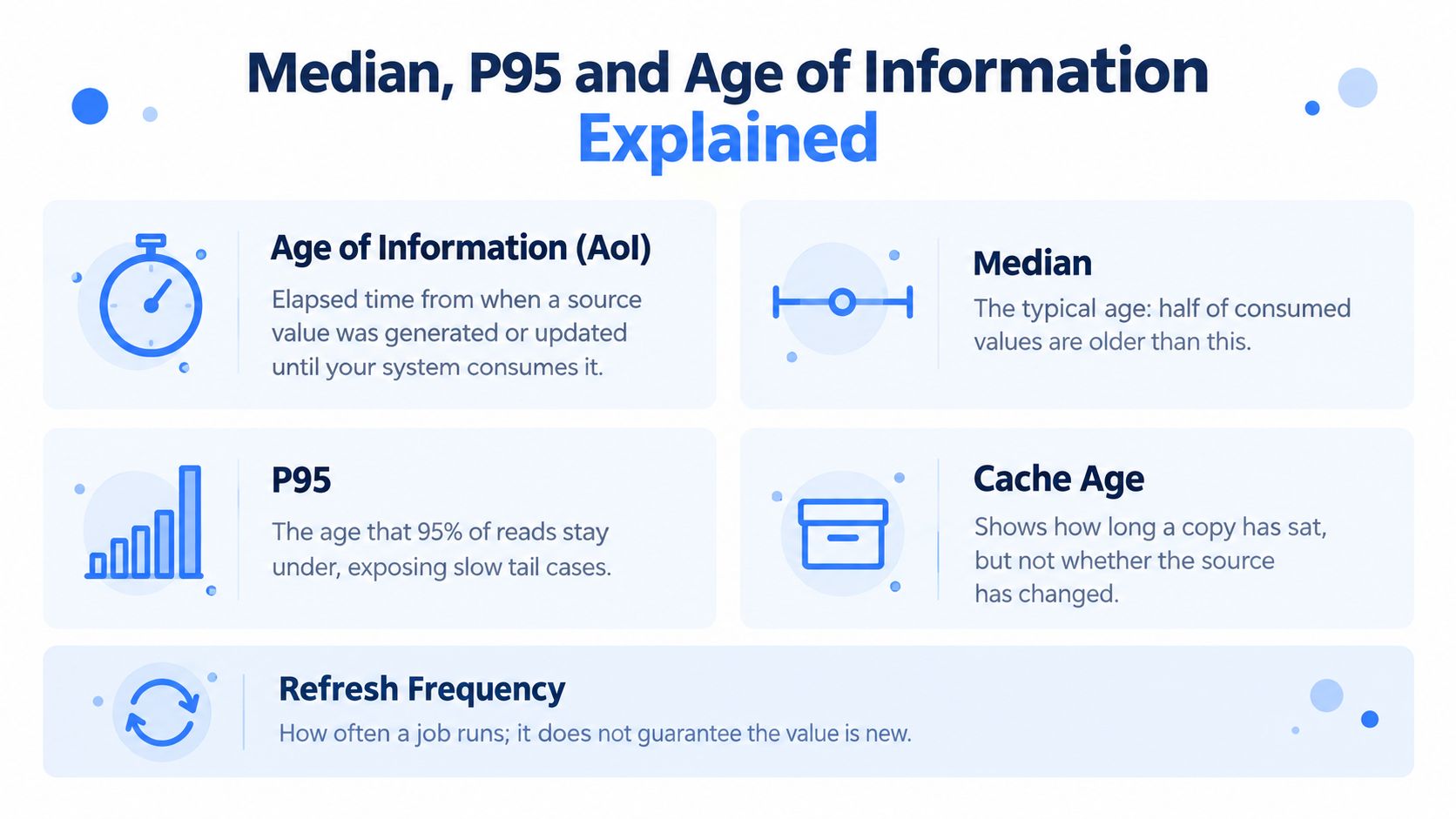
Cache age tells you how long a copy has sat in your store. It says nothing about whether the source changed during that time. Refresh frequency tells you how often a job runs, so an hourly refresh still says nothing about how old a value was when a user read it at minute fifty nine. Both numbers describe your machinery. AoI describes the data your user received, which is why it's the one worth reporting.
One caution before you chase the smallest possible age. Newer isn't always better. The freshest observation can be noisy, anomalous or poorly aligned with what you're predicting, so a slightly older, complete and authoritative value can outperform it. Track age together with quality checks, not instead of them.
Reading Percentiles Without Fooling Yourself
The median, or p50, is the typical case. Half of consumed values are younger and half are older. The P95 is the age that 95% of reads stay under, which means it exposes the slowest five percent where problems hide. The P99 and the maximum show the tail, the rare records old enough to break a workflow or embarrass you in front of a customer.
Guidance on real time data systems in a comprehensive guide to accessing real time data identifies p50, p95 and p99 as useful measures for detecting tail latency spikes, alongside error rate and throughput. The same percentile logic applies to age. An average hides the tail by blending it into the healthy majority, while percentiles keep the tail visible as its own number.
Work through one example. Say the job title field on one endpoint shows a median record age of 2 hours and a P95 of 9 days. The typical record is fine, so an average based dashboard stays green. But one read in twenty is serving a title over a week old, which points to a stale segment, perhaps a subset of records that a refresh job silently skips. You'd never find that segment by watching the median alone.
This short walkthrough shows how tail figures change the story a single average tells.
Freshness Is Not Latency
Keep age and speed in separate columns. A median response of about 1 second and a P95 near 1.5 seconds under production load describe how fast an answer arrives. They say nothing about how old the answer is. A fast API can serve stale results very quickly if its upstream state is cached, and that combination is dangerous precisely because it feels healthy. Our deeper look at latency and response time covers the speed side of that pairing.
Track two companions alongside age percentiles. Failed request rate tells you how often freshness checks couldn't complete at all. Throughput tells you whether age degrades as volume rises. Measure all of it under your own concurrency and payload mix, because a benchmark run at low volume won't predict your tail at peak.
How to Measure Freshness and Write a Freshness SLA
The five stage flow below compresses the procedure into the order you'd implement it.
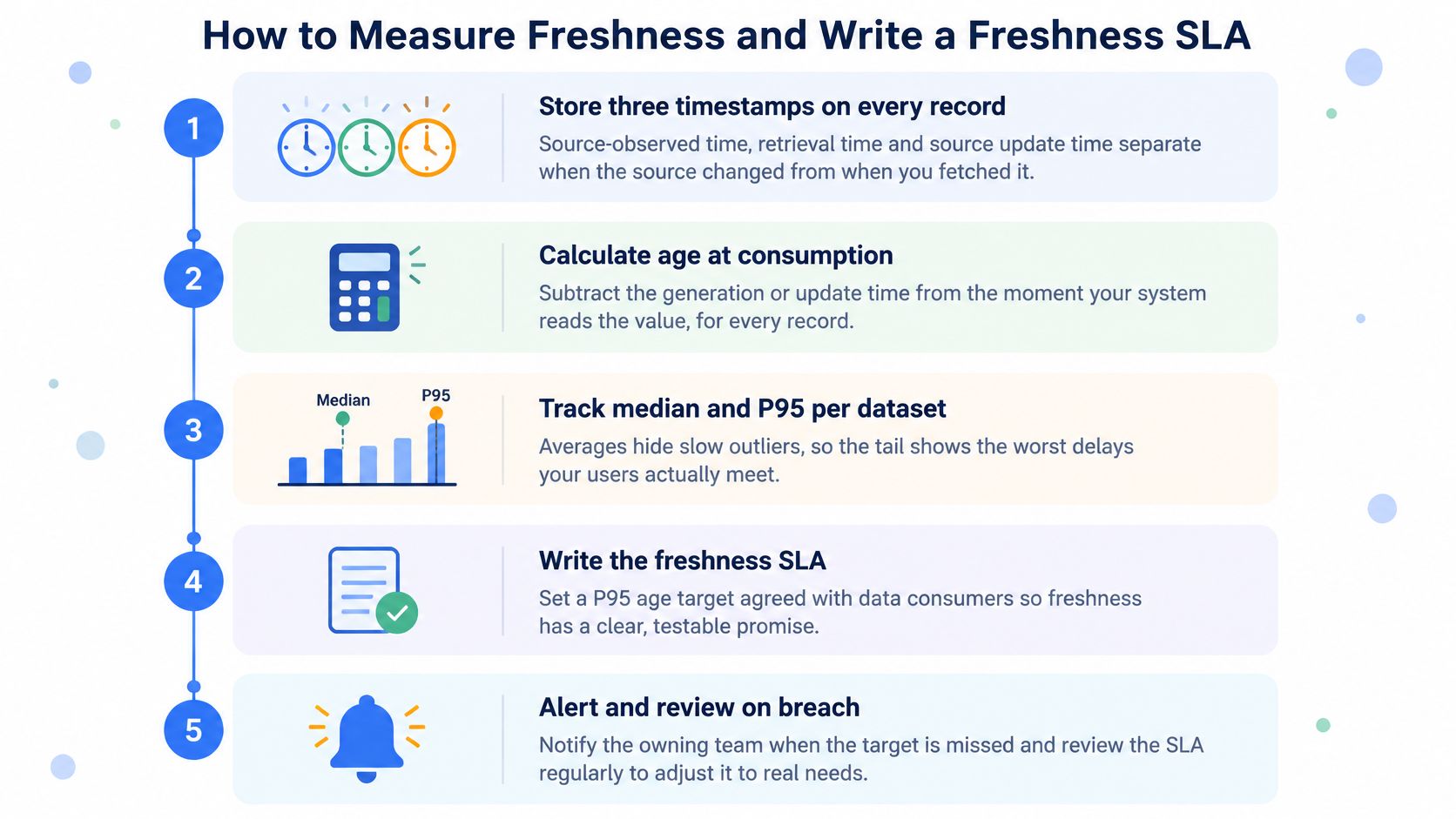
Work through these steps in order. Each one exists because skipping it leaves a specific blind spot.
- Store three timestamps on every record. Save source observed time, retrieval time and source update time where the source provides it. Without all three, you can't separate when the source changed from when you happened to fetch it, and every later calculation inherits that confusion.
- Assign each field a maximum age. Take the budgets from your target table and attach one to every field class. This turns a general preference for recent data into a per field rule your code can test.
- Compute record age at serving time. Calculate age for every response, not at ingestion. A record keeps aging while it sits in cache after ingestion, so an ingestion time measurement flatters you by exactly the storage duration.
- Aggregate by endpoint and attribute class. Calculate median, P95 and maximum age per endpoint and per field class, daily or hourly depending on volume. A single global number averages a healthy field together with a broken one and reports that everything is fine.
- Write the SLA as a percentage plus a threshold. For example, "95% of job title records have a source age below 72 hours." Write the same statement for each field class, so every budget becomes a promise a consumer can verify.
- Quarantine or flag records past tolerance. Reject or hold records whose source timestamp exceeds the budget, while allowing slightly older records when they're more complete or authoritative. Label those exceptions in the output, so downstream users see the tradeoff instead of discovering it.
- Alert when P95 age breaches the target. Page the owning team, then review the segment that caused the breach before adjusting anything. A breach usually has a mechanical cause, such as a skipped partition or a failing source, and fixing that beats relaxing the target.
Research on real time supervised learning catalogued in the ACM Digital Library shows that prediction error depends on AoI and may be non-monotonic, meaning newer data isn't always better when the freshest observation is noisy or anomalous. That's the academic version of step 6. Pair every age threshold with a quality check, so you don't discard a solid record in favor of a fresh but unreliable one.
What a Healthy Freshness Report Looks Like
Your recurring report needs only a few columns. List each field class, its median age, its P95 age and the share of records inside budget. Review it on a fixed schedule, weekly for volatile fields and monthly for stable ones, and keep the history so slow drift becomes visible. If you're setting up the alerting side for the first time, the SiteAlive guide to website monitoring offers a plain introduction to threshold alerts and escalation habits that transfer well to data pipelines.
A freshness SLA isn't a promise that data is recent. It's a testable statement about how old data may be when someone acts on it.
When a report shows a field drifting, resist the urge to refresh everything more often. Find the segment, check whether the source changed format or a job started skipping records, and fix that. Blanket refreshes raise cost across every field to solve a problem that usually lives in one.
Cache Strategies and How They Handle Staleness
A cache can serve a record that is valid by its own rules but wrong in the source. For example, set a fixed 24-hour expiry and refresh a person's profile. If they change jobs a minute later, the cache may still return the old employer for nearly a day. The timer limits age; it cannot predict when a record changes.
At expiry, a cache may fetch a replacement immediately, remove the entry and wait for the next read to fetch it, or serve the old value while refreshing in the background. The last approach, called stale-while-revalidate, keeps responses fast but allows a period when users see an expired value.
Comparing the Strategies
| Strategy | How it refreshes | Freshness guarantee | Best use |
|---|---|---|---|
| Fixed TTL (for example 24 hours) | Entry expires after a set time, then refetches | A change just after refresh can remain unseen until expiry | Stable fields and low-cost lookups |
| Time to idle (for example 17 seconds) | Entry expires after a period without reads | Busy records may stay cached; quiet records expire sooner | Frequently read records with bursty traffic |
| Event-triggered invalidation | Entry removed when a change signal arrives | Freshness depends on receiving reliable change signals | Volatile fields with change notifications |
| Adaptive refresh interval | Interval follows the observed update rate | Fits fields with stable, measurable change rates | Fields whose change rate can be measured |
| Stale-while-revalidate | Expired value served while a background refresh runs | May serve expired data until the refresh completes | Read-heavy interfaces that tolerate brief age |
| Fetch on every request | Source called for each request | Avoids cache age, but adds source load and response time | Low-volume, high-value decisions |
A Web cache study published by IEEE compares invalidation-based consistency with adaptive TTL. Its general takeaway is that invalidation can offer stronger freshness while remaining competitive on cost. Invalidation depends on reliable change signals; without them, a missed signal can leave the cache stale.
Time to idle has a less obvious tradeoff. An entry that expires 17 seconds after its last read may remain cached indefinitely if a popular record is read often. A quiet record expires sooner, then refreshes on its next read. So the busiest records can have the weakest freshness under this strategy.
The Failed Retrieval Rule
A failed refresh must not make an old value appear fresh. Keep the timestamp of the last successful retrieval, and continue measuring age from that point when a request fails. Once the field's freshness budget is exceeded, mark it stale and expose its last-successful timestamp to downstream users.
Design order: Set field budgets first, then choose the least costly strategy that can meet them.
Use invalidation when reliable change signals are available. Where they are not, adaptive intervals can follow observed update rates. Reserve fetching on every request for decisions where serving a stale value carries a high cost, such as routing or fraud review. Measure age when records are served, grouped by endpoint and attribute class. Cache hit rate shows how often the cache serves requests, not whether its answers are current.
Compliance and Retention for Refreshed Records
The freshest possible record isn't automatically the most compliant one. Freshness pushes you to refresh everything, store the result and refresh again. Data protection rules push in a different direction at the same time, toward keeping less, for a defined purpose, and only as long as you need it. Holding both pressures at once is the actual design problem.
Guidance in the ICO guide to the data protection principles states that personal data must be accurate and kept up to date, while inaccurate data should be corrected or erased and information should not be retained longer than necessary. Those duties sound aligned with freshness, and partly they are. The tension appears when a live lookup becomes a permanent record by default.
Four Questions Teams Tend to Skip
Should every live lookup be stored? No, not by default. Keep transient retrieval separate from your durable customer database, so a lookup used to answer one question doesn't become, without anyone deciding it should, a profile you hold for years. Store only what a defined purpose requires, and let the rest expire with the request.
How can the system prove when a field was observed? Keep observation timestamps and source references with each stored value. That provenance lets you show what you saw, where you saw it and when, which matters when a person disputes a record. Our explainer on what data provenance means in practice goes deeper on building that trail.
When should a stale value be rechecked, corrected, anonymized or deleted? Set field specific refresh and deletion schedules in advance, then build a correction workflow that acts on them. Say a recruiting database holds a profile last observed 18 months earlier. The system flags it, rechecks the public source, then corrects the record if the person has moved or deletes it if there's no longer a purpose for holding it.
What happens when a source page changes or disappears? Treat disappearance as information, not as an error to paper over. If the public source no longer shows a value, your stored copy has lost its basis, so recheck it and correct or remove it rather than presenting it as permanently authoritative. Expose freshness or confidence metadata to downstream users in the meantime, so they can weigh the value appropriately.
Jurisdiction Changes the Details
Recruiting, sales intelligence and AI agent products that process professional person data across the UK, EU and United States may face UK GDPR, EU GDPR or California's CCPA, depending on whose data it is and who uses it. The principles rhyme, since accuracy, purpose limitation, minimization and retention limits appear in each, but the specific duties and timelines differ. Don't assume one retention schedule satisfies all three.
Treat everything here as a design checklist, not legal advice. Build the timestamps, the separation between transient and durable storage, and the correction workflow into the architecture, then have counsel confirm the retention periods for your jurisdictions and use cases. Retrofitting deletion into a system that assumed permanent storage is far more expensive than designing it in.
Choose Live Fetch, Cache or Hybrid by Freshness Tier
Start with a definition that clarifies the whole choice. In IBM documentation on data freshness and expiration, a stale copy is one that is out of sync, or likely to be out of sync, with its authoritative source. That means a periodically indexed record can return successfully, pass every format check and still not match the source. The response is valid for the cache and wrong for the decision.
IBM also frames the underlying decision as a combination of business and technical requirements, not a purely technical setting. How long can your application tolerate divergence from the source? That tolerance, stated per field, is what selects your delivery model.
Three Delivery Models Side by Side
| Criterion | Live fetch per request | Periodic indexed snapshot | Hybrid tiers |
|---|---|---|---|
| Freshness at serving time | Current page state on each call | Only as current as the last index run | Current for volatile fields, stored for stable ones |
| Known age of returned data | Exact, from the retrieval timestamp | Unknown without extra metadata | Known per field class |
| Latency | Median near 1 second, P95 near 1.5 seconds under production load | Lowest, served from storage | Low for stored fields, live for volatile fields |
| Cost per useful record | Charged per request, failed requests not charged | Fixed storage and refresh cost | Mixed, set by the tier mix |
| Picks up a source change | On the next call | On the next index run | On the next call for the live tier |
| Best fit | Routing, matching, AI agent actions | Bulk analytics and offline modeling | Enrichment products with mixed field volatility |
Neither column wins outright. Indexed snapshots suit bulk analytics and offline modeling, where you need a consistent dataset to train or analyze, and a stable snapshot is itself a benefit. Live fetch is the default for routing, matching, fraud review and AI agent actions, where one changed value alters the outcome and there's no second chance to correct it. The latency row gives you a benchmark to test against, a median near 1 second and a P95 near 1.5 seconds under production load, rather than a promise to take on faith.
A 2025 paper in an IEEE Computer Society journal models freshness as a variable value data market and finds that data becomes less valuable as it gets staler, with pricing policies that should reflect freshness rather than treating all records as equivalent. That's the economic case for tiers. Continuously refreshing everything costs more than selectively refreshing high impact attributes, and it buys freshness in places where freshness changes nothing. Our overview of how a live data API structures on demand retrieval shows one way to implement the live tier without permanent polling.
Assigning Fields to Tiers
Tier 1, live per request, holds fields where a changed value alters routing, fraud review, ranking or an agent's action. Employer, operating status and recent engagement belong here. You pay per call, and in exchange the age of every returned value is known exactly from its retrieval timestamp.
Tier 2, stored with a maximum age of 24 hours to 7 days, holds fields used for sales prioritization and list building. Hours matter here because a rep works a list over days, but seconds don't, because nobody acts in the same second the list is generated. Refresh on a schedule, and flag anything that crosses the ceiling.
Tier 3, stored for 90 to 365 days, holds firmographics such as founding year, verified domain and education history. Refresh these mainly to catch original collection errors. Spending live calls here buys almost no decision quality.
The decision test: Would a changed value alter an action your product takes, and is the field cheap to refresh relative to the cost of acting on a wrong value? Two yes answers put the field in Tier 1.
Apply the test candidly and most products land on the hybrid column. A professional data API that fetches public professional data on each request avoids an unknown indexing interval for Tier 1 fields, while your own storage handles Tier 3 fields at a fraction of the cost. You can still cache live responses yourself, but you choose the retention period from field volatility instead of inheriting a provider's schedule you can't see.
Next Steps in Order
First, map every field to a tier, using the target table as your draft and the decision test to resolve arguments. Second, add the three timestamps to every record, including records you already hold, marking unknown observation times as unknown rather than guessing. Third, run a two week baseline of median and P95 age per field class, so you know your current state before you change anything. Fourth, choose synchronous calls for interactive enrichment, where a user is waiting, and asynchronous delivery for batch work, where completion can arrive later without blocking anyone.
You don't need a large commitment to run that baseline. Fetchin offers a free tier of 1,000 credits, which is enough to fetch a representative sample of professional profile URLs and company URLs, stamp each result, and compare the ages against your stored copies. The gaps you find in that sample will tell you which fields deserve Tier 1 treatment far more reliably than any general benchmark, including the ones cited here.
Fetchin is a B2B data API that fetches public professional data live on each request and returns structured JSON, so the values you serve carry a retrieval time from the moment of the call rather than from an unknown indexing run. Use it for the Tier 1 fields in your plan, keep stable firmographics in your own storage, and measure median and P95 age against the budgets you set here. Start with the free credits, run your two week baseline, and visit Fetchin to see which of your records are older than you thought.