In 2025, 76% of surveyed organizations said less than half of their CRM data was accurate and complete, according to Validity's survey of 602 CRM users and administrators in the United States, United Kingdom, and Australia. That reframes company enrichment: the job isn't merely to fill empty fields. It's to decide which values your software can safely act on, how recently someone verified them, and what happens when verification fails.
Table of Contents
- What a Company Data Enrichment API Actually Does
- Key Attributes Every Enrichment Response Should Carry
- Live Fetching Versus Stored Snapshots
- Integration Patterns and Rate Limits Explained
- Pricing and Credit Models Compared
- Compliance Duties Behind Public Professional Data
- Test a Provider Against Your Own Records Before You Commit
What a Company Data Enrichment API Actually Does
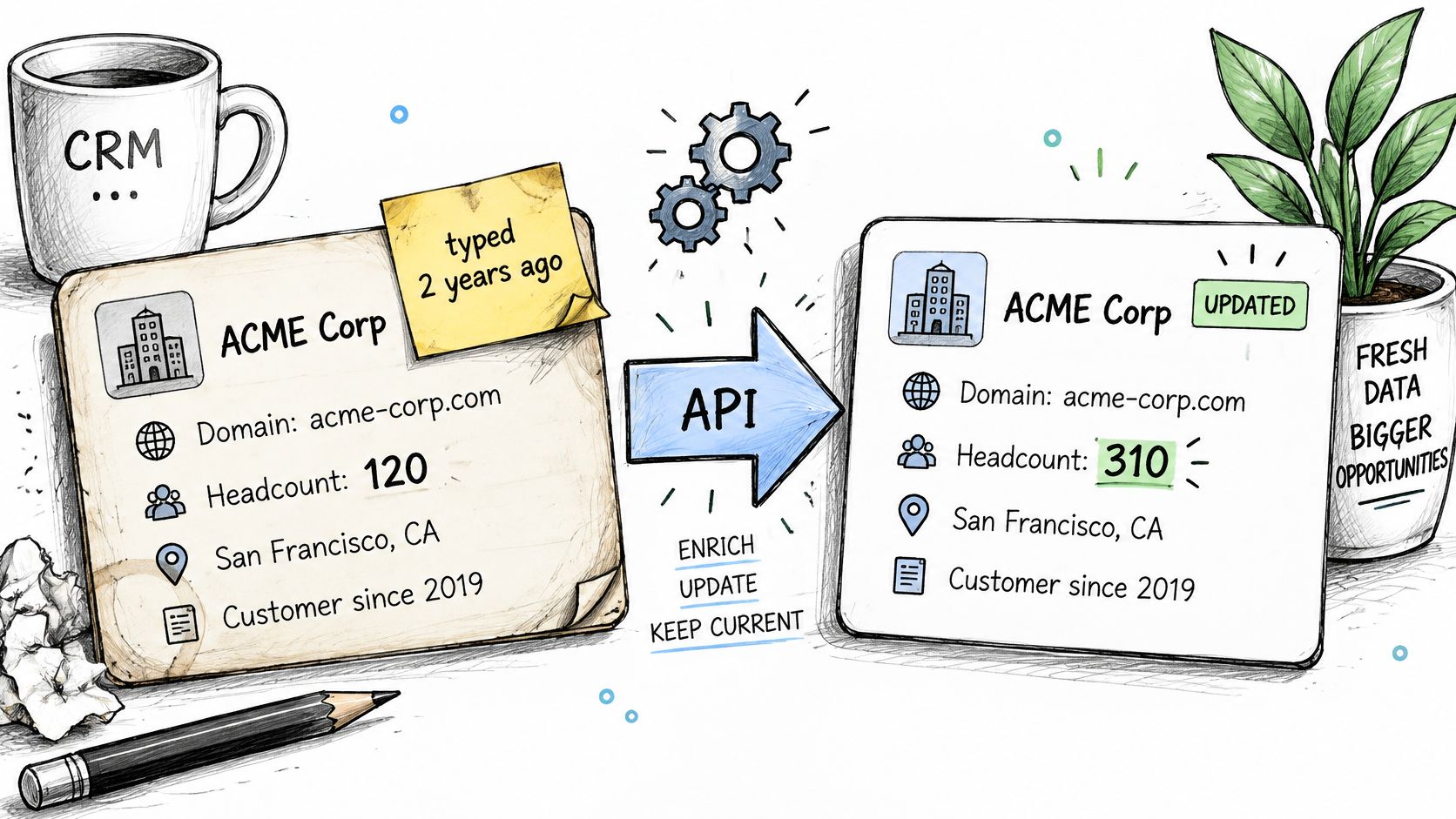
A CRM account contains a company domain and a headcount someone entered two years ago. A routing rule reads that headcount, assigns a territory, and triggers an outreach sequence. Nothing crashes, but every decision inherits the age of the original entry.
A company data enrichment API is a B2B data API that accepts an identifier, such as a company URL, verified domain, or professional profile URL, and returns structured JSON to fill or refresh a record. Think of it as an interface between public business information and the fields your application understands.
From a directory to an on-demand check
A printed directory tells you who worked at a company when the directory was compiled. Calling the company lets you ask who works there today. A live enrichment API is closer to that call: it fetches information on request and places the result into a predictable schema.
The analogy has a limit. The API can retrieve what a public page currently says, but it can't guarantee that the page owner updated it. Recently retrieved and independently verified aren't interchangeable.
The diagram shows how an identifier becomes an updated business record.
The jobs behind the request
An enrichment integration usually performs these jobs:
- Refresh an existing record. Update an account's headquarters or workforce information without replacing unrelated CRM properties.
- Match an incoming lead. Connect the submitted identifier to a real organization before assigning an account owner.
- Supply product context. Give an AI agent or SaaS feature current attributes rather than asking it to guess missing business facts.
For example, a recruiting product might resolve a candidate's current employer before grouping candidates by industry. A sales application might resolve the company first, then decide whether the account belongs in a particular segment.
Build the failure path alongside the successful path. Pipecorn's guidance on how to handle enrichment API errors is a useful companion when planning that integration work. The useful response isn't just a larger record, but a set of attributes with clear meanings, matching evidence, and freshness metadata.
Key Attributes Every Enrichment Response Should Carry
Attribute groups, freshness needs and uses
| Attribute group | Typical fields | Freshness need | Main use |
|---|---|---|---|
| Firmographics | Industry, headcount, headquarters, founding year, verified domain | Weeks to months, faster after moves or rebrands | Segmentation, territory routing, ICP scoring |
| Professional profile | Positions, education, skills, locations | Hours to days for role changes | Recruiting, outbound personalization, talent mapping |
| Contact fields | Work contact details where the source supports them | Varies by source, verify per field | Outreach workflows, with null rates tracked |
| Engagement signals | Posts, comments, reactions | Hours to days | Intent scoring, content monitoring |
| Provenance metadata | source_url, observed_at, confidence, expires_at |
Set on every call | Audit trails and per-field expiry rules |
Treat the freshness column as a starting policy, not a guarantee about how often sources change. Your workflow should determine the acceptable age of each field.
Firmographics describe the organization. Industry and headcount can support ideal customer profile scoring, while headquarters can inform territory assignment. The company endpoint's verified domain provides the connection between a company URL and a CRM account, but you should still check subsidiaries and similarly named organizations.
Professional profile data describes people rather than companies. Fetchin's profile endpoint offers 100+ attributes, including positions, education, skills, and locations. That breadth matters most when a recruiting or talent intelligence product needs those fields, not when it only needs to resolve an employer.
Contact fields should remain optional. If the source doesn't support a work contact detail, preserve the missing value instead of constructing a plausible answer. Track null rates separately for each field so a strong company match doesn't disguise poor contact coverage.
Engagement signals serve another purpose. Posts, comments, and reactions can support content monitoring or intent-scoring rules, but they shouldn't automatically become evidence of buying intent. Your application must define what an observed activity means.
Match the entity before updating its attributes
An incoming lead may provide a company URL or domain. Ask for the matched entity, a match status, and a confidence value where available, then agree on an acceptance cutoff during testing.
Accept sufficiently supported matches, send uncertain ones to human review, and treat a null match as a legitimate outcome. A false match can write one organization's headcount onto another organization's account, which is more damaging than leaving the field empty.
Make the schema usable downstream
For provenance, require source references and observation times alongside values. A data provenance framework helps explain which source supplied a field and how it reached your application.
Consistent names, stable types, and explicit nulls matter more than an impressive field count. Map each returned field to a CRM property or product feature, then mark which mappings need expiry rules.
A narrower schema with traceable observation times is more useful than a wide schema whose values you can't date.
Live Fetching Versus Stored Snapshots
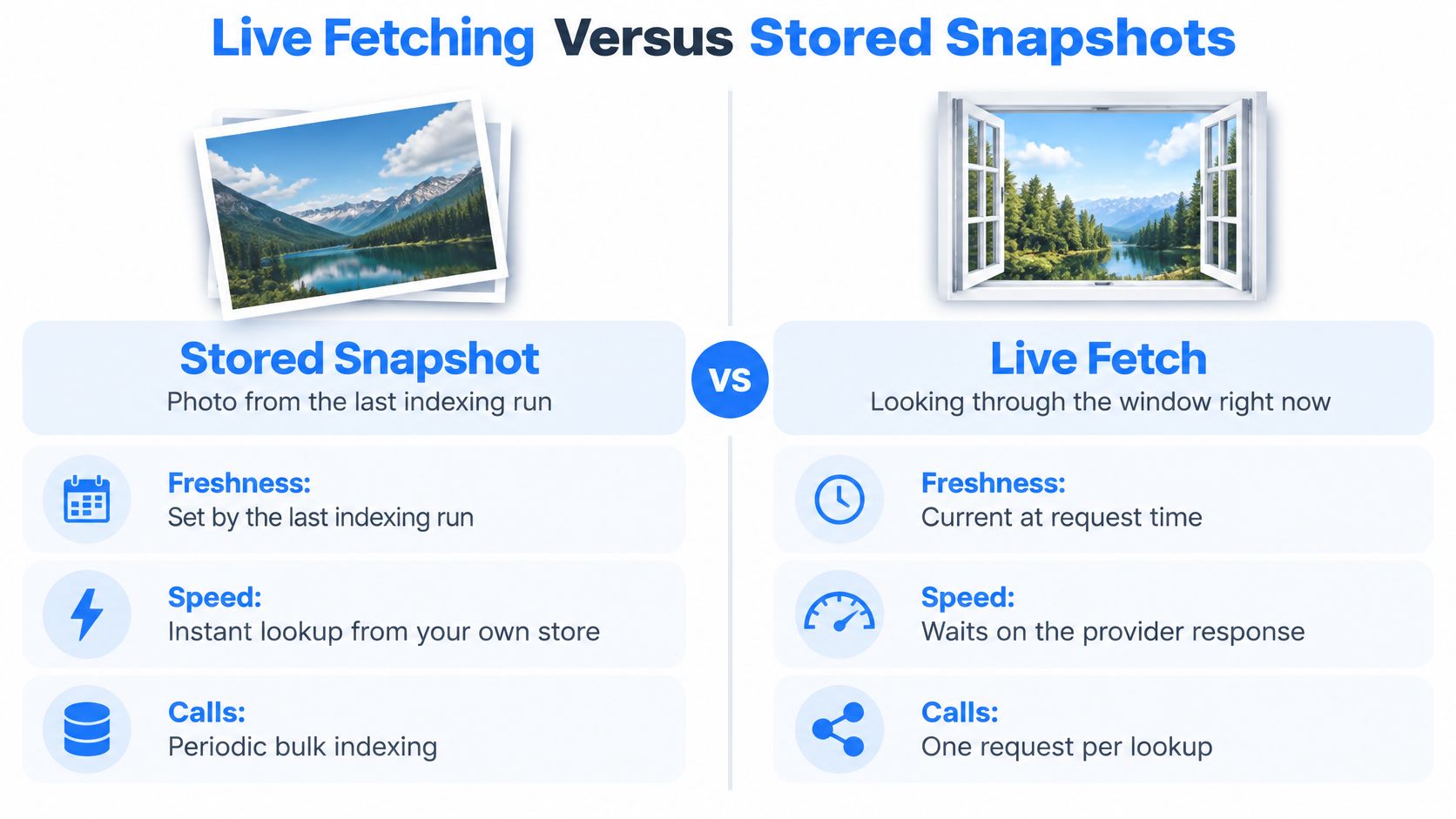
A stored snapshot is a photograph from the last indexing run. A live fetch is looking through the window now. Both can be useful, but they answer different questions.
Periodic indexing serves previously collected records. A live B2B data API retrieves the current public page state when you request it. IBM's explanation of stale data identifies the gap between the last update and the time of use as a simple measure of staleness, and notes that complete, internally consistent data can still be stale.
The comparison below separates retrieval time from lookup speed.
Compare the operating behavior
Live fetch versus stored snapshot on five dimensions
| Dimension | Live fetch | Stored snapshot |
|---|---|---|
| Freshness | Current public page state at the moment of the call | As old as the last indexing run |
| Latency | Fetchin reports around 1 second median and about 1.5 seconds at P95 under production load | Local reads are usually faster, but values may be days old |
| Cost predictability | Under successful-call billing, cost follows lookup volume | Scheduled refresh jobs can incur costs even for unused records |
| Coverage | Retrieves the records you request, subject to source availability | Makes records in the index available, including unused ones |
| Failure behavior | Explicit per-call errors; Fetchin doesn't charge failed requests | An application can silently serve old values until its next refresh |
These aren't universal billing rules for every vendor. They describe the operating trade-off between the live service discussed here and a periodically refreshed store. Confirm the actual contract before comparing costs.
P95 latency describes the slower end of the response distribution, not the typical request. Don't evaluate an interactive feature using the median alone: users also experience the requests that take longer.
Apply freshness rules by field
Fetch live when an outdated value could send automation to the wrong person or company. Current employer and job title deserve different treatment from a founding year.
A hybrid design often makes sense. Store each value with observed_at, serve it from cache until expires_at, and refetch when the workflow requires a more recent observation. If the source is unavailable, explicitly choose whether to stop, request review, or serve a clearly marked older value.
Practical rule: Set acceptable age according to the decision a field supports, not according to the provider's default cache duration.
Live retrieval reduces the gap between source changes and downstream availability. It doesn't prove that the source itself is correct. Keep separate checks for freshness, correctness, and completeness, rather than combining them into a single quality score.
Integration Patterns and Rate Limits Explained
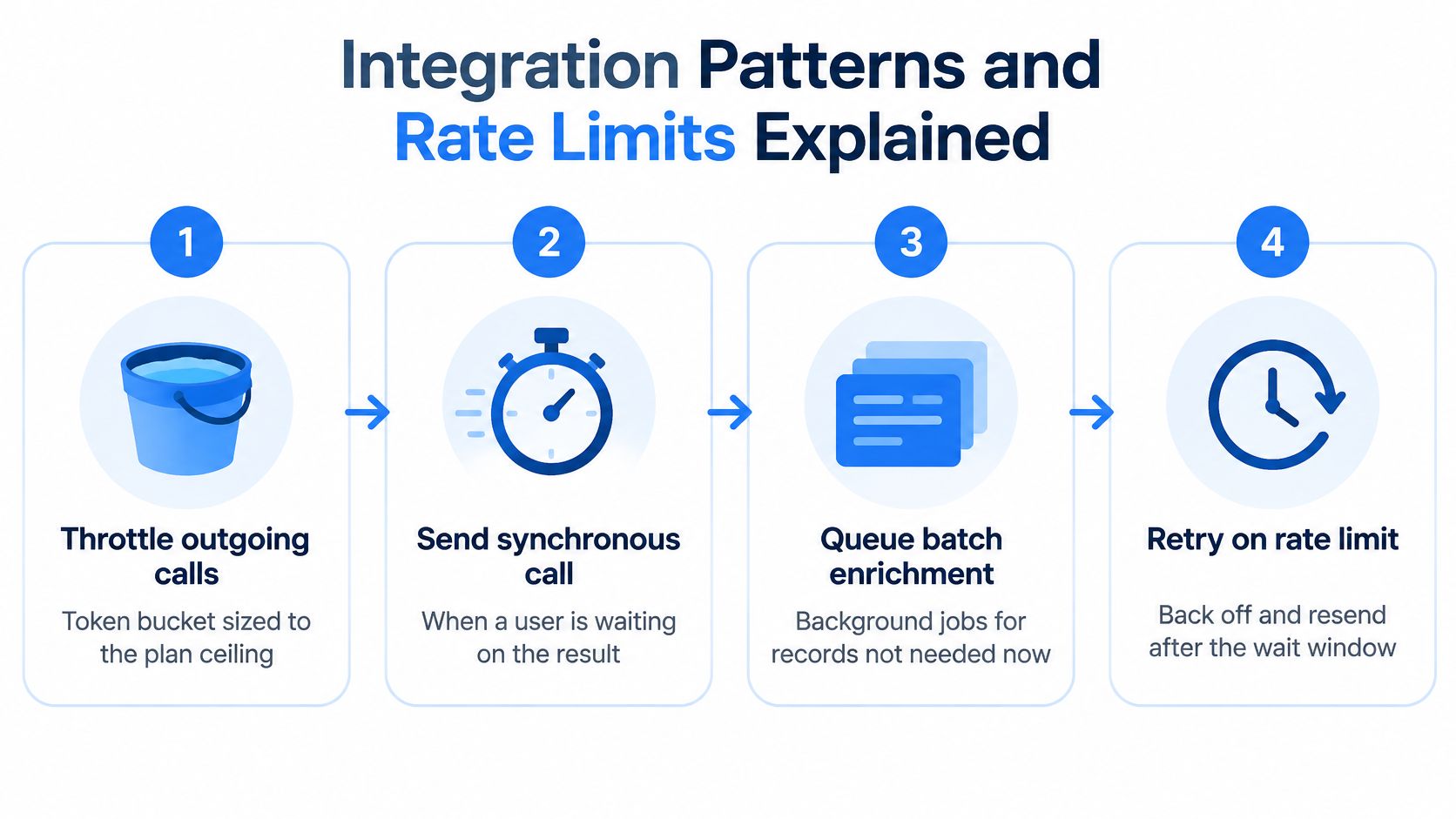
A rate limit works like a speed limit on a road: it controls how quickly requests can enter, while concurrency controls how many are on the road at once. Good integration design manages both, then tests the provider's actual limits against the workload your records require.
- Throttle outgoing calls. Set a token bucket to the request ceiling in your plan, and cap concurrent requests so slow responses do not build an uncontrolled backlog.
- Use synchronous delivery when someone is waiting. Send the request within the user's workflow only if the interface can tolerate the response time.
- Handle rate limits deliberately. When the API returns HTTP 429, check
Retry-After, wait as directed, and use exponential backoff with jitter for later retries. - Separate failure categories. Retry temporary failures cautiously. Fix invalid inputs rather than resending them, and avoid retrying unavailable records indefinitely.
- Make downstream writes idempotent. Use a stable job or record key so a repeated delivery does not create duplicate CRM entries.
- Queue bulk work. Process imports asynchronously so long-running requests do not occupy interactive application threads.
The diagram shows six patterns, from throttling and synchronous requests to retries and queued bulk work.
Understand what the limit controls
MDN's HTTP 429 reference explains that a server returns this status when a client sends too many requests in a period. A response may include Retry-After. Your client still needs a fallback policy for cases where that header is absent.
Concurrency counts requests currently in progress; request rate counts how frequently new requests start. Both matter, especially when response times vary. For a practical overview of managing API request limits, see Scrappey's guidance. The UK government's API service-level guidance recommends accounting for backend constraints, communicating quotas through headers, and allowing for bursts. Fetchin also publishes API rate-limit guidance.
Translate capacity into a workload
Capacity tiers and theoretical hourly throughput
| Capacity tier | Request ceiling | Theoretical requests per hour | Best fit |
|---|---|---|---|
| Self-serve | 5 req/s, confirm against current Fetchin plan terms | 18,000 | Prototypes, internal tools, small enrichment jobs |
| Dedicated capacity | Up to 100 req/s, confirm against current Fetchin plan terms | Up to 360,000 | Sustained production pipelines and large backfills |
| Free tier | Not stated | Cannot calculate from available information | Testing response shape with 1,000 credits |
The hourly figures are theoretical ceilings, calculated by multiplying the per-second rate by 3,600 seconds. They are not guarantees of completed, usable enrichments. Source availability, retries, queueing, and your own processing can all reduce throughput.
Fetchin states that dedicated capacity is provisioned in 2 to 5 business days. Confirm the current timing before scheduling a production migration.
For a companion walkthrough, use the video below.
Use synchronous requests for user-facing work when the response window fits the workflow. For backfills and overnight jobs, asynchronous delivery lets a queue absorb bursts. Test freshness, response delays, and failure billing against your own records, since those terms shape how the integration behaves in practice.
Pricing and Credit Models Compared
An API credit works like a meter on a utility: each call may use a different amount, and the bill depends on how the provider counts it. Compare the billing rules against your own records, including what happens when a request fails, returns incomplete data, or needs a retry.
| Pricing model | How it bills | Best fit | Watch for |
|---|---|---|---|
| Free tier | 1,000 credits, no recurring commitment | Testing schemas and latency | Credits may run out before a meaningful load test finishes |
| Monthly credits | Fixed credit pool each month | Predictable recurring workloads | Confirm rollover and expiry terms |
| Pay-as-you-go | Billed per credit consumed | Spiky or early-stage volume | Unplanned batch runs increase spend |
| Enterprise terms | Negotiated volume rates with dedicated capacity | Large sustained volume | Price remains unknown until quoted; review overages |
| Failed requests | Not charged under Fetchin's stated policy | Error-prone sources and outages | Successful retries still bill |
A credit does not always equal one enrichment. Start by mapping the endpoints in a completed workflow, then check the credit rate for each. The credit pricing model explanation can help frame the questions to ask about consumption and billing.
Work through an explicit planning example
For budgeting, assume 50,000 enrichments a month and one credit per successful call. This is a planning example, not a universal rate. Replace the assumed rate with the vendor's actual endpoint pricing before approving spend. Under these assumptions, the free allowance covers about 2% of monthly demand, so it is useful for testing rather than as a production budget.
A monthly pool suits recurring work with volume you can estimate. Pay-as-you-go can fit uneven demand, provided you set controls against accidental batch runs. Enterprise terms need a quote that separates data consumption from capacity commitments.
Compare providers using the same completed workflow and its actual credit use, rather than a per-credit figure alone. Check whether each vendor counts partial results, retries, and endpoint calls the same way. For a cross-industry example of credit documentation, see RealtyAPI.io's credit guidance for real estate APIs. Use it to shape billing questions, not to assume that another product follows identical terms.
Separate technical success from business value
Consider a hypothetical outage with a 5% failure rate. Under successful-call billing, failed attempts do not consume credits, but successful retries do. Test that rule against your own request logs: freshness and latency matter to operations, while retry and billing policies determine the cost of recovering from a failure.
Idempotent database writes can prevent duplicate records. They do not, by themselves, prevent duplicate API charges. Your application needs request deduplication, or the provider must explicitly support it.
Budget check: Calculate cost per successful, usable enrichment, not merely cost per HTTP request.
Before signing, ask vendors:
- Partial responses: Does a response missing a required field bill like a complete result?
- Unused allowance: Do credits roll over, expire, or disappear when you change plans?
- Overages: What rate applies after the included pool is exhausted?
- Capacity charges: Is dedicated throughput included or billed separately?
Fetchin's stated policy does not charge for failed requests, while successful retries still consume credits. Verify how that policy applies to your failure cases, and monitor duplicate lookups and unused results. Include engineering time for error handling in your operating-cost estimate.
Compliance Duties Behind Public Professional Data
Public availability isn't blanket permission. A professional detail can be visible online while its collection, storage, combination, or use still creates privacy obligations.
The California Attorney General's CCPA guidance explains that certain publicly available information is excluded from the law's definition of personal information. Examples include government records such as professional licenses and information a business reasonably believes was lawfully made public by the consumer or through widely distributed media. That isn't permission to classify every visible field as exempt.
The Dutch data protection authority's guidance on public sources states that publishing personal data is processing and that GDPR requirements still apply. Organizations need a specific, legitimate purpose and a legal basis; public accessibility doesn't authorize every reuse.
Treat enrichment as part of the decision pipeline
The enforcement context is substantial. A European Commission report published in July 2024 reported more than 6,680 fines totaling approximately EUR 4.2 billion.
GDPR Article 5 requires personal data to be accurate and requires reasonable steps to correct or delete inaccurate records. That makes correction workflows relevant to the integration itself, not just to a privacy policy.
Profiling, automated ranking, and lead scoring also need review in context. The European guidance on automated decision-making and profiling addresses accuracy and safeguards, including meaningful information about the logic involved where the relevant automated-decision rules apply. Not every scoring workflow triggers identical obligations.
Assign these controls to named owners:
- Purpose documentation: Record why each use case needs the data and its applicable lawful basis.
- Field minimization: Request only what the workflow needs.
- Traceability: Retain source references and observation times.
- Rights handling: Route correction and deletion requests to responsible data holders and propagate appropriate changes.
- Refresh ownership: Set review schedules for decision-relevant attributes.
- Human review: Require review before enrichment drives lead rejection or candidate exclusion.
Fetchin states that it uses publicly available data and references CCPA and GDPR. Request its source documentation, data processing terms, and deletion process instead of accepting those statements as a compliance determination. Compliance is a recurring operating process, not a one-time legal review.
Test a Provider Against Your Own Records Before You Commit
In 2024, 66% of surveyed B2B and B2B2C marketers ranked improving data quality among their top three go-to-market priorities, according to an Ascend2 and Anteriad survey of 429 marketing decision-makers. A provider test turns that priority into acceptance criteria.
Run a bounded pilot
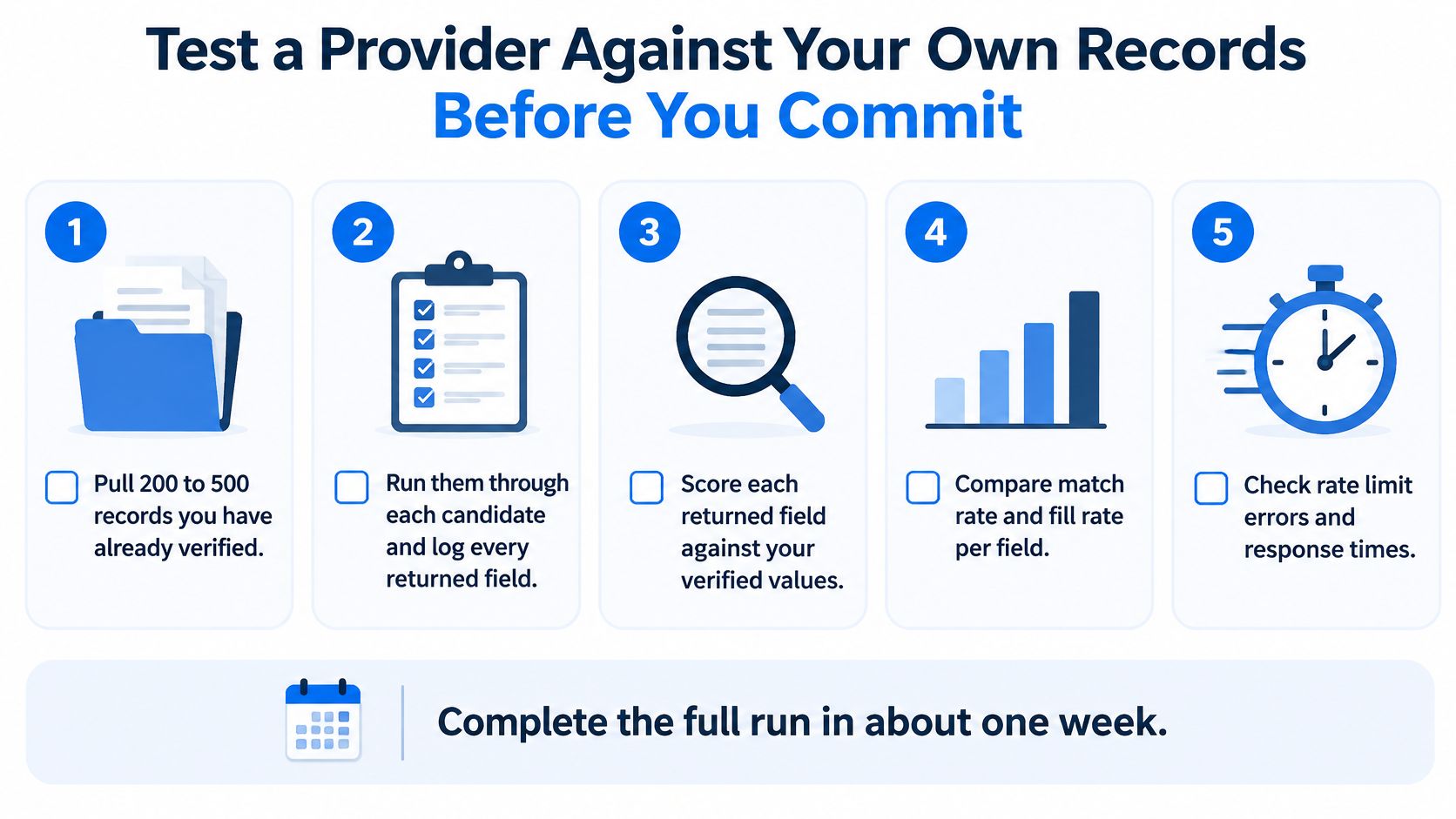
Plan the following as an approximately week-long exercise, adjusting the schedule to your team's availability:
- Select verified records. Pull a proposed sample of 200 to 500 records covering your actual markets, organization types, and difficult matches.
- Capture complete results. Run the sample through each candidate and log returned fields, match statuses, source references, and request identifiers.
- Test representative load. Use a proposed minimum of 1,000 calls to measure median and P95 latency at your expected request rate. Separate cached behavior from live retrieval where possible.
- Check observation times. Compare field-level timestamps and returned values against your verified records. A recent timestamp shouldn't excuse an incorrect value.
- Count missing and wrong results. Measure null rates per required field and count mismatched entities separately.
- Exercise failure paths. Submit an invalid URL, trigger a rate limit, and request an unavailable record. Reconcile each outcome with the credit ledger.
- Review governance. Request data processing terms, source documentation, and the correction and deletion process.
The checklist provides a compact view of the pilot.
Decide what passing means before testing
Set an acceptable P95, a tolerable null rate for each required field, and zero charges for failed calls if that's the promised billing contract. Don't move those thresholds after seeing attractive results elsewhere.
Verify the publisher's claims in the order your workflow encounters them: live fetching, reported latency, failure billing, synchronous and asynchronous delivery, and dedicated-capacity provisioning. Treat each as something to demonstrate, not a feature label to copy into a comparison sheet.
Budget for both record validation and load testing. The free credit allowance can't cover the proposed sample run plus the full latency run under the earlier assumed credit rate, so arrange a paid pilot or split initial evaluation across candidates.
Choose the provider whose measured results meet your freshness and failure thresholds. Move into production with monitoring for latency, null rates, incorrect matches, and credit spend.
Fetchin offers a B2B data API that turns company and professional profile URLs into structured JSON using live public information. Visit Fetchin to test your own records, inspect response schemas, and verify freshness, latency, and billing behavior before connecting enrichment to production decisions.