Delays above 1 second become perceptible to users, so real-time B2B data APIs must protect the interactive path from crossing that boundary. A response delay of up to 500 milliseconds is often difficult to distinguish from no delay, while delays beyond 1,000 milliseconds are highly likely to be noticed by users (controlled latency research).
That distinction changes how teams should think about latency response time. A static website can measure page loading as a signal of abandonment, but an API-driven product depends on the response to complete its core action. If a SaaS application can't enrich a record, an AI agent can't retrieve context, or a sales workflow can't resolve a company URL, the user doesn't experience a slightly slower page. They experience a blocked feature.
Live professional data adds another complication. Each request can involve variable upstream retrieval, parsing, queueing, network transit, and serialization. A median number can look healthy while a meaningful group of users waits long enough to abandon the workflow. The practical answer is to measure latency as an end-to-end distribution, then design the product around its tail.
Table of Contents
- Understanding Latency in Real-Time Data APIs
- The Psychology of Waiting and User Perception
- Beyond the Average, Why Percentiles Matter
- Latency in Agentic Workflows and Automation
- Architecting for Predictable Response Times
- Balancing Freshness and Speed
- Key Takeaways for Building Resilient Systems
Understanding Latency in Real-Time Data APIs
A professional data API can spend its latency budget across several systems before the caller receives a usable response. The path may include connection setup, service queueing, upstream page retrieval, extraction, validation, JSON serialization, network transfer, and client-side processing. Server execution time is only one part of the total.
That distinction matters because an API sits inside a user workflow. A delay can prevent a product from displaying a profile, scoring a lead, completing an enrichment step, or returning context to an AI agent. The user does not experience an isolated endpoint delay. They experience a feature that has not finished.
Chained extraction makes the problem harder. A workflow may resolve a company URL, retrieve its page, extract firmographic fields, validate the result, and then pass that context to another service. If each dependency adds variable time, the final response inherits every upstream delay. A healthy average at one endpoint does not guarantee a responsive end-to-end action.
Why live extraction creates variance
A cached snapshot usually offers more predictable timing because the provider controls the data path. Live extraction provides fresher page-state information, but upstream availability, content structure, network conditions, and source response behavior can change from request to request.
That variability matters for professional profile URLs, company URLs, and engagement data. One request may complete quickly, while another requires additional retrieval, parsing, retries, or validation. A median can look acceptable while slower requests make the complete enrichment workflow feel unreliable.
Practical rule: Treat live retrieval as a variable dependency, not as a fixed database lookup.
Measure each phase separately. Capture DNS, connection setup, queueing, upstream retrieval, parsing, serialization, time to first byte, total response time, retries, and timeouts. Teams operating AI infrastructure can also learn from guidance on real-time autoscaling for AI workloads, where capacity decisions must respond to changing execution demand rather than a static traffic assumption.
For product teams evaluating a live data architecture, this guide to live data APIs provides context on how current data retrieval fits into application workflows. The useful question is not how fast the endpoint responds. It is whether the complete user action can finish within the tolerance of the user and every calling system. That requires tracing the chain, setting budgets for each dependency, and designing a clear fallback when live extraction runs long.
The Psychology of Waiting and User Perception
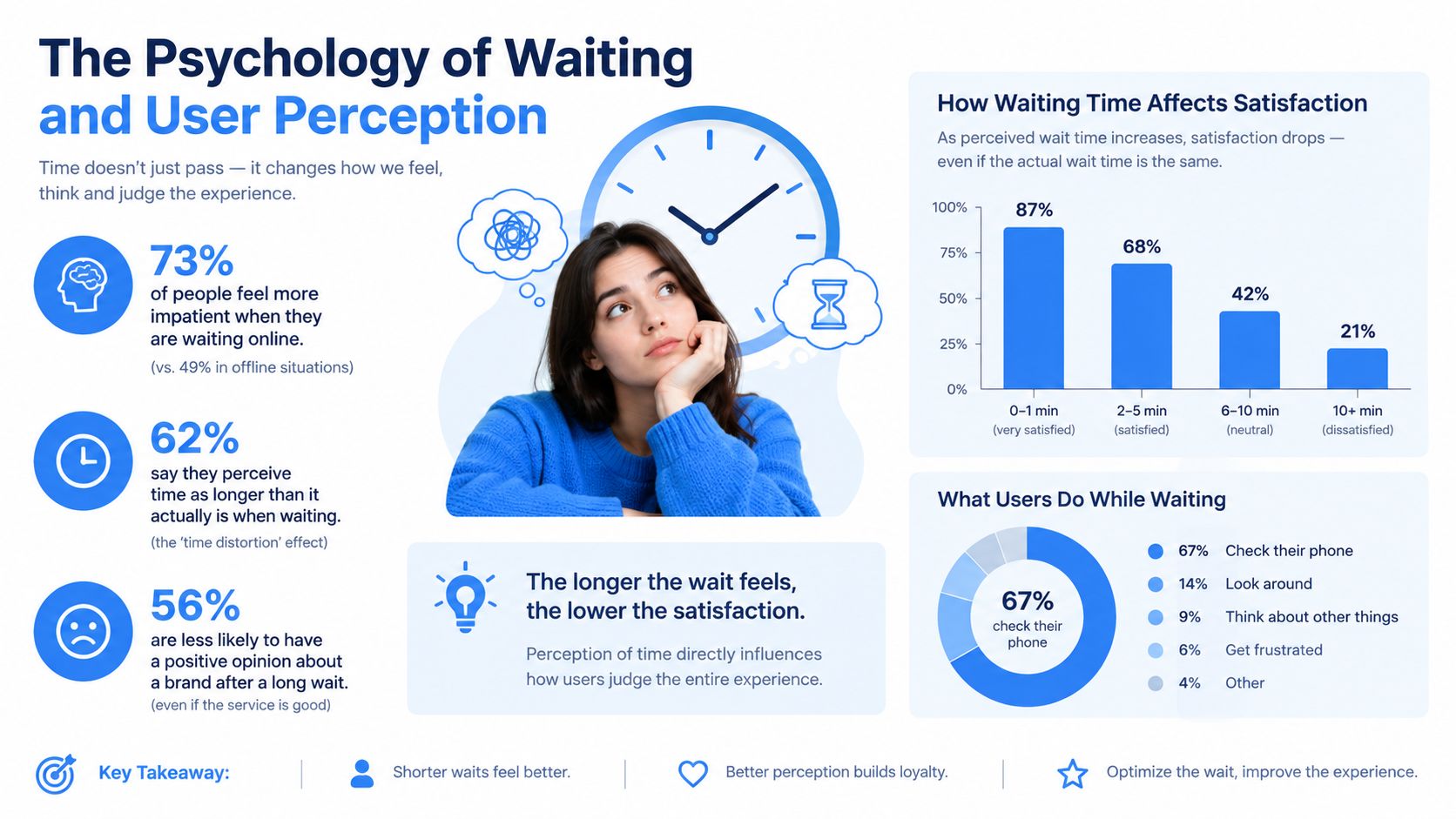
Sub-second interactions preserve a sense of continuity. The user clicks, the interface responds, and the next decision follows without a conscious pause. Once the delay becomes noticeable, attention shifts from the task to the system. Users may question whether the request failed, click again, switch tabs, or abandon the action.
The interface target depends on the work being performed. A direct search, profile lookup, or conversational agent call requires visible progress while the user waits. A background enrichment job can take longer when the application accepts the work asynchronously and reports its state clearly.
The boundary between flow and interruption
Practitioner guidance often places 100 milliseconds near the upper limit for an interaction that feels instantaneous, although sensitivity varies by task. Direct manipulation and conversational interfaces are less forgiving than background workflows because they depend on continuous feedback (latency and human-computer interaction research).
A roughly one-second median therefore does not guarantee a smooth experience. Slower requests can still create visible interruptions, even when the typical call feels fast. In a professional enrichment workflow, one delayed dependency can hold back an entire profile card, table row, or agent response. Chained retrieval makes this more noticeable because the user experiences the combined delay, not the isolated speed of each API.
Make waiting legible when it can't be avoided
The interface should acknowledge work instead of leaving users staring at an unchanged screen. A progress state, partial result, or clear “processing” status gives them a reason to continue. It does not reduce the underlying latency, but it distinguishes active work from a failed request.
For long-running retrieval, return a job identifier and let the application continue. The client can poll for completion, receive an update, or render other fields while extraction proceeds. For a bounded interactive lookup, return the structured result directly and keep the request within the caller's deadline. The delivery mechanism should match the user's attention and the dependency chain, not just the backend's preferred execution pattern.
Job identifiers also make retries safer. A client that loses its connection can check the existing job rather than start another extraction, avoiding duplicate work against slow sources. That matters when a workflow combines URL discovery, page retrieval, parsing, validation, and enrichment.
Conversational systems need the same discipline. A model may produce an early token quickly, while fetching, parsing, tool execution, and orchestration continue behind it. A fast first byte signals activity, but total completion time determines whether the answer is useful. Stream meaningful progress, expose partial results where they are reliable, and mark unfinished fields clearly.
The following video offers another perspective on how latency affects online experiences and user behavior.
Beyond the Average, Why Percentiles Matter
An average response time can hide the requests that shape user experience. A service may report a low average while a smaller group faces multi-second waits, timeouts, or retries. For professional data extraction, those slower requests often occur inside workflows that already depend on several upstream calls.
The median, or P50, marks the middle request. Half finish faster, and half finish slower. P95 marks the latency at or below which 95% of requests complete, leaving the slowest 5% beyond it (AWS explanation of percentile latency). P99 focuses further into the tail, showing behavior affecting the slowest 1%.
A highway makes the distinction clear. Average speed can look acceptable while one driver sits behind a bottleneck. Median latency describes the open road. P95 and P99 show the traffic jam.
What the tail reveals
Queueing, connection reuse problems, variable upstream retrieval, regional routing, retries, and a single slow dependency can all create tail latency. These events may barely move P50, yet determine whether a user receives a completed result or watches a spinner.
Chained enrichment makes the risk more visible. The tail-latency research in The Tail at Scale describes how small delays at individual services can become a much larger end-to-end delay in a distributed request path (tail-latency research). A workflow that retrieves profile, company, and engagement data can therefore feel slow even when no individual call looks alarming. Every dependency adds another opportunity for queueing, timeout, or retry.
A median tells you how the road looks on a quiet trip. A percentile tells you what happens when the trip matters.
Read performance claims critically
When a provider says “around one second,” ask four questions:
- Which percentile? A median near one second says something different from a P95 near one second.
- Which workload? A single profile lookup does not represent multi-record enrichment.
- Which endpoint? Company resolution, profile extraction, and engagement retrieval may have different latency distributions.
- Which boundary? Does the measurement cover only server processing, or also network transfer and client processing?
A useful benchmark records P50, P95, P99, timeout rate, retry rate, and completion within the product's interaction budget. The performance benchmarking guide can help teams evaluate those measures instead of comparing one attractive average. Test the complete enrichment chain as well as each endpoint, because users experience the chain, not its fastest component.
Latency in Agentic Workflows and Automation
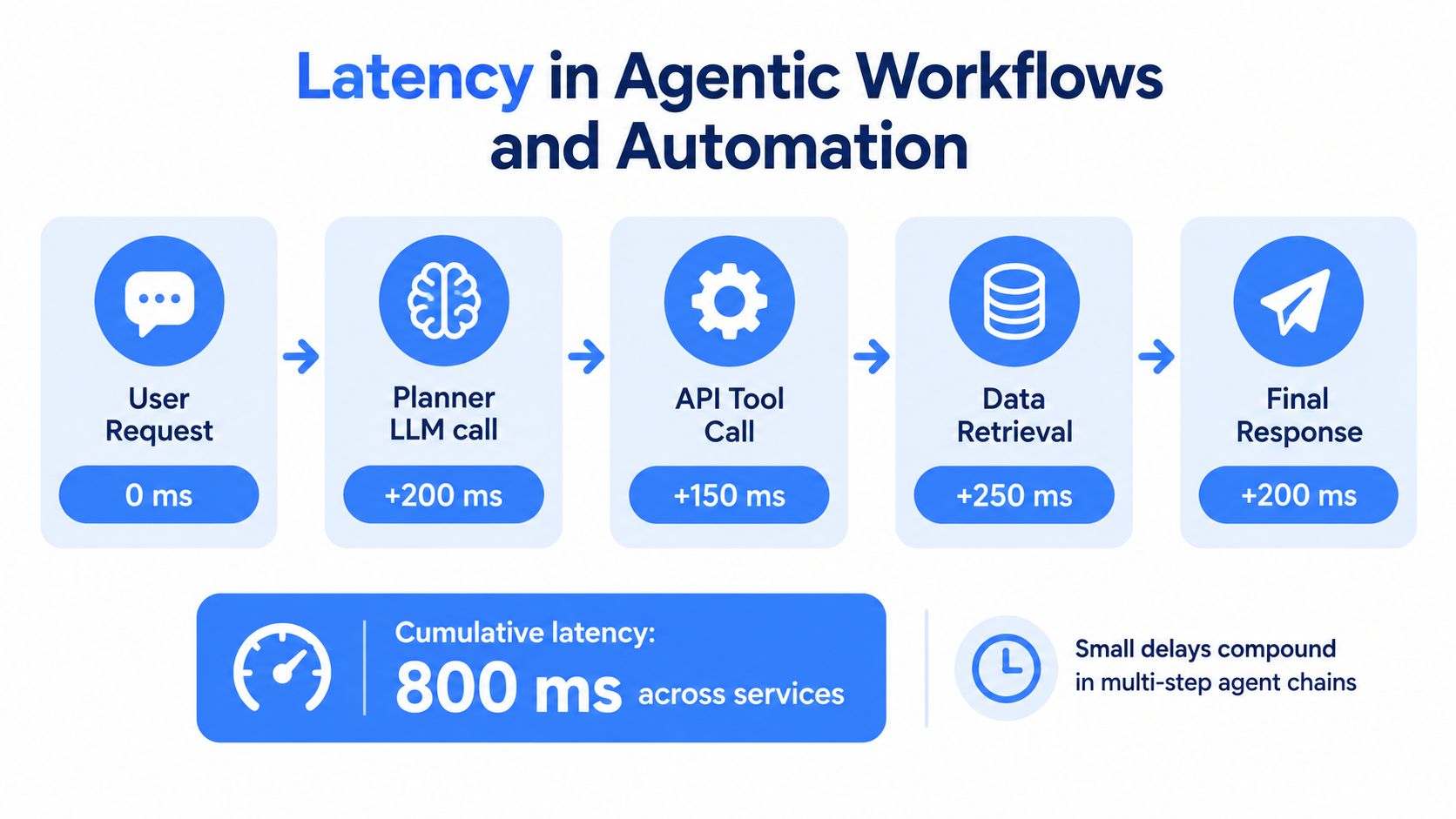
An AI agent doesn't experience API latency as one isolated number. It experiences a sequence: receive the user's request, plan the task, call a tool, fetch data, parse the result, decide what to do next, and produce an answer. Each step can add waiting, and the user sees the total.
Recent research on agentic systems found substantial variability across models and providers. For fixed-length requests, execution times differed by as much as 69.21 times, while web-environment work such as fetching and parsing contributed up to 53.7% of total agent runtime (research on agent runtime). Improving model generation alone therefore won't necessarily make the agent feel faster.
Parallelism beats unnecessary sequencing
Suppose an agent needs both a professional profile and company context. If the second request doesn't depend on the first response, run them in parallel. Sequential calls turn independent work into a chain, so the total time approaches the sum of both calls. Parallel calls make the workflow approach the slower branch, plus orchestration overhead.
Use sequential execution when the output of one call determines the next input. A profile lookup might determine which company URL to resolve, for example. In that case, parallelism can't remove the dependency, so the architecture should protect the user with a deadline, partial output, or asynchronous completion.
Small delays also compound through service chains. The more dependent calls an agent makes, the greater the chance that queueing, retries, or upstream variability pushes the final response outside the interaction budget. The correct unit of measurement is the complete agent task, not just the tool call.
Choose delivery mode deliberately
Synchronous retrieval works well for one bounded lookup where the caller needs the result immediately. It keeps application logic simple, but the caller remains connected for the full duration and must tolerate the slow tail.
Asynchronous delivery is better when the agent needs several records, retries are likely, or source variability makes completion time difficult to predict. The caller submits the work, receives an acknowledgement or job identifier, and continues without holding the interactive request open.
Teams designing multi-agent systems can also compare orchestration patterns for production AI before deciding where to parallelize, queue, or persist intermediate results. The strongest design usually combines approaches:
- Interactive lookup: Use synchronous retrieval for one bounded request.
- Independent context: Fetch profile and company data in parallel.
- Variable fan-out: Use asynchronous jobs when several sources or records are involved.
- Repeated context: Cache stable fields and refresh them outside the user's critical path.
- Agent deadlines: Preserve one overall deadline instead of granting each tool call a fresh full timeout.
A fast agent is one that completes the user's task quickly. It isn't necessarily the agent with the fastest individual API response.
Architecting for Predictable Response Times
Predictability starts with a latency budget. Define how long the user-facing action can take, then assign portions of that budget to network transit, connection setup, queueing, live retrieval, parsing, serialization, and client rendering. An endpoint can be operationally fast yet make the product feel slow if it consumes the entire budget before the application processes its result.
Set timeouts from the tail
AWS recommends choosing an acceptable false-timeout rate, using 0.1% as an example, and setting the timeout near the corresponding P99.9 latency (AWS guidance on timeouts and retries). A one-second median does not justify a one-second timeout when professional enrichment still has a longer legitimate tail.
Measure each phase separately:
- Connection work: DNS and TCP/TLS setup.
- Platform waiting: Application queueing and capacity contention.
- Upstream work: Retrieval, extraction, and source response time.
- Payload work: Parsing, validation, serialization, and transfer.
- Consumer work: JSON decoding, rendering, or agent processing.
Use a measured production P99 or P99.9 as the starting point, then add a bounded allowance for network variance. For example, if an enrichment workflow's measured P99.9 reaches the edge of the user-facing budget, the timeout must account for that observed tail and the remaining application work. A timeout that covers only the API call can still expire while the client parses or renders the response. The percentile guidance from AWS is useful for keeping this choice tied to observed behavior rather than an average (AWS percentile guidance).
Avoid unlimited timeouts. Long-held connections consume resources and delay recovery when a dependency is unhealthy. Chained extraction calls make this harder: each upstream delay consumes the same overall budget, and retries can extend the chain unless every operation shares one deadline.
Retry selectively
Retries can recover transient failures, but they multiply downstream work. Immediate retries intensify congestion because many clients repeat requests together.
Use exponential backoff with jitter, cap attempts, and preserve one overall deadline. Do not retry validation errors or capacity responses as if they were slow responses. A timeout means that a request exceeded its allowed time. An HTTP 429 means that a client exceeded configured rate or burst capacity, not that the network necessarily became slow (API Gateway rate-limit behavior).
For observability, reliable app monitoring for enterprises offers a useful reference point. Track latency, error type, retry count, queue depth, throughput, and completed work together so a fast response is not mistaken for a successful enrichment.
Pick synchronous or asynchronous delivery
Synchronous processing suits a result required during the current interaction with a predictable tail. Asynchronous processing handles high-variance retrieval, multi-record enrichment, and agent jobs that can continue after submission. This comparison of synchronous and asynchronous APIs explains the behavioral difference in more detail. Choose the mode that protects the complete workflow, not merely the first request.
Balancing Freshness and Speed
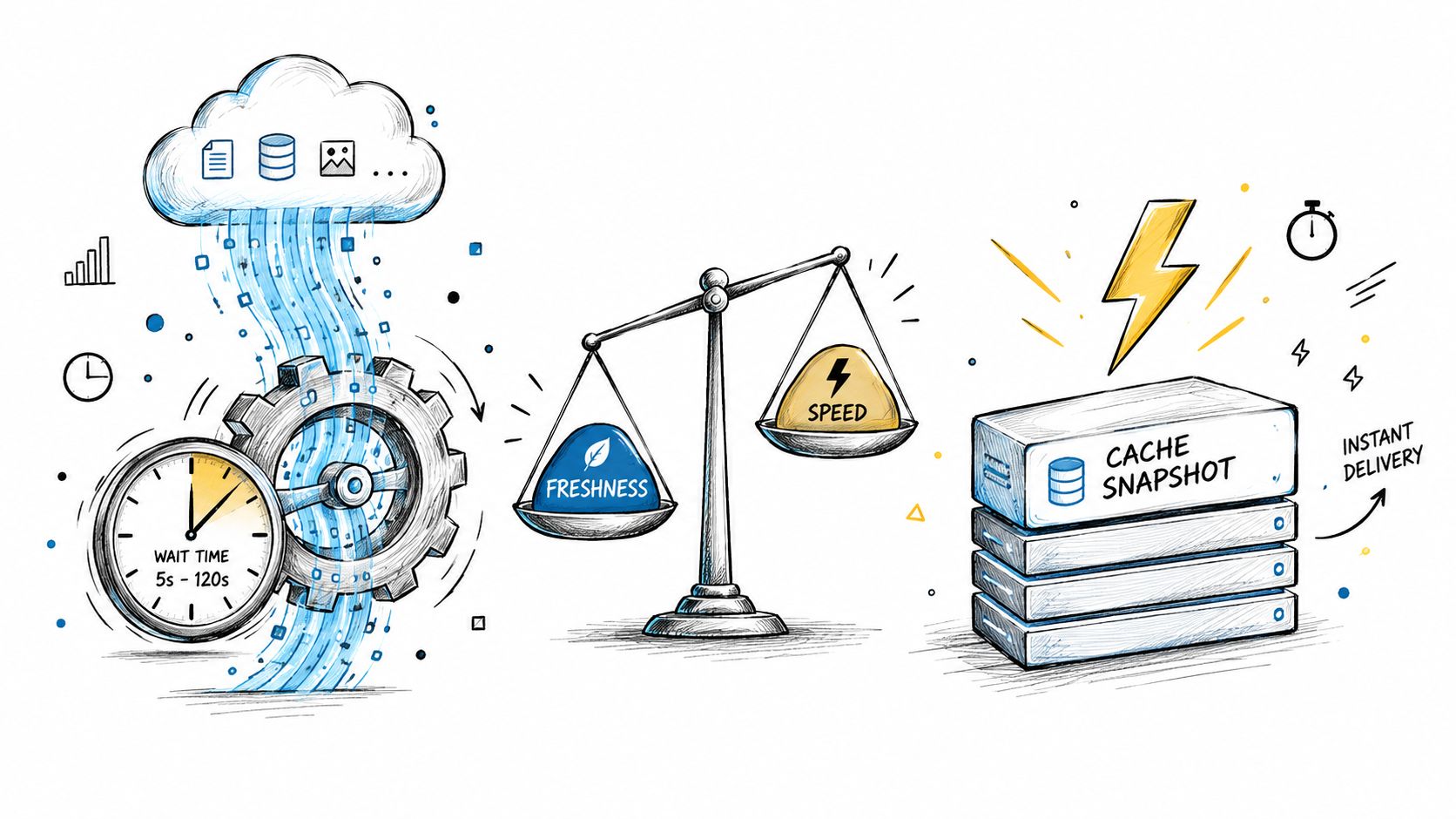
Fresh data and fast data aren't always the same thing. Live fetching can return current public professional information on demand, but it introduces upstream variability. A cached snapshot usually responds more predictably, but it may no longer reflect the state your product needs.
The right choice depends on the cost of being stale. A company directory that supports broad discovery may tolerate a previous snapshot. A workflow qualifying a prospect, matching a professional profile, or triggering an automated action may value current data more than a consistently fast response.
Spend latency where freshness matters
Don't make every field pay the cost of live retrieval. Separate data into categories:
- Stable attributes: Cache fields that rarely change and refresh them on a controlled schedule.
- Decision-critical fields: Fetch current values when stale information could change the outcome.
- Engagement data: Retrieve posts, comments, or reactions when recency is part of the product's value.
- Large enrichment jobs: Submit asynchronous work when the user doesn't need every result immediately.
A stale response can cause the product to recommend the wrong account, miss a relevant change, or send an agent down an outdated path. A slow response can cause a timeout or interrupt the user's flow. Neither is universally worse. The product owner must decide which failure damages trust more.
Budget the complete experience
A server-side response time around one second is useful only if the rest of the path fits. Network transit, TLS, queueing, extraction, JSON decoding, rendering, and agent reasoning all consume time. Track time to first byte separately from total completion so the interface can show progress without claiming that the result is ready.
Caching should also be evaluated against its misses. A cache may improve typical performance while leaving the slow path unchanged. In a multi-request workflow, one miss can delay the final result, so monitor end-to-end completion rather than cache-hit timing alone.
The strongest architecture uses freshness selectively. Keep interactive requests bounded, parallelize independent retrieval, cache what doesn't need live verification, and move unpredictable fan-out to asynchronous delivery.
Key Takeaways for Building Resilient Systems
Latency response time is a property of the complete workflow, not just one endpoint. In professional data extraction, a profile lookup may trigger company enrichment, engagement retrieval, retries, parsing, and agent execution. Each dependency adds another opportunity for delay or failure.
Use this checklist when evaluating a real-time workflow:
- What does the distribution look like? Record P50, P95, P99, and timeout rates. A median is useful only with its workload and measurement boundary.
- Where does time go? Separate connection setup, queueing, upstream retrieval, extraction, parsing, serialization, transfer, and consumer processing.
- What happens at the tail? Find the requests that become slow and test whether upstream variability, capacity contention, rate limits, or retries cause the delay.
- Does the workflow fit its budget? Measure the user action or agent task from submission through usable completion.
- Which delivery mode fits? Keep bounded interactive work synchronous. Send variable or high-fan-out jobs through asynchronous processing.
- What does freshness justify? Fetch live values when current information can change a decision. Cache fields when stale data presents little risk.
A workflow that starts with one profile lookup can become much slower after company enrichment and engagement data are added. The added calls may also have different latency distributions, rate limits, and failure modes. Benchmark the complete path under representative load, then identify the dependency that controls completion time. Parallel fetching can reduce waiting for independent calls, while caching can remove repeated work. Larger timeout budgets may protect slow but valuable requests, although they also keep resources occupied. Asynchronous delivery often fits jobs whose fan-out or extraction time cannot be bounded.
Visibility should cover both individual requests and the final user outcome. Track where time is spent, how often tail latency delays completion, and whether a timeout leaves the product with a usable fallback. These measurements connect API behavior to the decision the user is trying to make.
Real-time data requirements continue across SaaS products, enrichment tools, recruiting platforms, and AI automation. Reliable systems are not defined by their average alone. They expose latency, control the tail, choose delivery modes deliberately, and keep the complete workflow within a realistic budget.
Fetchin provides a real-time B2B data API that turns professional profile and company URLs into structured JSON, with synchronous responses for interactive lookups and asynchronous delivery for higher-latency workflows. Visit Fetchin to evaluate live data extraction, response-time behavior, schemas, and throughput options against the workflow you're building.