
You're looking at a company post, a professional profile, and a list of reactions. The names look familiar, but the employer fields disagree, the engagement counts came from different dates, and nobody knows which record should drive the next action. Finding results isn't the hard part. Deciding which results you can trust is.
To search social media for a product workflow, treat every result as evidence: who published it, what it says, when it was observed, and how confidently you can connect it to an entity. Popularity can help you prioritize review. It can't establish identity, accuracy, or buying intent.
Table of Contents
- Which Search Path Fits Your Question
- How to Build a Query That Surfaces Engagement Signals
- Filters That Narrow Results Without Hiding Signal
- Resolving Profile and Company URLs Into One Record
- Rate Limits, Retries and Credit Planning
- Live Fetching Versus Stored Snapshots for Real-Time Results
- Confirm Source and Basis Before You Ship
Which Search Path Fits Your Question
Many younger consumers now begin brand searches on social platforms, as described in Sprout Social's research on Gen Z search behavior. That shift makes social discovery relevant, but it does not make a keyword query the right input for every job. A phrase finds mentions; a URL anchors retrieval to a specific record.
Search path by question type
| Question | Starting input | First filters | Signals returned |
|---|---|---|---|
| What are people saying about a topic? | Phrase, hashtag or brand name | Recency window, language | Posts, comments, reactions |
| How active is one professional in public? | Professional profile URL | Date range, content format | Posts and reactions from that profile |
| What is a company posting and how is it received? | Company URL | Date range, account type | Company posts, comments, reactions |
| Who engaged with a specific post? | Post URL | None at first, then deduplicate | Full comment and reaction lists |
Treat “full” as a retrieval objective, not a guarantee. Follow pagination to completion, record inaccessible items, and distinguish an empty response from an interrupted collection. A reaction or comment is evidence tied to a post and an observation time; it is not, by itself, a popularity score or proof of intent.
Choose the Entity Before the Keywords
To inspect a software company's launch reception, a brand-name query can return giveaway posts, reseller promotions, and unrelated accounts using the same word. Starting with the company URL isolates its own publishing activity. A broader keyword search answers a different question by finding discussion around the brand, including posts the company did not publish.
For topic discovery on X, track product launch conversations on X. Use this path when surrounding discussion matters, rather than treating it as a substitute for retrieving a company's own posts.
A post URL narrows the scope further: it identifies the comments and reactions attached to that publication, without combining engagement from reposts or similar announcements. Keep the URL and the time each signal was observed with the result. If counts or records conflict across observations, retain their timestamps and confidence instead of letting a stale value decide which post performed better.
Practical rule: Name the entity first, choose the input that matches it, then add filters.
Save the question alongside the search configuration. Without that context, someone may interpret a company's own posts as the entire market conversation, or mistake topic mentions for activity by a particular professional. The distinction affects what the results can support: a company URL captures publishing activity, while a topic query captures mentions and a post URL captures engagement with one publication.
How to Build a Query That Surfaces Engagement Signals
A useful query describes both what belongs and what doesn't. Start with an observable behavior, such as someone describing a switch between products, rather than an inferred outcome such as someone being ready to buy.
The retrieval process should separate population definition, vocabulary construction, query execution, and validation. A peer-reviewed social-media retrieval study in JMIR illustrates why precision and recall must be evaluated separately, including the relevant material a query fails to retrieve.
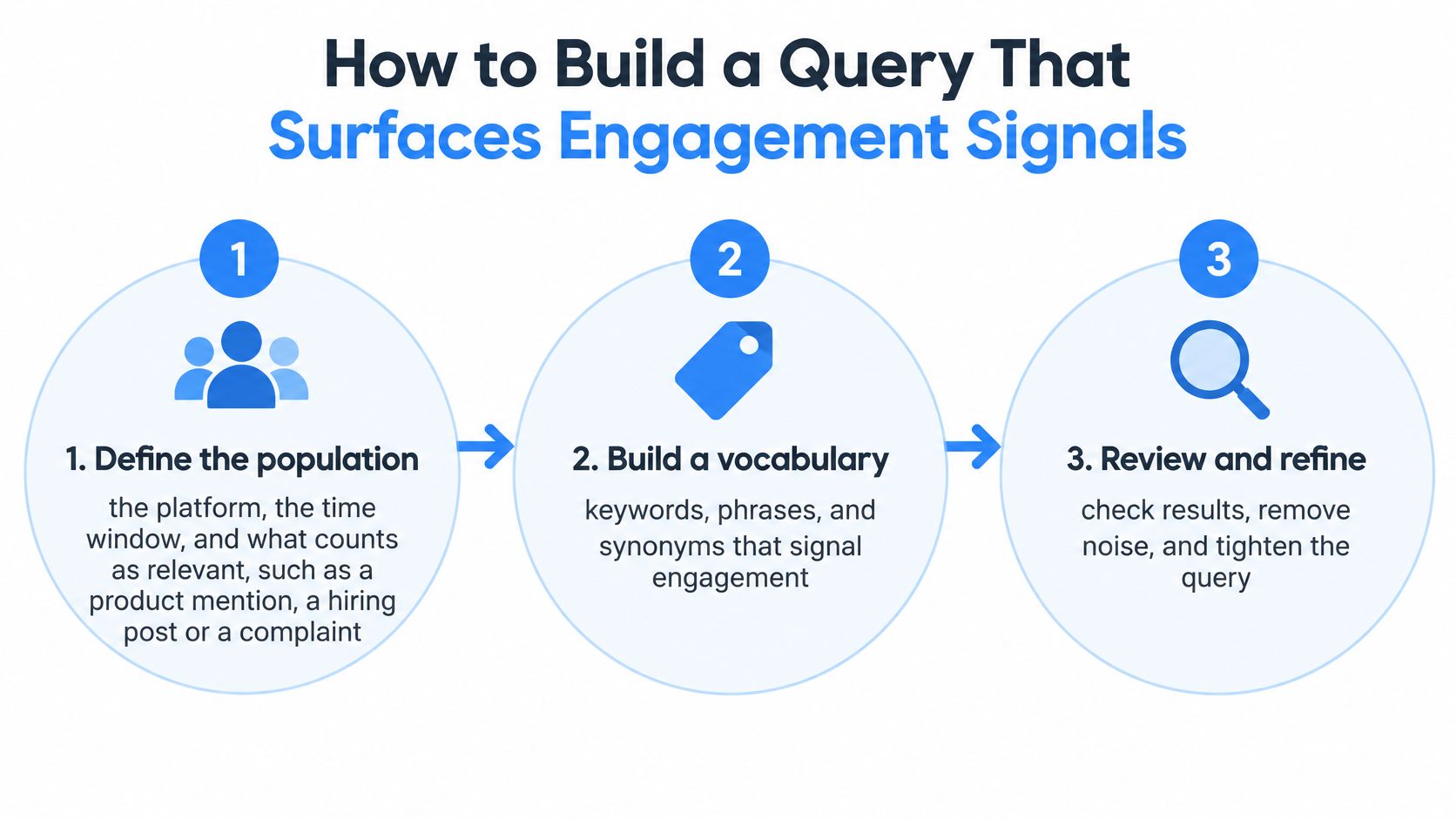
Build and Inspect the Query
Define the population. Specify the platform, time window, and relevance rule. For a hypothetical competitor-switching search, require a firsthand description of leaving or adopting a product, not merely a mention of its name.
Build a vocabulary around the exact brand name, product nicknames, common misspellings, hashtags, and switching language. Keep noise terms, such as giveaway and job listing, in a separate exclusion list so reviewers can inspect what you're removing.
Encode the Boolean logic. Combine the competitor's name with the quoted phrase “switched from,” then exclude giveaway language where appropriate. Confirm the platform's supported syntax before running it; quotation marks, operator precedence, and exclusions aren't interchangeable across search systems. This guide to search Boolean operators provides a practical starting point.
Run a short-window pilot and manually read a review batch, for example 50 results. Label why each item belongs or doesn't belong. A competitor name alone might retrieve promotions; adding switching language narrows the search toward accounts describing a transition.
Expand or tighten deliberately. Add indirect descriptions and slang when relevant posts are missing. Remove ambiguous terms only after checking the records they contribute, rather than deleting anything that makes the results look untidy.
Validate Before Automating
Sample retrieved and unretrieved material. Precision is the proportion of retrieved items that are relevant. Recall is the proportion of all relevant items that the query finds. Reviewing only returned posts cannot reveal false negatives; use a separately collected candidate pool or independently labeled reference set to inspect omissions.
Save the query text, version, execution time, and review decisions. Preserve post-level metadata, collection stratum, and sampling probability where known; mark an unknown sampling probability explicitly instead of inventing one.
Prefer high precision for alerts and lead qualification, where irrelevant results waste attention. Favor broader recall for trend discovery, where missing a new expression can hide an emerging topic.
For commercial workflows, Fypion Marketing's discussion of building prospect relationships before booking meetings supplies useful context: an engagement signal should prompt informed review, not automatic outreach.
Before reporting conversation volume or sentiment as representative, compare the validated sample with an external benchmark, such as a survey or independently coded panel. Academic guidance on social data and surveys explains why platform participation, posting behavior, and survey responses aren't equivalent.
Filters That Narrow Results Without Hiding Signal
Every filter removes useful material as well as noise. Evaluate filters by their false negatives, not just by how clean the first page looks.
Recency and Language
Recency removes older material. For a breaking announcement, date order makes inspection easier than a relevance ranking that may favor established posts. But a narrow publication window can hide the original announcement while retaining later commentary about it.
Distinguish publication date from the date you collected a post. An old post fetched today isn't a new event, and a newly edited page doesn't necessarily describe a new development.
Language removes material outside the selected segment. Run supported languages separately and keep the language label with each result. Don't assume a company's headquarters or website language determines the language its employees use.
Say a recruiter filters to the last 14 days and English. A week-old hiring announcement in Portuguese still disappears, even though it passes the date filter. The fix is a parallel language segment, not a longer time window.
Format and Account Type
- Content format: Text-only retrieval can exclude image and video posts whose relevant information appears in captions or on-screen text. Mark unsupported formats as coverage gaps, rather than treating them as evidence that nobody discussed the topic.
- Account type: Separate company publications, individual posts, and reposts. Preserve the relationship between a source post and its reshares so amplification doesn't become a count of independent statements.
- Engagement thresholds: A minimum reaction count removes quieter posts. That may reduce review work, but it can also hide a relevant announcement from a verified company account.
Keep author confidence separate from content significance. A verified company domain helps establish who published something; it doesn't prove every claim in the post.
A filter that makes results easier to read can also make your conclusion less defensible.
Maintain an unfiltered control query to expose exclusions and an unpersonalized control query to detect ranking changes caused by account history. Compare which records disappear, not just whether the total falls.
Record filters as explicit configuration fields. If a reviewer can't tell whether a missing post was outside the language, date, format, or account-type boundary, they can't diagnose the retrieval failure.
Resolving Profile and Company URLs Into One Record
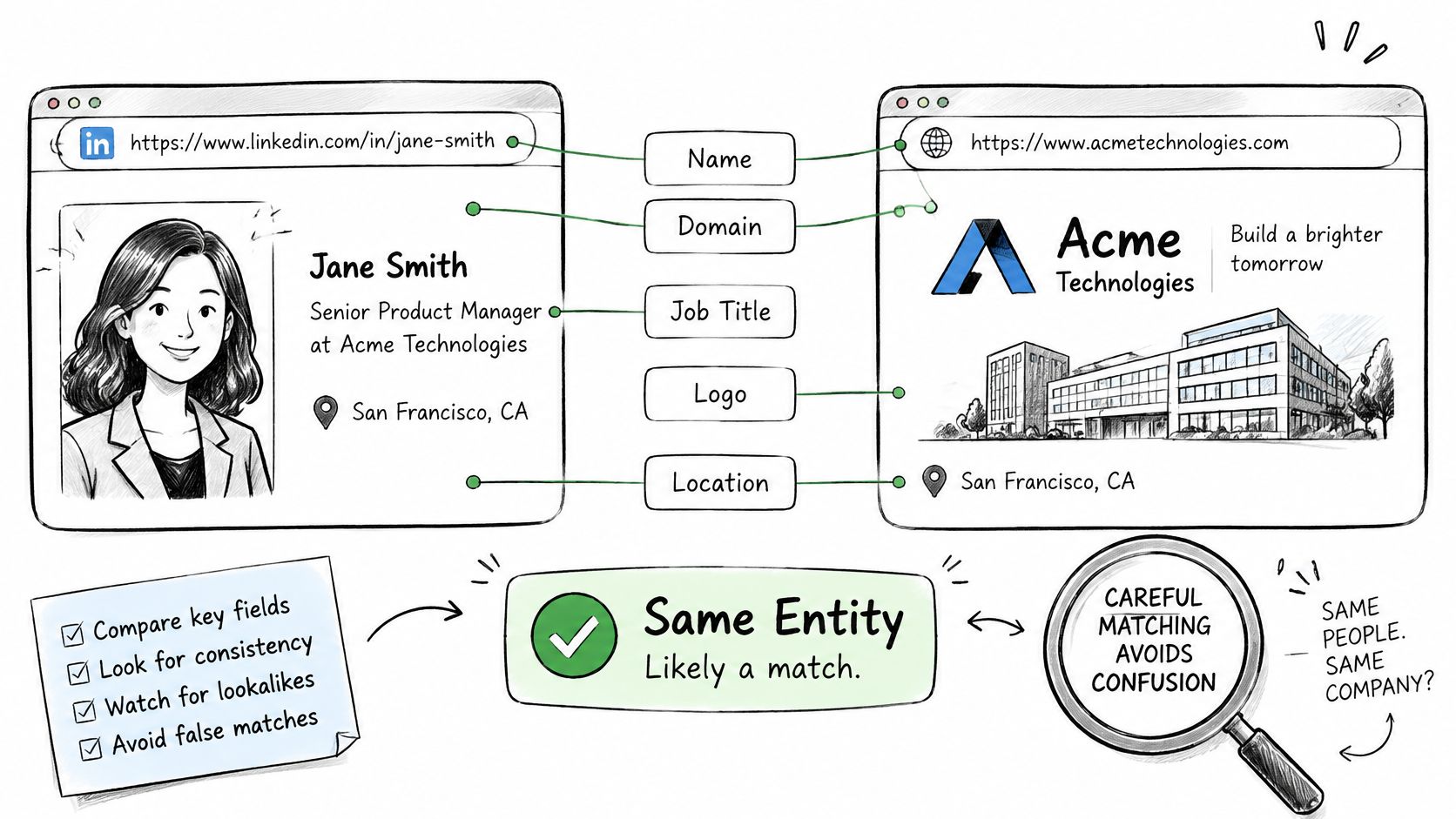
Matching on name alone is an identity error waiting to happen. Two professionals can share a name and city, while unrelated companies can use nearly identical names. Fetch the professional profile record and company record separately, then compare the attributes that connect them.
A practical matching pipeline needs entity resolution, timestamped evidence, and confidence labels, not a larger pile of profiles. This matters when users reconcile conflicting information across platforms, a problem made more relevant by the social-first discovery behavior described in Sprout Social's consumer research.
Rank the Evidence Before Merging
Use employer, tenure, location, and education together for people. For companies, compare the verified domain and headquarters, then inspect industry and founding year for contradictions.
Match signals and what to do with each
| Match signal | Strength | Action |
|---|---|---|
| Shared verified company domain | Strong | Link the records and label as confirmed |
| Same full name and same current employer | Strong | Link and check the fetch timestamp |
| Same name and location only | Weak | Label as unresolved and hold for review |
| Similar company name, different industry or founding year | Conflicting | Keep as separate records |
| Conflicting headcount or role across two fetches | Freshness conflict | Store both values with timestamps and mark the newer one current |
| Blank contact field | None | Treat as missing, not as a mismatch |
A confirmed domain match confirms the company relationship represented by that domain. It doesn't establish that every associated person is the same individual. Likewise, employer matching should still trigger review when other strong attributes conflict.
For a concrete example, a sales team has profiles for two people named Priya Shah in the same city. Keep them separate until the current employer and supporting career details align. Don't merge first and hope later enrichment fixes it.
Preserve Ambiguity Instead of Hiding It
Assign each proposed match a label:
- Confirmed: Authoritative identifiers or consistent corroborating attributes support the link, with no unresolved material contradiction.
- Probable: Several attributes agree, but an authoritative connection is missing.
- Unresolved: Evidence is weak, contradictory, or insufficient for an automated merge.
Store the evidence behind the label. A reviewer should be able to see the source URLs, compared attributes, observation times, and rule that produced the decision.
Contact fields deserve special care. A blank email field means missing information, not a different person; an email address can help investigate identity without replacing corroboration. How to Contact's guide to find podcast guests by email is useful when contact discovery is the next task.
For changing attributes, retain history rather than overwriting it without notice. Treat the newer observation as current only when its source is comparable or stronger; a recent fetch of an outdated biography shouldn't automatically defeat an authoritative company announcement.
Rate Limits, Retries and Credit Planning
A hypothetical batch of 10,000 profiles needs about 33 minutes at 5 requests per second or 100 seconds at 100 requests per second, assuming one request per profile and no retries. Those are theoretical minimums, not completion guarantees. Pagination, network latency, retry delays, and downstream writes extend the schedule, so leave room for them when setting a deadline.
Rate limits and typical use by plan
| Plan | Rate limit | Typical use | Planning note |
|---|---|---|---|
| Free tier | Set by plan terms | Testing and prototypes | Check the included credit balance and endpoint costs |
| Self-serve | Up to 5 requests per second | Prototypes and small internal tools | Check monthly credits or pay-as-you-go terms |
| Dedicated capacity | Up to 100 requests per second | Sustained production throughput | Confirm activation timing before scheduling the batch |
| Enterprise | Set by plan terms | Custom volume and terms | Follow negotiated terms |
Free-tier and enterprise limits depend on their plan terms. Don't infer a free-tier rate from a paid plan's ceiling. Credit balance, request rate, concurrency, and endpoint cost are separate constraints.
Handle Throttling as a Normal Response
The 429 Too Many Requests status indicates that a client exceeded an allowed request rate. A response may include a Retry-After header, as described in MDN's HTTP reference. Limits may apply across resources, applications, authenticated users, or other scopes. Slowing one worker will not solve a shared-account limit if other workers continue sending requests.
Use a controlled retry sequence:
- Detect throttling separately. Keep it distinct from invalid inputs, authentication failures, and unavailable records.
- Honor
Retry-Afterwhen present. Otherwise, increase the delay between retries and add random jitter so workers don't resume together. - Cap attempts and elapsed time. Move exhausted work to a retry queue with its failure reason attached.
- Reduce shared dispatch throughput if throttling persists. A central limiter is safer than independent workers guessing how much capacity remains.
The API rate-limit guide covers practical client behavior. Use dashboard rate controls where available, and keep dispatch below the configured ceiling rather than repeatedly testing it.
Budget for Completed Work
Estimate credit use from unique inputs, endpoint calls, pagination, and refresh frequency. Deduplicate URLs before dispatch, then checkpoint successful results so a restarted job does not repeat completed work.
Failed requests may have different credit treatment. Check whether throttled responses consume credits instead of assuming failures are free. During a pilot, log request outcomes and credit changes, then reconcile them against dashboard usage.
Separate retryable reads from downstream actions. Repeating a read should not create a duplicate CRM activity, notification, or enrichment charge in your application. Tie each engagement result to its observation time and source, and keep conflicting or older observations from replacing stronger evidence.
Live Fetching Versus Stored Snapshots for Real-Time Results
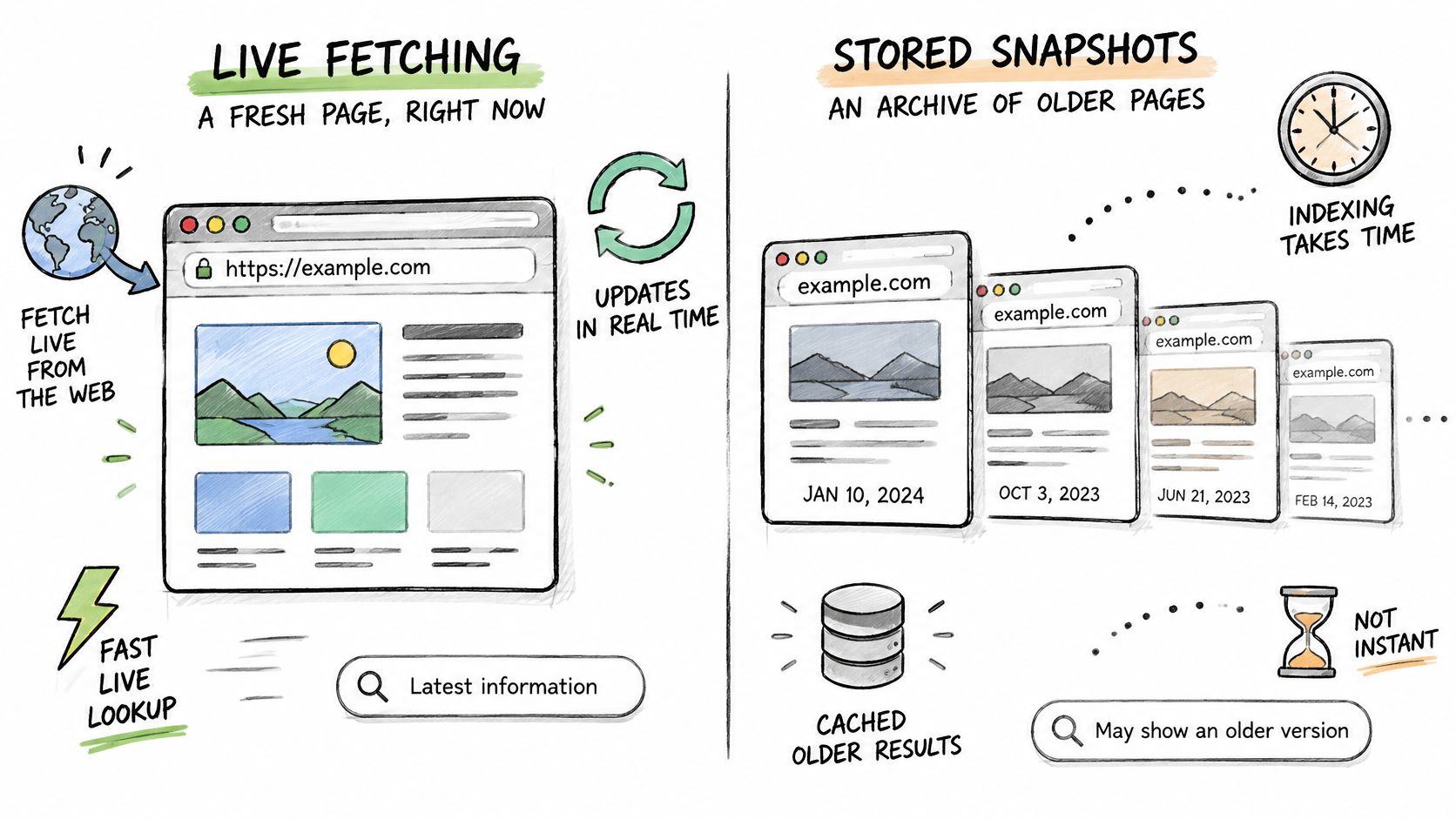
Live fetching requests the page's currently accessible state. Stored snapshots return an earlier observation. Neither approach guarantees that the author's underlying claim is accurate, but they support different freshness and reproducibility needs.
A live lookup suits a user opening a professional record before taking action. A snapshot suits historical analysis, debugging, and explaining what the system knew when it made a decision. Keep both when the decision needs an audit trail.
Choose Freshness by Field
| Data or workflow | Preferred approach | Reason |
|---|---|---|
| User opens a professional record | Live fetch with a labeled fallback | Current context matters to the immediate action |
| Historical report | Stored, versioned snapshot | Results must remain reproducible |
| Company headcount display | Policy-controlled cache | Avoid unnecessary refreshes when the workflow tolerates delay |
| Reaction or comment ranking | Refresh before evaluation | Counts can change between observations |
| Overnight enrichment | Asynchronous processing | The user doesn't need to hold a request open |
For a hypothetical cache policy, company headcount might tolerate a snapshot for up to a day. Reaction and comment counts used for ranking should be refreshed before evaluation. Those are application choices, not universal freshness guarantees.
Store field observation times, not just a record-level update time. Otherwise, refreshing a company description can make an old headcount look newly verified.
Separate Delivery From Evidence Quality
Use synchronous delivery when an interactive feature needs the response immediately. For long-running batches or unpredictable source latency, asynchronous delivery lets workers finish independently while the product tracks completion.
Benchmark the actual endpoint and payload before promising an interface deadline. Measure typical latency, tail latency, failures, and retry-inclusive completion time; a fast successful response doesn't describe the slowest user experience.
Say a post was fetched three days ago and now qualifies for an alert. Refresh its engagement before evaluating the rule, preserve the previous observation, and record the new decision time. If the refresh fails, label the evidence stale or defer the alert rather than reusing old counts.
Ranking principle: Prefer evidence that matches the decision's time horizon, not whichever post accumulated the most reactions.
A recent, relevant announcement can outrank an older viral post for a live alert. Keep relevance, source confidence, recency, and engagement as separate ranking inputs so reviewers can understand why the system selected it.
Confirm Source and Basis Before You Ship
California's privacy statute defines exclusions for publicly available information, including information lawfully available through government records, made available to the general public by the individual or widely distributed media, or disclosed without restricting access to a specific audience; it excludes biometric information collected without the consumer's knowledge from that category, as set out in the CCPA statute.
Technical accessibility alone doesn't establish that boundary. Under the ICO's lawful-basis guidance, organizations must identify and document an applicable lawful basis before processing personal information. Public availability doesn't remove that obligation.
Make Provenance Part of the Record
- Source: Record the origin of each field and its audience restrictions.
- Observation: Store the fetch timestamp alongside the value.
- Purpose: State why the workflow needs the information.
- Lawful basis: Document the applicable basis and any required assessment.
- Exclusions: Omit fields that don't meet your sourcing and processing rules.
European Commission guidance also addresses informing individuals about processing grounds and, where relevant, data origins, including publicly accessible sources, in its data-protection principles. Preserve enough provenance to support those notices downstream.
A professional data API can return profile, company, and post information as structured JSON, allowing the same checklist to operate directly inside an ingestion pipeline. Use these social engagement examples to define which observable behaviors your feature needs, rather than collecting everything available.
Choose the search path, run a small manually reviewed sample through the matching rules, and check rate headroom in the dashboard before production. Require unresolved identities and stale evidence to stop automated actions.
Public access is not permission to process.
Fetchin offers a B2B data API for turning public professional profile and company URLs into structured JSON, with post, comment, and reaction data for engagement workflows. Visit Fetchin to evaluate a small set of known records, inspect the returned evidence, and test your matching and freshness rules before scaling.