You've got a product spec that says "enrich the lead" and an engineer asking what the endpoint should return. The sales rep pastes a professional profile URL, waits in the CRM, and expects a name, title, and company to appear without a spinner that never ends. That's the moment most API design example posts skip past. They show a happy path GET and stop before authorization, field classification, timeouts, and failure billing force the hard decisions. This walkthrough starts there, because those choices decide whether your integration survives production.
Table of Contents
- Start With the Endpoint Contract
- Public Data Rules Your Endpoint Must Enforce
- How to Design the Request and Response Schema
- Choosing Between Sync and Async Delivery
- Rate Limits and Error Responses Clients Can Act On
- Testing and Versioning Tips Before Launch
- Confirm the Contract and Run a Test Call
Start With the Endpoint Contract
An endpoint contract is a set of decisions a client engineer could build against without asking you a question. For a B2B data API that fetches live public professional data, each decision carries more weight than it would for an internal CRUD service, because upstream availability, tenant isolation, and per-call cost all leak into the user experience.
Copy this table into your spec and refuse to start coding until every row has an owner.
Endpoint Contract for a Real-Time Profile Lookup
| Design Decision | Choice for This Example | Reason |
|---|---|---|
| Method and path | GET /v1/profiles | Read-only lookup with a stable, versioned path |
| Input | One professional profile URL in a query parameter | One identifier per call, validated before any fetch |
| Authentication | Bearer API key per application | Ties usage and rate limits to a single tenant |
| Delivery | Synchronous, 200 response with JSON body | The user waits for the result inside the product |
| Client timeout | 5 seconds | Leaves headroom above your measured median and P95 from test calls, with room for network variance |
| Rate limit | 5 requests per second on self-serve keys | Predictable throughput, with 429 and Retry-After above it |
| Field selection | fields query parameter from an allow list | Smaller payloads and fewer exposed fields |
| Failure billing | Failed requests consume no credits | Upstream errors cost the caller nothing |
GET /v1/profiles keeps the operation read-only and cache-friendly in principle, while the version prefix gives you an escape hatch later. One URL per call sounds limiting, but it makes validation, authorization, and billing deterministic. You can always add a batch endpoint later. You can't easily untangle a mixed batch where three records succeed, two are private, and one times out.
Why Each Row Earns Its Place
Bearer API key per application matters because rate limits and audit logs need a tenant, not a person. If two customers share a key pattern, you can't tell who exhausted throughput or who requested a restricted field. Synchronous delivery fits because the caller blocks on the result. The fields row is where authorization gets granular: an allow list turns a request for a gated field into a defined rejection instead of a silent omission.
The 5-second client timeout should sit comfortably above the latency you measure in your own test calls. If those calls show a median near one second and a P95 that stays well under two seconds, five seconds absorbs a slow network hop without making the UI feel hung. The example is illustrative; set the timeout from latency you measure under your own production conditions.
Practical rule: If a failure costs the caller money, you'll get support tickets instead of retries. Decide failure billing in the contract, not in billing code after launch.
Failed requests consume no credits is the row teams forget. State it plainly, then test it. When you later build a risk-based API testing strategy, that billing rule becomes a test case alongside status codes, not an afterthought discovered by finance. Two negative tests belong in that plan before launch: a cross-tenant call that reuses one customer's key against another customer's account, and a property-level call where the fields parameter asks for something outside the allow list. Each should return a defined status and bill nothing.
This discipline matters at scale. In 2024, APIs accounted for 57% of dynamic internet traffic globally, according to Cloudflare's 2024 API Security and Management Report. An endpoint isn't a side feature anymore. For many products, it is the product surface.
Public Data Rules Your Endpoint Must Enforce
Public does not mean unrestricted. That's the assumption to kill first. A field can be visible on a public page and still be wrong to return to every caller, on every plan, for every purpose.
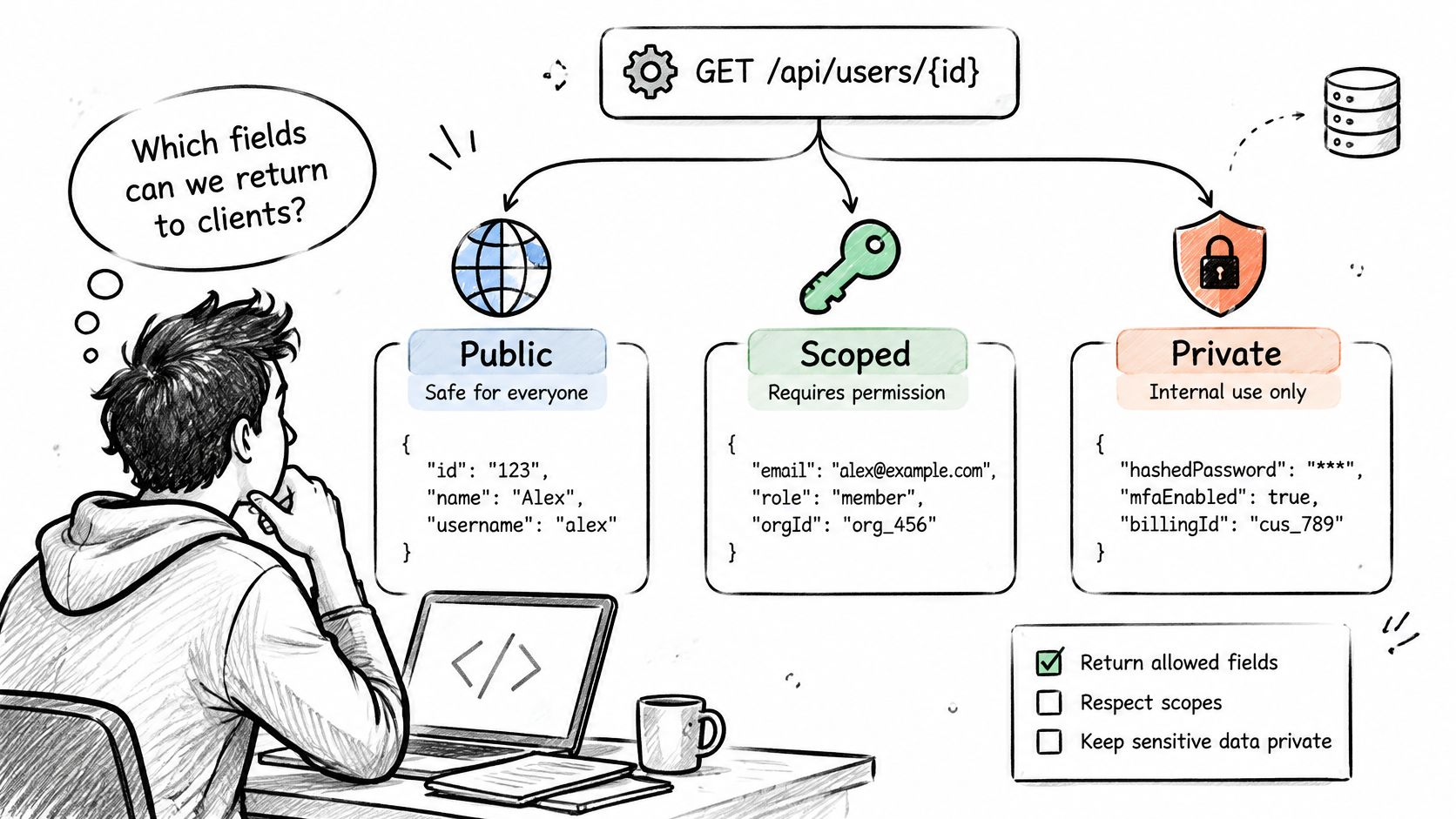
Classify every field before you serialize anything. I use three buckets for a professional data API, and I want the classification in the spec next to the schema.
- Returned publicly: Name, headline, current role, and company name that any authenticated caller can receive.
- Returned only to specific plans or scopes: Contact fields, detailed history, or engagement attributes gated by an explicit scope on the API key.
- Never returned: Audience-limited fields, inferred private attributes, and anything your source record can't justify as public.
The California Attorney General guidance on the CCPA states that publicly available information includes government-record information such as professional licenses and public property records, as well as information a business reasonably believes has been lawfully made available to the general public by the consumer or widely distributed media. Information a consumer disclosed but restricted to a specific audience does not fit that concept. So audience-limited data belongs in your restricted or never-returned bucket, even if a logged-in viewer can see it somewhere.
Under the GDPR, you also need a documented lawful basis, a stated purpose, field minimization, and a retention rule. Public visibility alone doesn't satisfy that. Don't let engineering improvise this. Settle retention length, deletion requests, and whether you need a data processing agreement with legal counsel before launch.
Turn Classification Into Endpoint Controls
Accept only professional profile URLs and company URLs as inputs, and reject everything else with a clear error. Record source and access time for each record you fetch, so you can answer where a field came from months later. Filter fields by the caller's scope before serialization, not by deleting keys in the client.
Map every object identifier and field to an authorization rule before coding. Check the caller's rights on each profile identifier so a valid key can't swap in another tenant's record and succeed. Choose between 403 and 404 for restricted records and document it. I prefer 404 when you don't want to confirm the record exists, and 403 when the caller legitimately knows it exists but lacks scope.
Test property-level access directly. Request a scope-restricted field with a basic key and confirm it's dropped or denied. Keep administrator operations out of this endpoint entirely. A lookup route that also accepts admin actions is an authorization bug waiting for a tired reviewer.
How to Design the Request and Response Schema
A good Api Design Example lives or dies on schema discipline. Clients don't break because your JSON is ugly. They break because a field is sometimes missing, sometimes null, and sometimes a string that used to be a number.
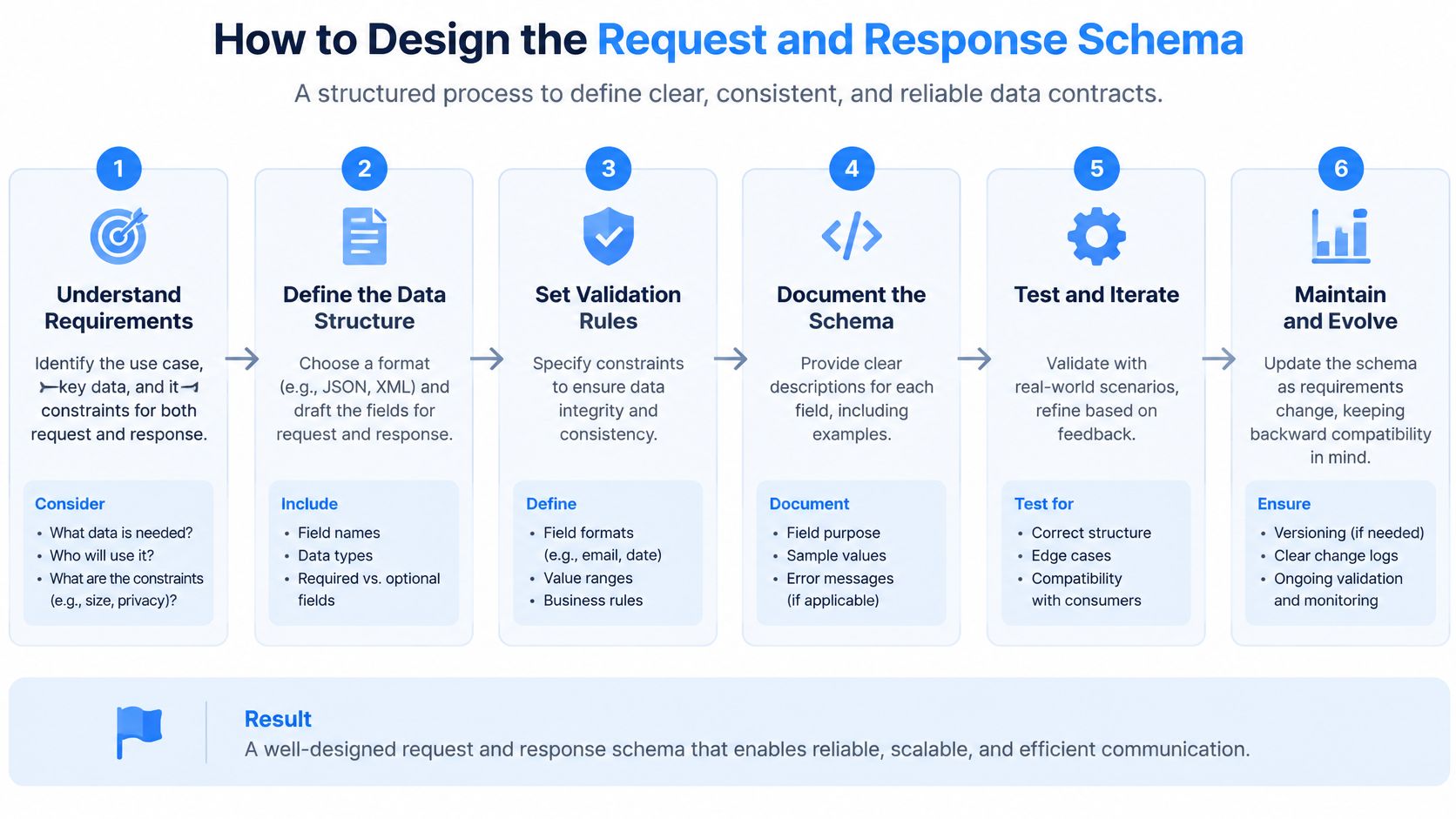
Work through these six steps in order. Each one prevents a class of client bug you otherwise debug in production.
Six Steps to a Predictable Schema
Name the resource and identifier. A profile is identified by its professional profile URL, normalized before lookup. Lowercase the host, remove the trailing slash, and strip tracking parameters. Skip normalization and you'll fetch the same person twice under two cache keys.
List required and optional inputs with validation rules. Require the URL, check the host, cap length at 2,048 characters, and limit the fields parameter to your known allow list. The common mistake is accepting any fields value and passing it downstream, where it becomes an injection or overexposure problem.
Shape the response as a predictable envelope. Return a data object, a meta block holding request_id, fetched_at, and source_status, and an errors array that's empty on success. A sample call is
GET /v1/profiles?url=https://example.com/in/jane-doe&fields=name,title,companywith a bearer key. A shortened 200 response looks like this: data holds name "Jane Doe", title "Account Executive", company "Example Corp", and location null, while meta carries the request_id and fetched_at timestamp. Three real attributes and one explicit null tell the client more than a sprawling payload ever will.Decide how missing data appears. Use null for a known empty field, and omit a key only when the field falls outside the schema for that record type. Never mix the two for the same field. Clients write branching logic around this choice within an hour of integrating.
Add pagination only if the endpoint returns lists. A single profile lookup doesn't need it. Posts, comments, or reactions do. The JSON:API specification permits a server to limit a collection to a subset, or page, and says pagination links must appear in the links object associated with that collection, naming first, last, prev, and next, with an unavailable direction omitted or set to null. Follow that pattern instead of inventing page parameters per endpoint.
Freeze the schema under /v1 and document it in OpenAPI. Publish request and response schemas, examples, and the 404 body for a profile that's missing or not public. If it's not in the OpenAPI document, clients will treat observed behavior as the contract, including your bugs.
The mistake most teams make is returning every attribute by default. You inflate payloads, slow down parsing, and expose fields the caller never asked for and may not be entitled to see.
Field selection fixes that. Default to a small, documented set, let callers request more from the allow list, and reject unknown field names instead of ignoring them. Ignoring unknown fields hides typos until a customer notices missing data.
If you're evaluating how a structured data API should shape these envelopes, compare the null handling and meta block across providers. That's where integration effort hides, not in the headline attribute count.
Choosing Between Sync and Async Delivery
Start synchronous for this use case. A rep pasted a URL and is staring at a form. Returning the profile in the same HTTP response is the only delivery mode that matches that interaction. Async is for work nobody is watching.
Contrast that with a nightly refresh of 50,000 company URLs. No human waits on that. The caller creates a job, receives 202 Accepted with a job_id, and polls a status endpoint or receives a callback if your product supports one. Trying to hold a synchronous connection open for that workload guarantees timeouts.
Synchronous Versus Asynchronous Delivery
| Factor | Synchronous | Asynchronous |
|---|---|---|
| Response path | 200 OK with the JSON body in the same call | 202 Accepted with a job_id, results retrieved later |
| Typical wait | Bounded by your client timeout, measured from your own test calls | Scales with batch size and queue depth |
| Timeout rule | Client timeout around 5 seconds | Timeout applies to job creation only |
| Retry rule | Retry reads freely, repeat billable writes only with an idempotency key | Retry job creation with an idempotency key, never duplicate jobs |
| Best fit | Single profile lookup inside a user flow | Bulk refresh, nightly enrichment, large company lists |
| Client work | Parse one response | Track job states: queued, running, complete, failed |
A sample 202 body keeps the async contract concrete: {"job_id": "job_8f2c", "status": "queued", "status_url": "/v1/jobs/job_8f2c", "expires_in_hours": 72}. Note the expiry. Stored results need a lifetime, or you'll accumulate personal data you no longer have a purpose for keeping.
A Worked Case With Both Modes
Say an enrichment product fetches live data for one profile when a rep clicks a lead. That's sync, with the timeout and retry rule from the table. The same product runs a weekly account refresh across its customer base. That's async, with batches capped at 500 URLs per job in this example so a single bad job doesn't stall the queue. One product, two delivery modes, each recorded in the contract per feature.
Tools in this category reflect that split. Fetchin, for example, is a real-time B2B data API that turns professional profile and company URLs into structured JSON, with synchronous responses by default and optional asynchronous delivery for high-latency workflows. Judge any provider on whether both paths share the same schema and error model. If they don't, you're integrating twice.
Use your own test results as the latency benchmark for the sync path. Run calls under realistic load, record median and P95, and check the headroom against your timeout. A P95 that creeps toward the timeout means ordinary variance becomes user-visible failure. Reading a deeper comparison of synchronous vs asynchronous API delivery helps, but it doesn't replace those measurements.
Decide during design. Switching modes later changes client code, retry logic, and your billing surface. That's a breaking change wearing a configuration costume.
Rate Limits and Error Responses Clients Can Act On
A rep pastes ten URLs in quick succession, your plugin fires ten calls, and the eleventh comes back throttled. What the rep sees next depends entirely on whether your rate limit and error contract were designed together. Clients handle both through the same retry logic, so spec them on the same page.
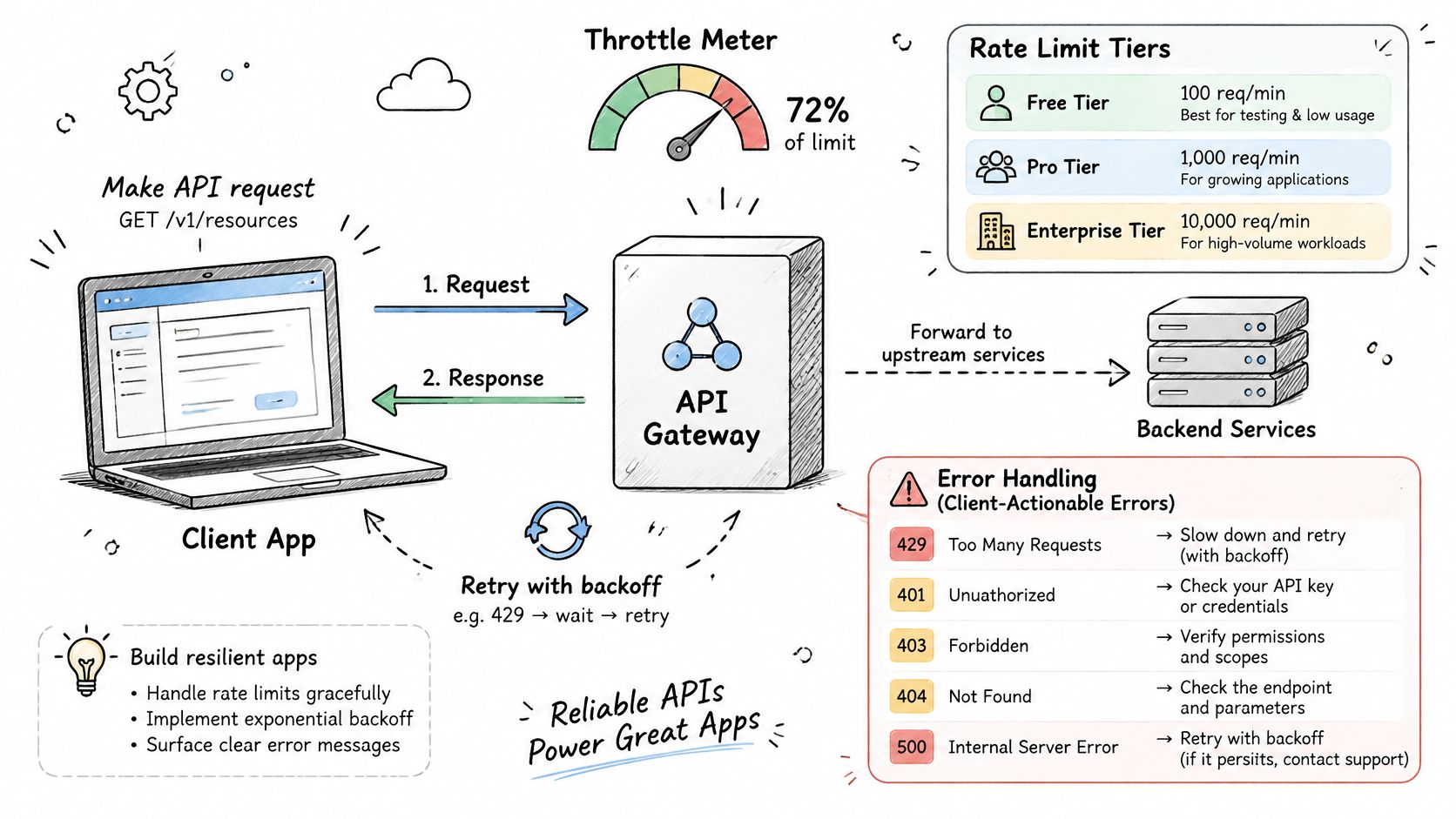
State throughput tiers plainly: 5 requests per second on self-serve keys and up to 100 requests per second on dedicated capacity, scoped per authenticated application. Per-application scoping keeps one noisy tenant from consuming everyone else's allocation.
At the limit, return 429 with a Retry-After header in seconds and a message that explains the condition. The MDN documentation for status code 429 notes that 429 means a client has sent too many requests within a specified period and the response may include a Retry-After header telling the client how long to wait before retrying. Clients should back off using that value plus jitter, not guess. Guessing produces synchronized retry storms that extend the incident.
Status Codes, Causes and Client Actions
| Status | When It Happens | Retry? | Client Action |
|---|---|---|---|
| 400 | Malformed or non-profile URL | No | Ask the user to correct the input |
| 401 | Missing or revoked API key | No | Prompt re-authentication or key rotation |
| 404 | Profile missing or no longer public | No | Mark the record as unavailable |
| 429 | Rate limit exceeded | Yes, after Retry-After | Queue the call and back off with jitter |
Three more codes complete the contract. Return 403 when the key lacks access to a field or endpoint, and tell the user their plan doesn't include it rather than showing a generic failure. Return 502 for an upstream failure and 504 for a timeout. Both are retryable after a short backoff, and both should consume no credits under your failure billing rule.
Watch how this throttling and error flow plays out in practice before you finalize your client handling:
Every error body needs the same shape. Include code, message, retry_after where relevant, and request_id on all of them: {"code": "rate_limited", "message": "Limit of 5 requests per second exceeded", "retry_after": 2, "request_id": "req_9a41"}. One shape means one error handler in client code.
Support reality: A bug report with a request_id takes minutes to trace. A screenshot saying "it failed" takes days. Put the ID in the body, the logs, and the UI error state.
Don't retry a 400 or 404. The input won't become valid and the profile won't become public because you asked again. You'll burn quota, add latency, and teach your monitoring to ignore real error spikes. If you want the full mechanics of API rate limit handling, work through them before you set client backoff defaults.
Show the user something honest per code. Correct the URL for 400, reconnect the account for 401, mark unavailable for 404, and show a brief queued state for 429. A spinner that ends in "something went wrong" is where trust in enrichment features goes to die.
Testing and Versioning Tips Before Launch
Happy path tests prove your endpoint works once, on your machine, with your key. Production failures come from other tenants, hostile inputs, slow upstreams, and retries. Test those paths by name, with the expected result written down before you run anything.
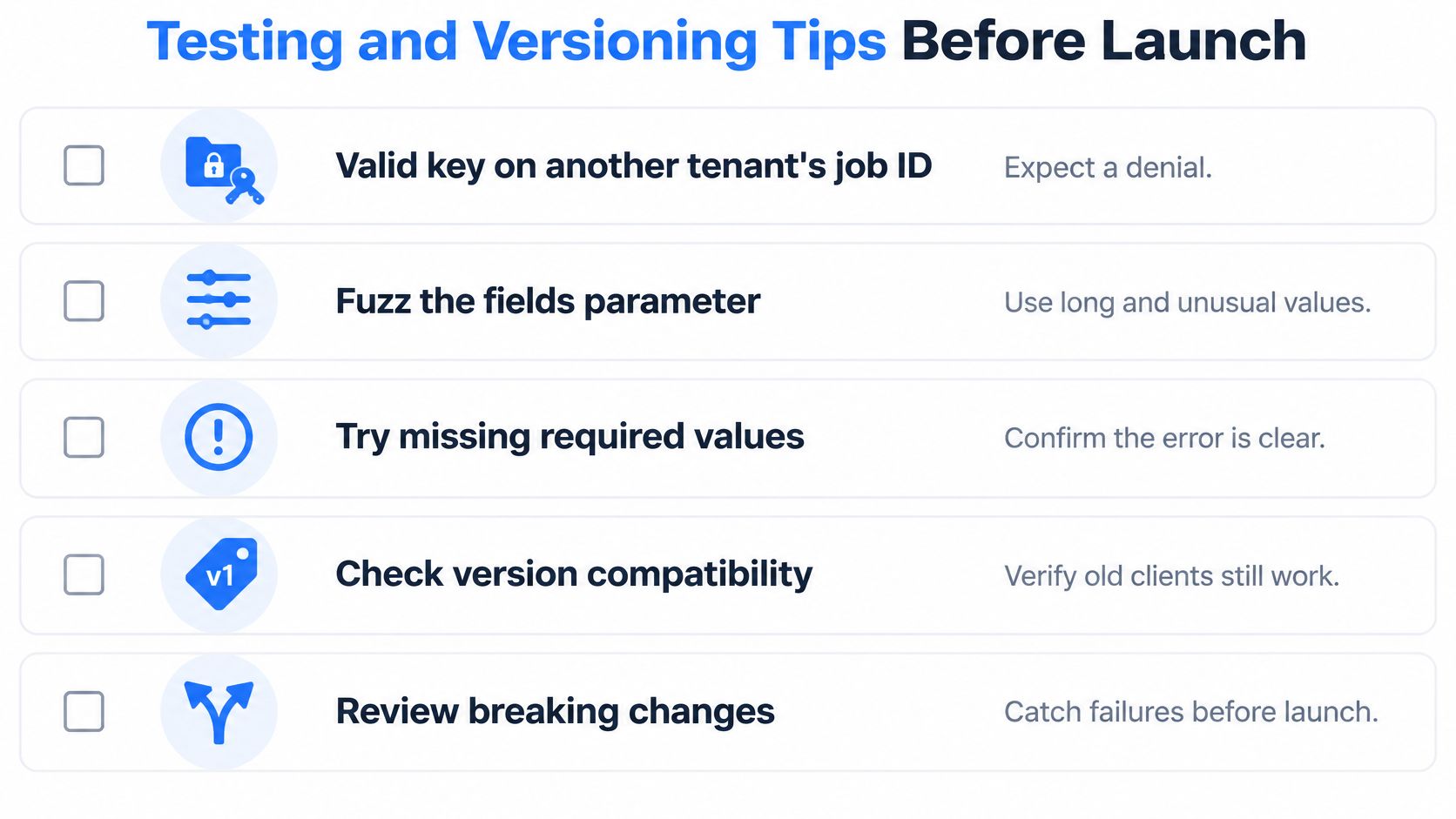
Run this checklist against a staging environment that enforces the actual rate limits and scopes. A staging setup with limits disabled will pass tests that production fails on day one.
Negative and Load Tests That Catch Real Failures
- Cross-tenant access: Send a valid key against another tenant's job ID. Expect a denial, every time, with no data from the other tenant in the body.
- Fuzz the fields parameter: Use long values, repeated values, unknown field names, and empty strings. Expect a 400 or a filtered response, never a 500 and never unrequested fields.
- Simulate a slow upstream: Delay the upstream response beyond your timeout. Confirm the client receives 504 rather than a hanging connection.
- Retry async job creation: Submit the same idempotency key twice. Confirm you get the original job back, not a duplicate that bills twice.
- Load test at the limit: Run at 5 requests per second, then just above it. Confirm the 429 path returns Retry-After and matches your error table exactly.
Add a cross-tenant profile test too. Swap one tenant's profile identifier into another tenant's request context and confirm the authorization rule blocks it. Authentication proves who is calling. These tests prove what they're allowed to touch.
Versioning and Monitoring Habits
Keep /v1 stable. Announce deprecations with a date and a Sunset header so clients can detect them programmatically. Never remove a field without a version bump, even a field you're sure nobody uses. Somebody's reporting job uses it.
Track p50, p95, error rate by status code, and payload size per endpoint. Alert when the 429 rate crosses an agreed threshold, because a rising throttle rate usually means a client shipped a loop or your capacity assumptions changed. Payload size catches the slow creep of returned fields before it becomes a latency problem.
Keep a current inventory of active, deprecated, and internal endpoints. Undocumented routes and forgotten old versions widen your attack surface because nobody patches what nobody listed. Review that inventory at every release, not after an incident.
Confirm the Contract and Run a Test Call
You don't need another architecture meeting. You need a signed contract and measured numbers. Do both this week, in this order.
Confirm the contract table with engineering and product together. Mark each row that's still open and assign an owner to every open row. An unowned open row becomes a production surprise.
Five Actions Before You Build the Interface
- Sign off the contract and field classification. No handler code until the public, scoped, and never-returned buckets are agreed in writing.
- Run 50 test calls. Cover valid, invalid, private, and missing profiles, plus the negative cases from your testing checklist.
- Record median and P95 latency from those calls. Use your numbers, from your network, under your key.
- Compare against the 5-second timeout. If the P95 leaves little headroom, adjust the timeout, cut payload, or move the feature to async.
- Choose sync or async per feature. Record the decision in the contract so the next engineer doesn't relitigate it.
You can run those calls on a free tier of 1,000 credits where failed requests consume none, using self-serve keys at 5 requests per second. That's enough throughput to verify the sync path, every error response, and the negative authorization tests before anyone builds a user interface on top.
If a feature needs more, ask about dedicated capacity of up to 100 requests per second before launch, not after your first customer hits the ceiling during a board demo. Capacity conversations are cheap in design week and expensive in incident week.
Ship only after every negative test passes. A working happy path with a broken cross-tenant test isn't a launch candidate. It's a disclosure waiting for a date.
Fetchin offers a real-time B2B data API that fetches public professional profile and company data on demand and returns structured JSON you can integrate against the contract, schema, and error model described above. Start with the free tier, run your 50 test calls, and measure the latency yourself by visiting Fetchin.