Poor data quality costs U.S. businesses approximately $3.1 trillion annually, according to an industry benchmark compiled in Pintel's B2B data quality and CRM decay statistics. That's a secondary industry estimate rather than an audited national-accounts figure, so read it as a signal of scale, not a line item you can reconcile. The mechanism behind it is mundane: reps email people who've left, routing rules assign accounts to the wrong owner, and analysts build segments on job titles that were true two years ago.
A B2B data provider is the layer that's supposed to prevent that. Most comparisons rank providers by record counts and field totals. Those numbers tell you almost nothing about how a record behaves once your product depends on it. What matters is whether the value reflects the public page at the moment you asked, how long the slow responses take, what a failed lookup costs you, and whether you can trace a field back to its source.
Table of Contents
- What a B2B Data Provider Sells
- Delivery Models and How Fresh They Stay
- Why Business Records Go Stale So Fast
- Evaluation Criteria for Comparing Providers
- Public Data, Privacy and Compliance Duties
- Run a Pilot Before You Sign a Contract
What a B2B Data Provider Sells
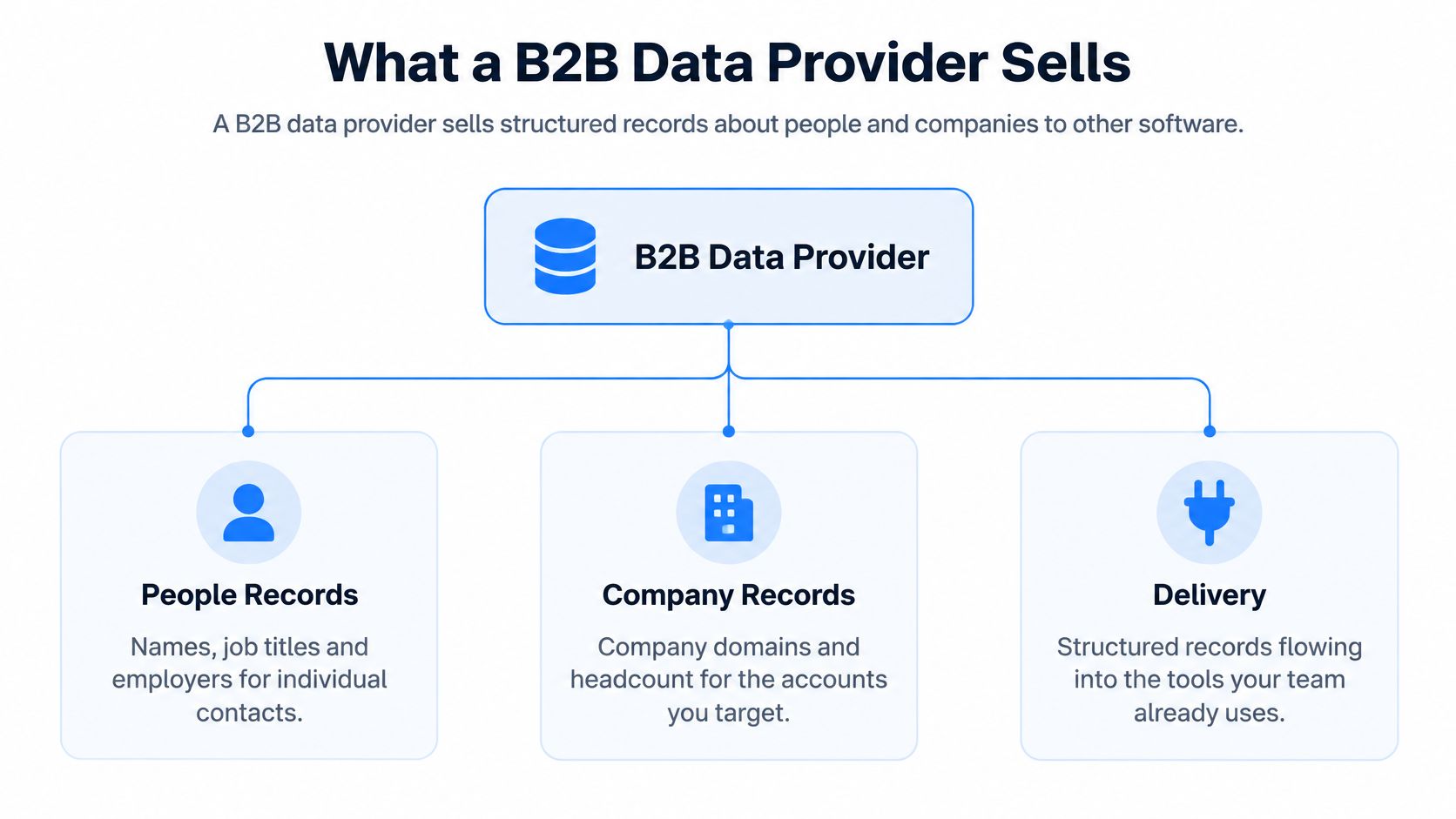
A B2B data provider sells structured records about people and companies, such as names, job titles, employers, company domains and headcount, that other software reads and acts on. Think of it as a utility for business information: your CRM, recruiting tool or AI agent switches it on when a record is needed, rather than keeping a warehouse of profiles it has to maintain itself.
The output arrives in three layers, and each layer ages at a different speed.
The three layers in a record
- Identity fields: name and business email, the minimum needed to address a person. These change least often, which is why they're the easiest layer to sell as a static file.
- Professional context: current role, seniority and employment history. This is the layer that decides whether your personalization lands or embarrasses you.
- Company context: industry, headcount, headquarters location, founding year and verified domain. Slower moving than job titles, but a merger or rebrand can invalidate an entire account segment at once.
Most providers package these layers into a similar service list: professional profile enrichment, company data enrichment, people search, post retrieval, API access to professional datasets, data verification, and analytics. We built Fetchin as a B2B data API along those lines, turning a professional profile URL or company URL into structured JSON that a product can consume directly.
The use cases follow from the layers. CRM enrichment fills role, seniority and employer on records that arrived with only a name and an email. Lead scoring and routing checks an inbound signup against your ideal customer profile while the form is still on screen. Buying signals watch for role changes and company events. Recruiting and sourcing tools search on current employment rather than historical employment. Content and analytics products, including post generators and dashboards you sell to your own customers, read engagement data through the same interface.
Scale explains why this became a category rather than a freelance task: Research and Markets valued the global sales-intelligence market at USD 4.5 billion in 2025 in its sales intelligence global strategic business report. Buying inside that category is different from buying a file of addresses, and CleanMyList's breakdown of the risks of buying email lists is a useful reminder of what a one-time purchase can't guarantee.
The category test is simple. If your product needs a current, structured record on demand, you want a data provider. If you need a one-time audience for a single campaign, you want a list, and the deeper mechanics of sales intelligence data are worth understanding before you sign anything.
Delivery Models and How Fresh They Stay
Four delivery models dominate, and they differ less in what fields they return than in when those fields were true.
| Delivery model | How data arrives | Freshness at use | Best fit |
|---|---|---|---|
| Purchased static list | CSV or spreadsheet export | Fixed at the date of purchase | One-off outbound campaigns |
| Indexed database API | Records served from a stored index | Current only as of the last index refresh | Enrichment at scale where some lag is acceptable |
| Live synchronous API | JSON returned for each request | Current at the moment of the call | Lead routing, forms, AI agents and checks before an action |
| Asynchronous delivery | Results returned after a batch job completes | Current at the time the job runs | Large batch enrichment and high-latency workflows |
Stored copy versus live retrieval
An indexed provider serves you a copy it collected earlier and refreshes on its own schedule. That's a reasonable design for bulk work, and it's usually cheaper per record because the retrieval cost is amortized across many customers asking for the same profile. The trade-off is that your application inherits the provider's refresh interval without seeing it.
A live provider fetches the record when your request arrives, so the returned value reflects the public page as it stands at that moment. Say a candidate updates their employer on a Monday morning and your recruiting product queries that professional profile URL on Monday afternoon. An indexed copy might still show the previous employer for weeks. A live call returns the new one, because there's no copy in between.
The cost of that guarantee is latency, and it's the reason delivery choice matters more than field count. A synchronous call returns in seconds, which fits a signup form that has to route a lead before the visitor closes the tab, or an agent that needs to confirm an employer before it drafts a message. Asynchronous delivery accepts a queue delay in exchange for throughput, which suits a nightly job re-enriching a large CRM segment where nobody is waiting on the response.
One scenario per model
A paid-media team running a single campaign buys a CSV of 50,000 prospects, uploads it, and never queries it again. A RevOps team enriching its entire CRM overnight calls an indexed API and accepts that some titles lag. A product team scoring inbound signups calls a live synchronous endpoint inside the form handler. A talent intelligence platform rebuilding its candidate graph submits a batch and collects results when the job finishes.
Where does this record come from, and when was it last checked? Any provider that can't answer both parts in writing is selling you a snapshot with an unspecified date on it.
Ask for the answer per field, not per database. A company's headquarters may have been verified last quarter while the contact's title was checked this morning, and a single "last updated" stamp on the record hides that difference. When you evaluate a vendor, request the retrieval timestamp semantics explicitly: does the timestamp mean "we fetched this then" or "we last confirmed this then"? Those are different promises, and only one of them tells you what your product is reading.
Why Business Records Go Stale So Fast
Start with the arithmetic. A commonly cited benchmark places average B2B contact-data decay at approximately 22.5% per year, equivalent to roughly 2.1% per month, according to Tamgraph's B2B data statistics compilation. At that pace, a database of 100,000 contact records could accumulate about 22,500 materially outdated records over twelve months with no effective refresh or validation.
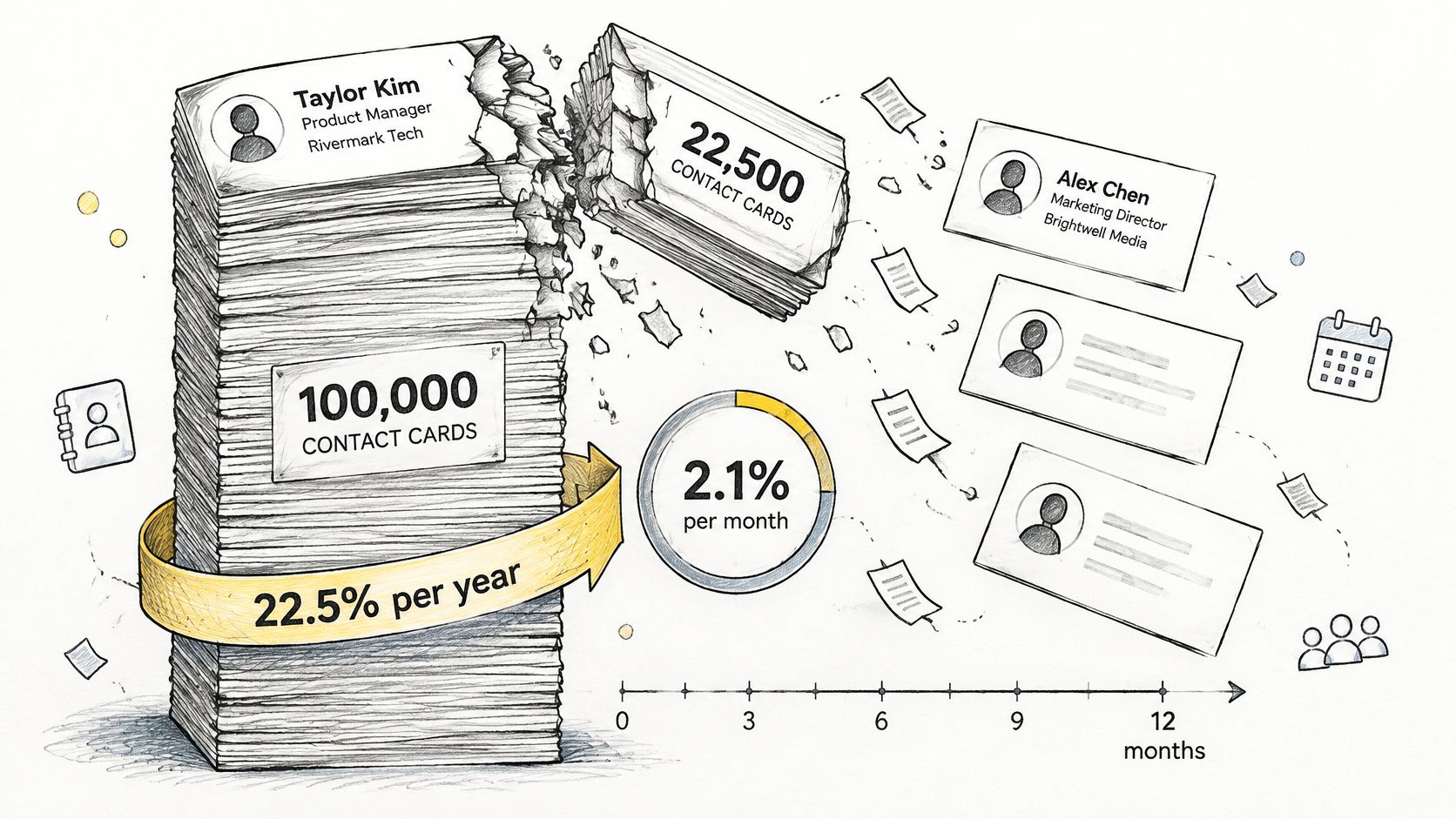
Nobody deletes those 22,500 records. They stay in the CRM, keep their old scores, and keep receiving mail. That's what makes decay expensive rather than merely annoying: the wrong records look identical to the right ones until someone acts on them.
What actually changes
The causes are ordinary business events. People change jobs. Companies move office, rename themselves, switch domains, get acquired, or merge. Contact details change when a company standardizes its email format. Each of these invalidates a different field, which is why "the record is still there" is not evidence that the record is still correct.
Other compilations in that same Tamgraph research report a wider annual range of 22.5% to 70.3%, reflecting differences in data type, geography, sector and methodology. Treat both ends as market benchmarks rather than a decay law. A venture-backed sales org in a hot hiring market churns titles far faster than a national registry of established firms, and a benchmark that averages the two describes neither.
The operational bill shows up as labor. Revenue Operations Alliance reported in 2024 that 46.51% of revenue-operations professionals named manual data cleaning as their biggest waste of time, in findings published alongside Research and Markets' sales intelligence market industry analysis. That's the cost you're already paying when refresh isn't automated: someone on your team is doing the provider's job by hand.
Setting a refresh interval by segment
A single annual re-enrichment job is the wrong default. Segment by turnover instead, and check the populations that move fastest most often.
- Sales and recruiting populations: re-check employer and title frequently, because these are the fields your routing and outreach depend on and the people most likely to move.
- Company registries and firmographics: re-check on a slower cycle, with event triggers for mergers, rebrands and domain changes.
- Anything feeding an automated action: verify at the moment of the action, not on a schedule, since a wrong employer here produces a wrong assignment rather than a wrong report.
The Keendai B2B data decay benchmark guide recommends storing the retrieval timestamp, source URL, normalized field value and verification state for every attribute, and distinguishing "record changed" from "record became unreachable." That distinction matters in practice: a profile can stay publicly visible while its employer changes, and a blocked retrieval must never be logged as a confirmed fact.
Practical rule: one purchase doesn't cover a year. Schedule re-enrichment by segment, and treat the initial match rate as the start of the measurement, not the end.
A team that bought a list twelve months ago and emails it today is mailing people who've already moved. Our own guide to data freshness covers how to turn that into a schedule your pipeline can enforce.
Evaluation Criteria for Comparing Providers
Buyers rarely get a rigorous comparison of freshness, completeness and failure behavior. In Adverity's State of Play research on data quality, 45% of CMOs surveyed across the US, UK, Germany, Austria and Switzerland estimated that their teams' decision-making data was incomplete, inaccurate or outdated. Field counts didn't protect them. Six criteria will tell you more.
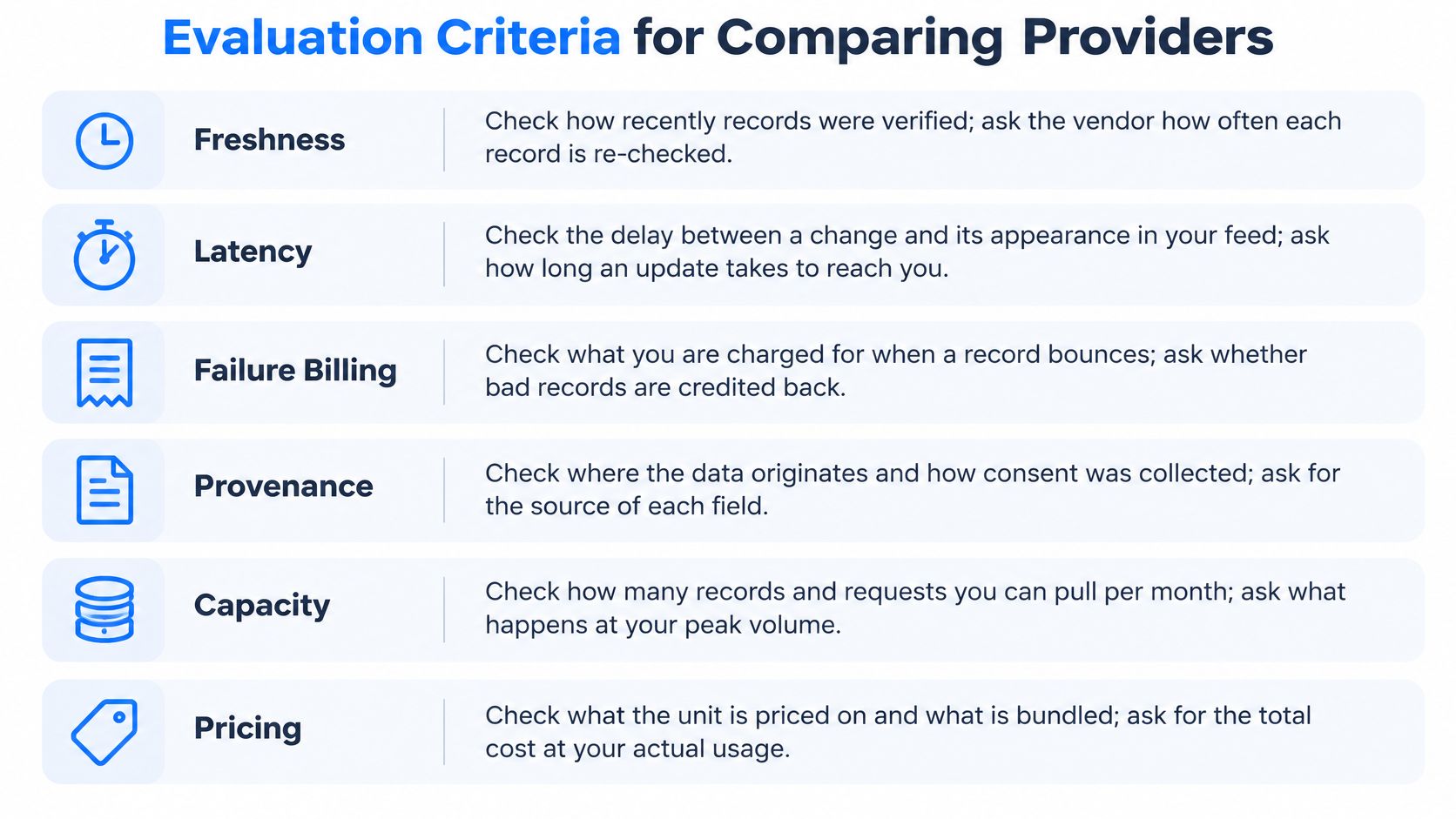
| Criterion | What to verify | Red flag |
|---|---|---|
| Freshness | Retrieval timestamp per field and values checked at request time | Only a general refresh date is published |
| Latency | Median and P95 response times under production load | Only an average response time is quoted |
| Failure billing | Whether failed or blocked requests consume credits | Credits are charged for errors |
| Provenance | Source reference and retrieval time for each record | No source is given for individual fields |
| Capacity | Rate limits by plan and time to provision dedicated throughput | Limits are undisclosed or vague |
| Pricing | Cost per credit, overage terms and free-tier size | Price is available only after a sales call |
Freshness and latency
Ask whether each field carries its own retrieval timestamp and whether the value reflects the page at request time. A provider that publishes only a general refresh date is telling you the age of its index, not the age of your record.
Then ask for median and P95 response times, not an average. The average hides the tail, and the tail is what stalls a checkout, a form handler or an agent loop. A provider with a fast median and a long tail will pass your demo and fail your busiest hour. Our own published figures are a median near 1 second and a P95 near 1.5 seconds under production load, and each call fetches the record live rather than reading a stored copy, so the returned record is the one as it stands at the moment of the request. Treat those as claims to reproduce in your own pilot, on your own record mix.
Failure billing and provenance
Ask what happens to your credits when a lookup fails or gets blocked. An error-heavy integration can multiply your bill if every attempt is charged, and the invoice won't distinguish a returned record from a timeout. Failed requests don't consume credits with us, which is the behavior you should demand from anyone you compare.
Provenance is the criterion most buyers skip and most regret later. Ask for a source reference and retrieval time per record, so you can answer a deletion request or explain a field to a customer without guessing. If you're combining enrichment with signal layers, LeadBeast's comparison of intent data and enrichment tools is a useful map of which vendor supplies which layer, and where you'll need provenance from more than one.
Capacity and pricing
Ask for rate limits by plan and how long dedicated throughput takes to provision. Self-serve limits with us start at 5 requests per second, and higher-throughput dedicated capacity is provisioned in 2 to 5 business days. Those two numbers decide whether your launch date is realistic, and a vendor who won't state them is asking you to discover the ceiling in production.
On pricing, ask what a credit costs, how overage is handled, and how large the free tier is. A price you can only learn on a sales call can't be modeled against your projected volume.
The record-count misconception belongs here. A larger catalogue with more fields can still hold stale titles, changed domains and silent failures, and none of those show up in a coverage slide. Measure accuracy on a sample you verify yourself before you let catalogue size break a tie.
Public Data, Privacy and Compliance Duties
Public availability doesn't remove privacy duties, and the legal definition of "public" is narrower than "visible online." California law treats some lawfully available government records, widely distributed information and details a person made available to the general public as publicly available information. The European Commission guidance comparing GDPR and CCPA is useful for framing the practical difference between public availability and personal data obligations.
The sourcing rule that follows is concrete: collect public professional data only when it is lawfully available and not audience-restricted. A profile visible to a limited audience isn't public just because your browser can render it. That distinction matters in B2B data because names, job titles, company affiliations and professional experience can still be personal data even when they come from public professional sources.
What GDPR still requires
Under GDPR, personal data collected from public sources stays inside the regulation. The official Article 14 text creates a transparency obligation when data comes from a source other than the individual. It requires the controller to disclose where the data originated, including whether it came from publicly accessible sources, within the applicable time frames.
A professional data API can't treat public availability as a complete compliance answer. Your customers may still owe source documentation and a privacy notice to the people in those records. That turns URL-to-JSON enrichment into a governed processing pipeline, with purpose limitation, data minimization, provenance, retention rules, access controls, deletion handling and an audit trail connecting each output field to its source and retrieval time. Those controls are easier to evaluate than a broad claim that a provider uses public data.
The controller and processor split
Work out who is who before you sign. Where a provider processes data on your behalf, you need a Data Processing Agreement, not a compliance badge on a homepage. Fetchin acts as a data processor for data clients submit through its APIs, and a Data Processing Agreement can be requested by contacting Fetchin when personal data is processed on the customer's behalf under GDPR, CCPA or similar laws.
Fetchin processes publicly available professional information, which may include names, job titles, company affiliations and professional experience. Fetchin does not sell personal data. When data is transferred outside the EEA, Standard Contractual Clauses approved by the European Commission are used. Each of those statements should be checked against the contract text rather than the marketing page, with Fetchin or any other provider.
Four documents to request before procurement closes:
- The DPA, naming the roles and the permitted purposes.
- The subprocessor list, with notice terms for changes.
- The retention policy, including what happens to cached values.
- A description of how corrections and deletions reach your systems, not just theirs.
The processor question has a product consequence too. Users keep ownership of data they submit to the Services and grant Fetchin a limited license to process it solely to provide the Services. Data obtained through the Services may be displayed to end users, combined with the user's own data, and passed to customers within the user's own product or API without separate written consent. That is different from reselling raw access, which users may not do, just as they may not use the data to build a competing data API.
Use restrictions belong in the same review. The data may not be used for unsolicited bulk communications, harassment, discrimination, or any unlawful purpose. If your product turns enrichment into outreach, scoring or recruiting workflows, map those uses to the contract before launch. Lead Printer's comparison of which database fills your pipeline shows how differently vendors position coverage and compliance, which is exactly why the documents matter more than the positioning. Fetchin's ethical sourcing standards set out the sourcing limits it works within.
Run a Pilot Before You Sign a Contract
Don't commit on a demo. A time-boxed pilot on your own records answers every question that a coverage slide can't, and it costs you a day of engineering time.
- Pick 200 to 500 records from your own CRM or target list, deliberately mixing segments: enterprise and SMB, your strongest region and your weakest, stable accounts and high-turnover ones.
- Send each record through the provider and log response time and failure count per call. Keep the raw timings, not just the average, so you can compute your own tail.
- Verify a sample of fields against the live public page or another trusted source. Check employer, title and company domain specifically, because those are the fields that break routing and personalization.
- Calculate the match rate and the freshness error rate for each field separately. A provider can match nearly everything and still return a stale title on a meaningful share of records, and a single blended accuracy number hides that.
- Record credits used, including any failed calls. This makes failure billing, once an abstract policy, a number in your model.
- Compare vendors on cost per correct, current record, not cost per call. Divide total credits spent by the count of records that were both matched and verified current. A cheap call that returns a stale employer is more expensive than a pricier call that returns the right one, because you pay again to fix it.
- Decide: adopt broadly, adopt for one workflow where the numbers hold, or walk away. Adopting for a single workflow is a legitimate outcome, and it's often the right one when accuracy varies by segment.
Prepare the account setup before you start the clock. Registering with us requires your name, email address, company name and billing details, and the free tier of 1,000 credits covers an initial test at the sample size above.
Choose the provider whose cost per verified, current record fits your workflow's latency and accuracy needs. Everything else is a proxy for that number.
We built Fetchin to return the record as it stands at the moment you ask for it, with structured JSON from professional profile and company URLs, synchronous responses for forms and agents, and no credits charged on failed requests. Run the pilot above against your own segments using our free tier of 1,000 credits and compare the cost per verified, current record yourself at Fetchin.