Your enrichment job finishes at 4am, and by lunchtime someone has posted a screenshot of a field that's wrong. Between those two moments sits a decision your product team keeps deferring: keep serving stored copies of professional data, or fetch the record at the moment a user needs it.
This problem often surfaces through a support ticket rather than an architecture review. A recruiter spots a headline that changed last week, a rep dials a number attached to a job the contact left, and the fix sounds trivial until somebody asks what it does to p95 latency and the monthly bill.
What follows is the practical version. How one live request runs, what to measure beyond the average, where the legal boundary sits, and how to set freshness per field instead of per product.
Table of Contents
- What Real Time Data Extraction Means for Your Product
- Live Fetching Compared With Snapshots and Streams
- How a Live Extraction Request Works
- Measuring Freshness, Latency and Reliability
- Staying Compliant With Public Professional Data
- Setting Per-Field Freshness Targets and Running a Pilot
What Real Time Data Extraction Means for Your Product
A sales team routes a new lead to the rep who covers the company on the stored record. Three weeks earlier, the contact moved to a different employer. Nobody updated the row. The rep opens with a pitch for a product line that company doesn't buy, and the thread ends with the question every data team hears eventually: why can't the system just check?
Real time data extraction means requesting one record and receiving the page state as it stands at that moment, returned as structured JSON your product can read directly. No browsing, no HTML parsing, no waiting for an overnight batch.
Think of the difference between asking a colleague for today's figures and pulling last quarter's report out of a drawer. Both hand you a number. Only one describes the business you're operating in.
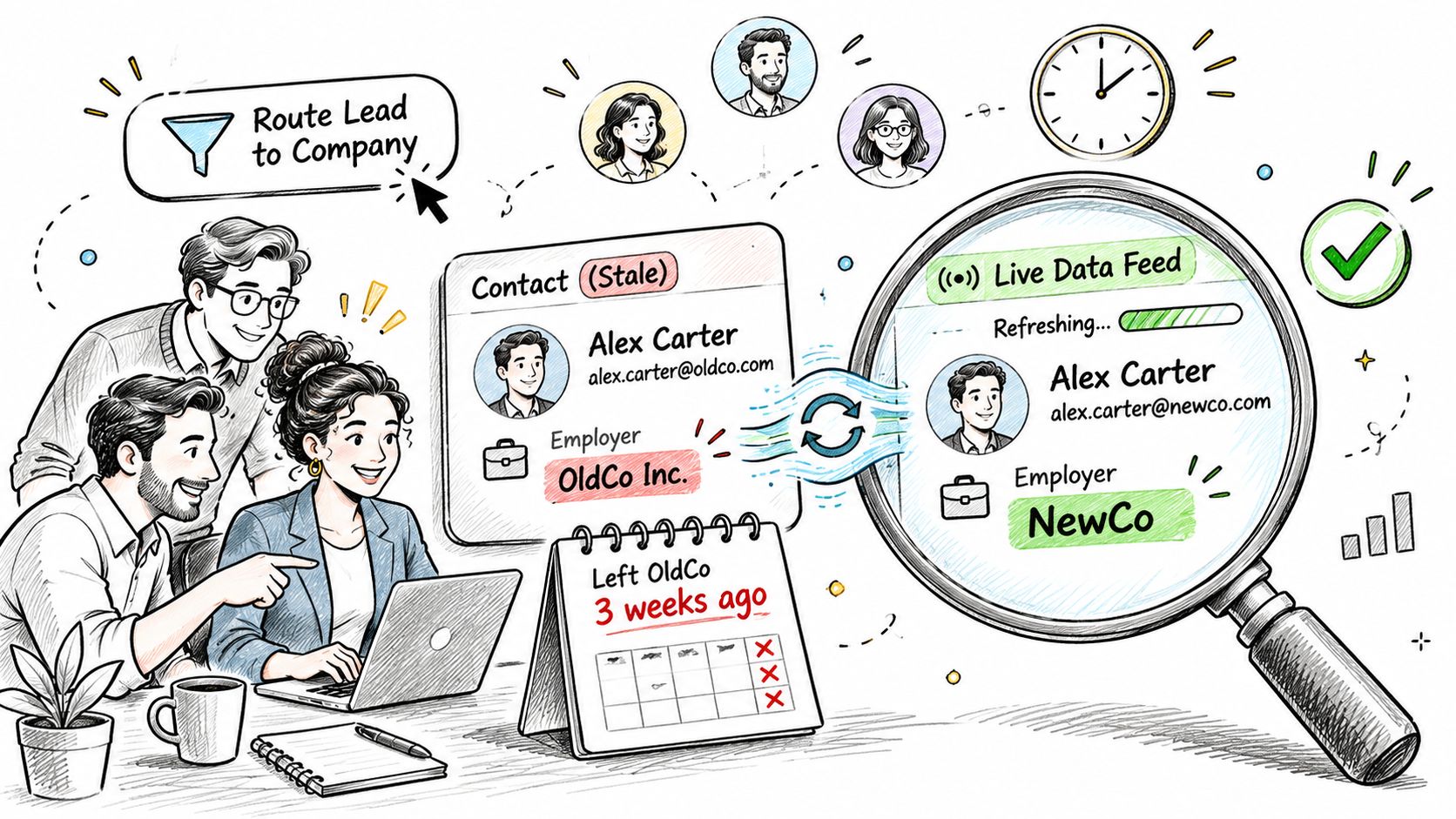
- What the live call changes. Decisions run on current values instead of whatever survived the last indexing cycle. Manual browsing and parsing leave your codebase. A signup flow or a lead router makes one call and moves on.
- What it costs you. Every benefit carries a bill. Per-call latency lands inside your request path. The source page has to be reachable when you ask, and some pages answer slowly or not at all. Your plan's rate limit decides how much of a burst you can absorb before requests queue or fail. Pages also arrive incomplete, with a field hidden behind a wall or rendered after the data you wanted.
Why the page you copied last month misleads today
The web your product reads isn't a stack of static documents. The HTTP Archive has crawled leading websites periodically since 2010, recording fetched resources, platform APIs, page features and execution traces, and it describes its purpose as measuring how the web is built at large scale rather than examining isolated pages. Client-side execution, embedded APIs and mixed resource types are the normal case now. A snapshot that was accurate when captured can describe a page structure that no longer exists, which is why a copy made last month can mislead a product today.
Three questions decide whether live extraction belongs in your stack: how a single request runs end to end, how freshness and latency get measured once it's in production, and how to set a different freshness target per field while staying inside privacy law. None of them is answered by "just call the API".
Live Fetching Compared With Snapshots and Streams
Three approaches dominate, and they differ mainly in when the record is read. That single difference decides what the value is worth at the point of use.
| Approach | When the Record Is Read | How Current the Value Is | Best Fit | Main Risk |
|---|---|---|---|---|
| Live fetch per request | At the moment of each call | Current page state at request time | Signup enrichment, matching and lead routing | Latency tail under heavy load |
| Periodic indexed snapshot | From a stored copy | Age set by the indexing cycle | Bulk research and trend analysis | Stale values between indexing cycles |
| Change-data stream | As source changes arrive | Close to the source change, depending on pipeline design | Monitoring and alerts on changes | Needs source access and ongoing pipeline upkeep |
Where a week of record age changes the answer
Take one CRM contact who changed jobs last week. A snapshot taken three weeks ago still shows the old employer, the old title and the old seniority band, so a lead score computed from that row is wrong in three places at once. A live fetch returns the employer as it stands now, and the headline that changed with it, which is the difference between routing the lead to the right segment and routing it to the wrong queue entirely.
A live fetch solves record age and charges you for it in per-call latency and a hard dependency on the source page being available. It earns that cost in workflows where a person or an automated step is waiting on the answer: signup enrichment, lead routing, identity matching before a write.
Snapshots suit work where a few days of age costs almost nothing, such as bulk market research, trend analysis and backfilling a warehouse. Nobody makes a decision inside the query.
A definition worth borrowing: IBM frames data freshness as how frequently data is updated in a system, with more recent updates more likely to represent real-world conditions accurately, as IBM's overview of data freshness sets out. Freshness is a measurable operational property, not a synonym for data availability.
That definition matters because it forces a target. "Fresh" means nothing until you say how old is too old for this workflow, and the honest answer differs between a router and a research dashboard.
If you're weighing what a per-record call costs against what a stale record costs, the trade-offs between enrichment pricing and data quality are worth reading before you pick a tier.
The test I'd apply: if serving a stale record would stop something the user is waiting on, go live; if nobody acts on the value within days, a snapshot is cheaper and simpler.
How a Live Extraction Request Works
A live extraction call is brief, but seven things happen inside it. Your code owns some of them and the provider owns the rest, and knowing which is which keeps a slow page from becoming a slow product.
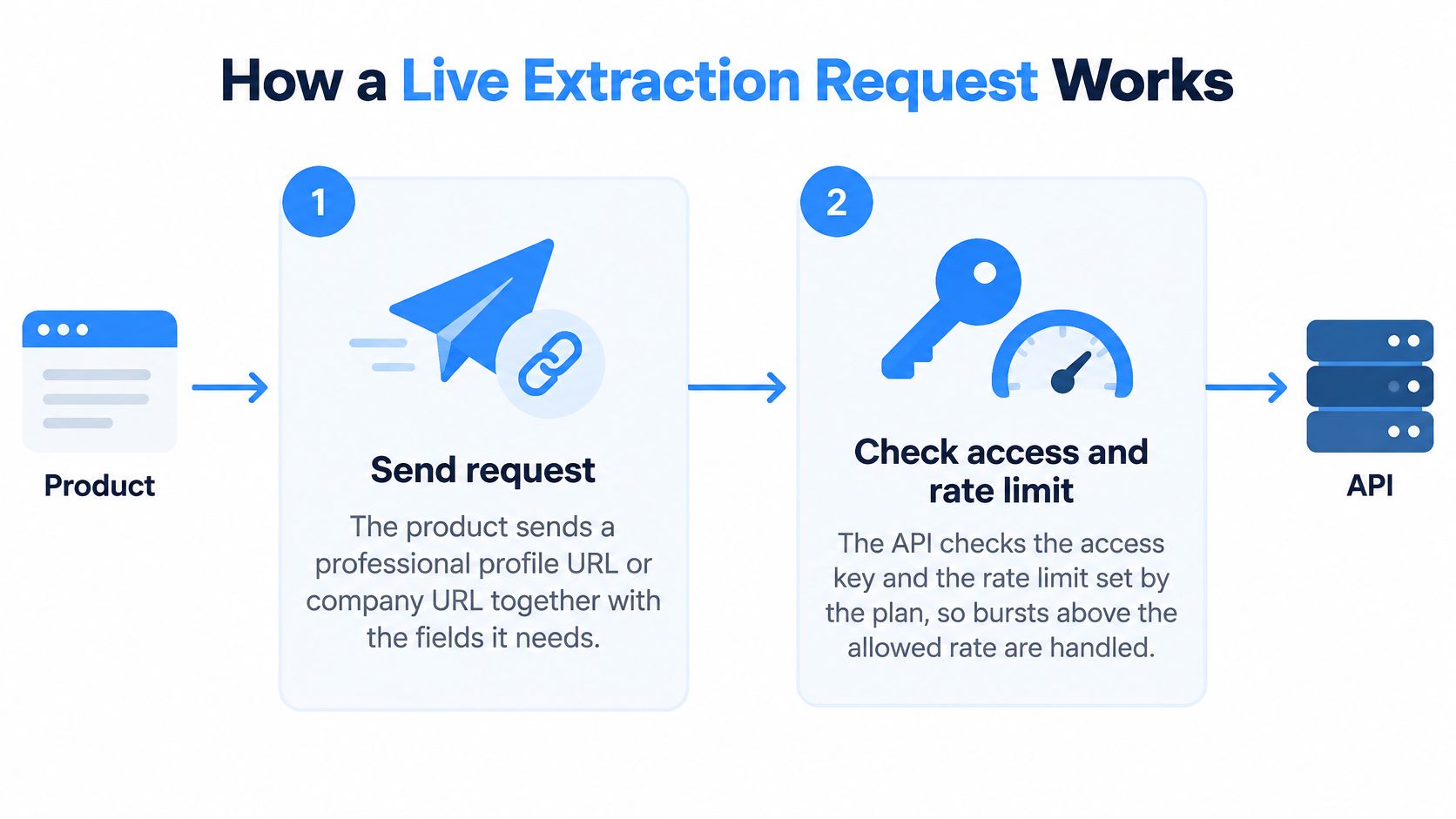
- Send the request. Your product sends a professional profile URL or a company URL together with the field list it needs. A narrow field list returns a smaller payload that's faster to validate and easier to reason about later.
- Check the key and the rate limit. The API validates the access key and measures the call against the rate limit your plan sets. Bursts above the allowance get queued or rejected, which is far better than letting one noisy customer degrade everyone's latency.
- Fetch the page state now. The service retrieves the public page during the call instead of reading a stored copy. That's the entire point of the exercise: the record you get back is the record as it stands at request time.
- Parse into a stable schema. Positions, education, skills, locations and company attributes get mapped into a consistent JSON shape, so a markup change on the source doesn't turn into a code change in your product.
- Return inside your window. The response comes back synchronously within the time your request path can tolerate, or arrives asynchronously when the job behind it can wait.
- Validate and timestamp. Your code checks the record against the schema, stores an observation timestamp, and writes explicit nulls for attributes the page doesn't show. An explicit null is information. A missing key is a support ticket in waiting.
- Retry with bounds. Bounded backoff plus an idempotency key means a timeout can't become a duplicate write when the retry finally lands.
The request and response shapes matter more than many expect, and working from a concrete API design example for enrichment endpoints is a faster path than reverse engineering one from a payload.
A recruiting product puts the whole sequence to work in a single call. An application arrives, the tool fetches the candidate's current headline and employer, validates the record, and routes the applicant to the right queue. Nobody waits for a nightly batch, and nobody discovers on Monday that the employer changed in between.
Here's the same sequence running against a live endpoint, from the key check through the parsed response.
Sketch those seven stages for your own product and mark ownership. Retrieval, parsing and schema stability belong to the provider. Validation, timestamps, retry policy and the decision to accept a null belong to you. The second list is where the operational risk concentrates.
Measuring Freshness, Latency and Reliability
An average response time is a marketing number. What you can run a product on is a distribution, tracked separately from throughput and broken down by what it measures.
| Metric | What It Shows | What It Hides |
|---|---|---|
| Median (p50) response time | The typical call under normal load | Queue build-up and throttling in the tail |
| P95 response time | Slow calls that one in twenty requests experience | Heavy-tailed failures under concurrent load |
| P99 response time | The worst long-tail calls | The requests that timed out and never entered the distribution, which need their own budget |
| Field freshness age | Time since each field was observed | Whether the source page itself was incomplete |
Why the median alone misleads
Treat real time data extraction as an end-to-end freshness problem, not a parser speed contest. In change-data-capture architectures, a pipeline has to capture source mutations, transport them, transform them and expose them to consumers while sustaining the source's write rate. A recent academic benchmark of that pattern reported median freshness at the 10-millisecond level, sub-250-millisecond P99 freshness, and 80,000 changed rows per second with 103-millisecond P99 freshness on one workload, according to the change-data-capture freshness benchmark.
Those figures describe change-data-capture pipelines, not a profile extraction API, so treat them as a model of how to reason rather than a performance spec for your provider. The lesson transfers intact: a fast median conceals queue build-up, throttling and long-tail failures under concurrency. Track p50, p95 and p99 separately from throughput, and page someone on the tail rather than the centre.
What to ask a provider before you sign: p50, p95 and p99 reported separately, measured at your concurrency, against the rate limit you actually bought. A single "average" number is a refusal to answer the question.
Choosing a call mode, and planning for the tail
Synchronous calls suit a request path where bounded latency is the priority, because your application needs the answer before it renders. Asynchronous delivery is safer when page rendering, bot challenges or multi-source enrichment can produce heavy-tailed execution times, since one slow page shouldn't hold a thread hostage.
Mixed pipelines are normal and healthy. The signup path stays synchronous, the nightly re-enrichment job goes async, and both write the same schema.
Capacity planning needs four inputs, and average response time is not one of them:
- Arrival rate, including the peak your product sees, not a smoothed daily figure.
- Extraction duration as a distribution, with the slow pages included.
- Retry behaviour, because a timeout storm triples your effective load.
- Downstream saturation, since your own database writes can become the bottleneck long before the API does.
Staying Compliant With Public Professional Data
A professional profile can be visible without a login, yet visibility alone does not establish whether you may store its fields, how long you may retain them, or how you may use them. Public availability is one part of the compliance analysis, not a complete permission to process.
Under the California Consumer Privacy Act, publicly available information is generally excluded from the definition of personal information when it comes from government records, is lawfully made available to the general public by the consumer, appears in widely distributed media, or is disclosed by a person without restricting it to a specific audience, as the California Attorney General's CCPA guidance explains. One boundary matters: biometric information collected without the person's knowledge is specifically excluded from the definition of publicly available information.
The GDPR side asks a different question
The European Commission lists six grounds for processing personal data: consent, contractual necessity, legal obligation, public interest or official authority, vital interests, and legitimate interests, as set out in the Commission's summary of legal grounds for processing. Legitimate interests is not a blanket permission. It requires an assessment of whether the organisation's interests are overridden by the individual's rights and freedoms. The balancing test weighs the purpose and necessity of processing alongside the individual's reasonable expectations, including how the data was sourced.
Field-level minimisation limits what your product collects and uses. Returning every field from a page creates a larger compliance surface than requesting five fields tied to a defined purpose. Treat the field list as part of your product's processing design, and review it when that purpose or the data use changes.
Before the first production call, document the decisions:
- Define the purpose in one sentence. “Enrich inbound signups for routing” describes a use; “improve our data” does not.
- Justify each field against that purpose. Leave out fields that the workflow does not need.
- Record the legal basis. If you rely on legitimate interests, document the balancing test, including reasonable expectations and data sources.
- Set a retention period for API logs and enforce it in code, not only in a policy document.
- Confirm whether a Data Processing Agreement is needed between your company and your provider. Fetchin acts as a data processor for data clients submit through its APIs, and a DPA can be requested when it processes personal data on a customer's behalf under GDPR, CCPA, or similar laws.
For a practical overview of how the two regimes apply to public professional data, see this guide to CCPA and GDPR compliance.
Setting Per-Field Freshness Targets and Running a Pilot
The unexamined assumption in most rollouts is that every request should trigger a live fetch, and that more live is automatically better. It isn't. The productive version of the question is per field, and it takes three inputs: how often the field changes, what a wrong value costs the workflow reading it, and what the request costs you in money and latency. Answer those and the policy writes itself.
| Field | Volatility | Refresh policy |
|---|---|---|
| Job title or current employer | High | Live fetch on demand |
| Education history | Low | Monthly refresh |
| Company headcount | Medium | Weekly refresh |
| Post engagement counts | High | Live call only when a user is waiting |
Look at what that table does to your bill. Making everything live multiplies request volume across fields that change once a year. Making everything a snapshot breaks the one field your routing depends on. The split is where the money and the accuracy both come from. If you want the volatility reasoning in more depth before you commit to targets, this article on the freshness of data covers the policy side.
Never present a guess as a current value
A quick answer doesn't help if the page was incomplete when you read it. Each field should arrive with an observation timestamp, a confidence indicator, and an explicit unknown state rather than a silent carry-forward of the previous value. A null with a timestamp tells your application to retry later or fall back to a manual check. A stale value dressed as current data tells it nothing, and the failure surfaces three weeks later in a customer's screenshot.
Parse cheaply first, escalate only when confidence drops
Method choice creates a measurable trade-off. A recent multi-type extraction benchmark measured heuristic parsers at roughly 26 to 1,825 milliseconds per page on commodity hardware, with most completing under 100 milliseconds, against roughly 1,570 to 10,410 milliseconds for neural systems even on an A100 GPU, as reported in the extraction method benchmark. The production design that follows is two-stage: deterministic parsing and schema validation on every request, with heavier layout or language-model inference invoked only when confidence checks flag a missing, ambiguous or structurally new field.
A pilot you can run this week
Take about a hundred URLs your product already holds, run each one twice a day apart, and record five things:
- p50, p95 and p99 response times from the metrics table, not an average.
- The share of null fields, split by field name so you can see which attributes the source hides.
- The share of values that changed between the two runs, which is your real volatility estimate.
- The field-level confidence distribution, so you know how often stage two parsing would fire.
- The cost per useful record, meaning credits spent divided by records that passed validation.
Turn that into a per-field decision table you can hand to the team, with one row per attribute and one of three verdicts: live on demand, scheduled refresh, or don't collect it.
Fetchin is a B2B data API that fetches each record live on every call rather than reading a stored copy, so the returned record is the one as it stands at the moment of the request. It delivers data synchronously by default or asynchronously for high-latency workflows, at a median response time of 1 second and a P95 of 1.5 seconds, which puts a live fetch comfortably inside a signup flow rather than only behind a queue. That makes it one option to test against your current approach during the pilot.
Where a wrong field value would stall a workflow a user is watching, pay for the live call. Where it wouldn't, let the schedule carry it and spend the difference on the few attributes that decide the outcome.
Fetchin turns a professional profile URL or a company URL into structured JSON on every call, fetching the record live instead of serving a stored copy, with synchronous responses by default and asynchronous delivery when a workflow can wait. Point it at a hundred URLs your product already holds and compare the fields, nulls and observation timestamps against whatever you run today. Start with the free tier at Fetchin, run the pilot, and let the per-field decision table settle the rest.