A dashboard shows 12,480 credits remaining. The overnight job log says 9,000 records came back. The invoice says $50, and nothing on the screen connects the three numbers.
That gap is where most credit confusion lives. The model itself is simple, but the arithmetic that turns a backlog of planned calls into a monthly bill sits in details most pricing pages skip: which result counts as a billable event, whether a retry costs anything, and what a plan's per-credit rate really is once you step off the entry tier.
The arithmetic is learnable, and it's the same arithmetic whether you run 5,000 calls a month or 5 million.
Table of Contents
- What Credit Based Pricing Means for Buyers
- One Currency Across Many Endpoints
- How Each API Call Converts Into Credits
- Choosing a Plan by Monthly Volume
- Expiry, Refunds and When Calls Stop
- Spend Order, Caps and Rate Limits
- Worked Examples of Monthly Credit Spend
- Confirm the Credit Model Before You Buy
What Credit Based Pricing Means for Buyers
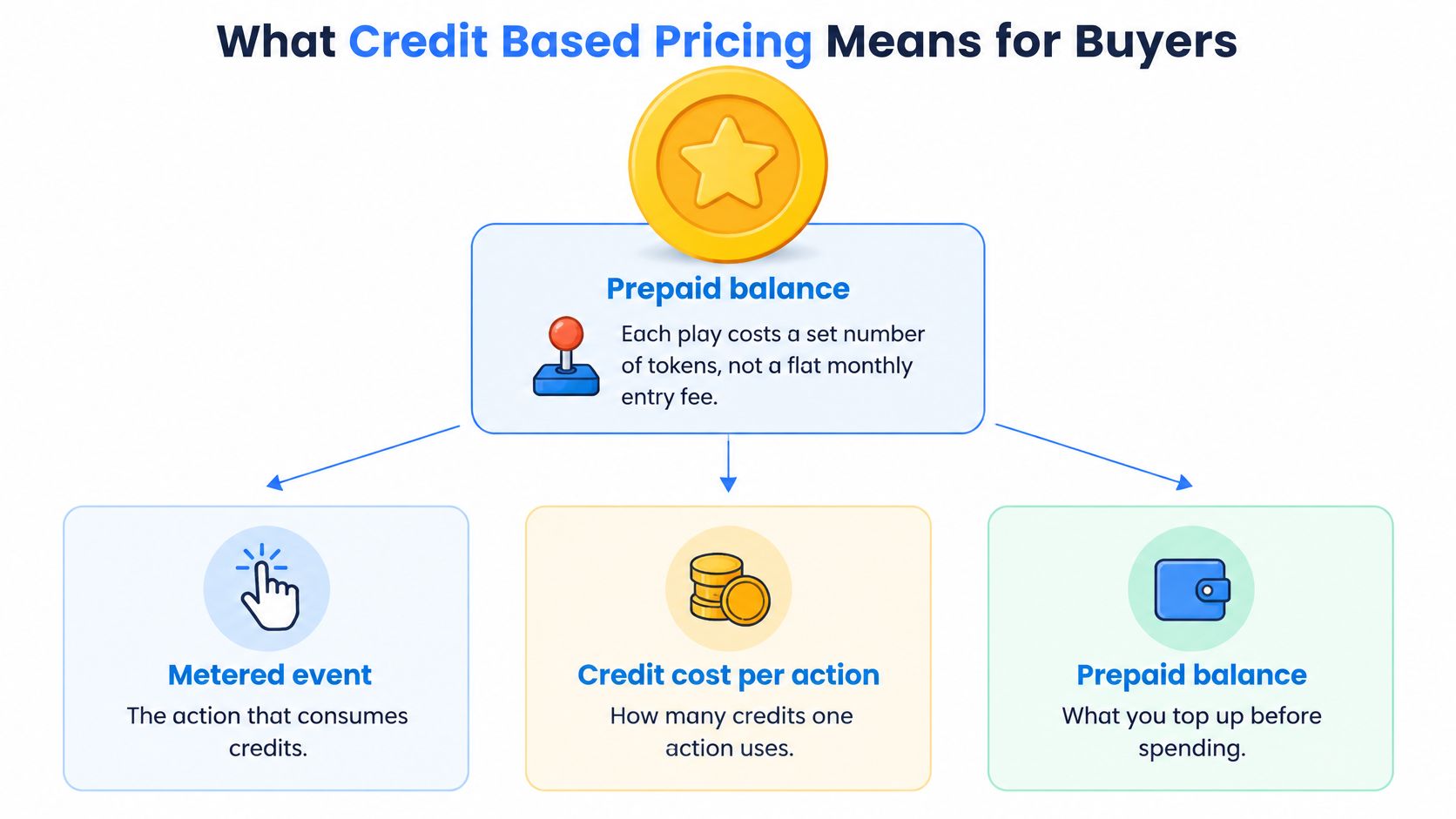
An arcade token is worthless outside the arcade and priceless inside it. You buy a roll in advance, each machine charges a fixed number of tokens, and your only real control is counting plays before you start.
Credit based pricing runs on the same logic, applied to API calls instead of cabinets. Three terms carry everything a buyer needs, and most pricing pages publish only one of them.
The balance is what the account holds right now. On a subscription it's the allocation for the current billing period. On pay as you go it's whatever you've purchased, and it carries its own expiry date. Fetchin shows the subscription balance and the pay as you go balance separately, because they behave differently at renewal and a single combined number hides which one is about to disappear.
The meter is the billable event, meaning the specific outcome that triggers a deduction. For a data API, the honest meter is a record returned (a professional profile, a company, a post), not a request sent. That choice decides whether a retry costs you money.
The rate is how many credits one metered event consumes, and it varies with the work. A standard profile lookup takes one credit. A profile fetched with fullProfile=true takes two when at least one extra page could be read. Post engagement takes two. Once you know the rate per action, forecasting is multiplication.
Different models price the same returned record very differently, and this comparison of API pricing models sets the alternatives out side by side.
One Currency Across Many Endpoints
Providers consolidate into one account-level currency for a practical reason: profile lookups, company records and engagement calls consume very different amounts of underlying work, and exposing infrastructure pricing to a buyer would be unusable. A single balance covers all of them at different rates.
That's why credit systems so often run alongside subscriptions rather than replacing them. Among software companies with usage-based pricing in production, 72% of B2B companies used a hybrid model combining a subscription fee with usage charges, while only 28% priced on consumption alone, according to Orb's metering and usage event data statistics. Adoption is the norm now rather than the exception: in January 2025, 85% of 100 surveyed software companies had adopted usage-based pricing, according to Metronome and Greyhound Capital's state of usage-based pricing report.
The one-sentence test: if you can't say what your balance is denominated in and which event reduces it, you can't forecast it, and no pricing page will do that work for you.
How Each API Call Converts Into Credits
Every action carries two prices: the credits it consumes and the money those credits represent. The figures below use the $1.00 per 1,000 subscription rate and the $1.50 per 1,000 pay as you go rate.
| Action | Credits charged | Cost at $1.00 per 1,000 | Cost at $1.50 per 1,000 |
|---|---|---|---|
| Standard profile lookup | 1 | $0.001 | $0.0015 |
| Profile with fullProfile=true, extra page readable | 2 | $0.002 | $0.003 |
| Profile with fullProfile=true, no extra page readable | 1 | $0.001 | $0.0015 |
| Company record in a batch call | 1 per company returned | $0.001 | $0.0015 |
| Paginated request | 1 per page requested | $0.001 | $0.0015 |
| Post engagement call | 2 | $0.002 | $0.003 |
| Not-found result | 1 | $0.001 | $0.0015 |
| Failed or errored request | 0 | $0.00 | $0.00 |
Start with the base case. A standard profile lookup costs one credit, and most endpoints behave the same way, one credit per call, with one credit equal to one returned record such as a profile, a company or a post. At the entry subscription rate that's a tenth of a cent per record.
The fullProfile case is where budgets break. Requesting a profile with fullProfile=true costs two credits when at least one of its extra pages could be read, and one credit when none could. You can't tell from the request alone which will happen, so budget the two-credit price and treat the one-credit outcome as headroom.
Company batches bill per record, not per call: one credit per company returned, up to 50 companies in a single call. A batch of 50 therefore consumes 50 credits, which makes batching a latency optimization rather than a discount.
Paginated endpoints charge one credit per page requested, not one credit for the whole timeline. A 20-page post history is 20 credits. Engagement extraction is the heaviest standard action at two credits.
The final two rows do the most work in practice. A not-found result costs one credit, because a lookup returning nothing still ran a live fetch. A failed or errored request costs nothing. Charging for failures would push provider-side errors and rate-limit collisions onto the customer, which is the kind of line item that erodes trust in a usage bill, as Bain's analysis of consumption-based pricing argues when it ties the model's appeal to alignment with value received.
Metering, Rating And Billing Are Three Jobs
A credit charge is the output of three separate stages, and vendors that blur them produce bills nobody can reconcile. Metering records the billable event. Rating converts that event into a credit charge. Billing turns charges into invoices, payments and balance replenishment. Solvimon's glossary entry on usage-based pricing separates the three, which is why an event-level ledger keyed by account, endpoint, request ID, timestamp, outcome and credits charged is the artifact finance needs.
The napkin arithmetic is short. 1,000 profile lookups consume 1,000 credits, or $1.00. 1,000 lookups with fullProfile=true consume 2,000 credits, or $2.00. Multiply planned calls by the credits in each row, add the rows, and you have your monthly balance requirement.
One timing detail decides how you build retry logic. A credit attaches to the record returned, so a failed call is free, but a successful retry after a partial failure that already returned data is a second billable record. Deduplicate on record ID before you requeue anything.
Choosing a Plan by Monthly Volume
Price per credit, not sticker price, decides which tier wins. Every subscription below is billed in advance each month, and the credits in a plan are available for that billing period only; the allocation renews rather than accumulating.
| Plan | Price | Credits included | Price per 1,000 credits |
|---|---|---|---|
| Subscription 50K | $50 per month | 50,000 | $1.00 |
| Subscription 100K | $100 per month | 100,000 | $1.00 |
| Subscription 250K | $250 per month | 250,000 | $1.00 |
| Subscription 500K | $475 per month | 500,000 | $0.95 |
| Subscription 1M | $900 per month | 1,000,000 | $0.90 |
| Subscription 2M | $1,700 per month | 2,000,000 | $0.85 |
| Pay as you go | $75 one time | 50,000 | $1.50 |
Read the ladder upward and a pattern appears. The three smallest tiers all sit at $1.00 per 1,000 credits, so moving from 50K to 250K buys capacity at an unchanged rate. The step-downs start at 500K, where the rate falls to $0.95, then $0.90 at 1M and $0.85 at 2M.
Pay as you go is a one-time purchase from $75 for 50,000 credits with no subscription attached, which works out to $1.50 per 1,000 credits. That's 50% more per credit than the 50K subscription and 76% more than the 2M plan. Stated the other way, a subscription costs 33% less per credit.
When Pay As You Go Wins
The premium buys flexibility, and it's worth paying in exactly two situations. Overflow is the first: your subscription fits a normal month and one project needs 8,000 extra records. Irregular work is the second: a quarterly audit touching 5,000 records four times a year doesn't justify a monthly commitment, and unused subscription credits don't carry into the next period.
Break-even is about utilization, not volume. A 250K plan at $250 costs the same per credit as the 50K plan, so the only question is whether you'll consume close to 250,000 credits in the billing period. Teams habitually using 30% of their allocation should drop a tier or move to pay as you go; there's no per-credit penalty for right-sizing at the small end.
Forecasting, though, is hard, and it isn't only your problem. Among usage-priced companies, 73% were building processes to forecast variable revenue, and 43% billed more frequently than monthly, according to Orb's developer tools pricing statistics. Frequent billing and forecasting effort are two symptoms of the same uncertainty.
If you want to see how another vendor structures its credit tiers and trial terms before committing to a ladder like this, CapyScout plans and trial details documents one structure in full, which helps you judge whether a step-down at 500K credits is generous or standard.
Practical rule: size the subscription to your median month and keep pay as you go for the tail. Paying $1.50 for overflow beats paying $1.00 for 200,000 credits you never touch.
Expiry, Refunds and When Calls Stop
The edges of a balance are where procurement arguments begin. Four rules matter, and none of them are unusual, which is precisely why they need checking rather than assuming.
Expiry runs per purchase, not per account. Pay as you go credits are valid for 12 months from the day they're bought, and each purchase carries its own date. A block of 5,000 credits bought thirteen months ago is gone. A block of 50,000 bought last month still has eleven months on it. Anything unused past its date is forfeited, with no refund or replacement.
Credits are prepaid and non-refundable, including credits added by automatic top-up. Fees are otherwise non-refundable except where applicable law requires a refund, so a change of plan doesn't release money already spent. Read that line before buying a large block for a project that might slip.
Zero stops calls; it doesn't create an overage. When the balance runs out, requests fail with a clear error, and no overage is charged unless auto top-up is switched on. That's safer for a budget owner and harder on an unattended job: a nightly enrichment run that hits zero at record 40,000 of 60,000 stops, and the last 20,000 records don't arrive.
Subscription credits sit in a different bucket. They're allocated per billing period and renew monthly rather than ageing from a purchase date, so the open question is whether unused subscription credits roll over or vanish at period end.
The Questions That Expose The Terms
Four questions settle any credit contract in under five minutes:
- When does each credit expire? Ask for the rule per purchase type, not one account-wide date.
- Is any charge refundable? Get a separate answer for subscription credits, purchased credits and auto top-up.
- What happens at zero? Confirm whether the call fails or an overage is billed.
- Do unused subscription credits roll over? A monthly reset and a rollover behave very differently across a slow quarter.
Vendors that bury these terms pay for it later. Solvimon's usage-based pricing glossary notes that hard expiry and opaque deductions raise procurement friction, and recommends usage exports, low-balance webhooks, idempotency keys and configurable monthly caps as the controls that lower it. Stripe's documentation on billing credits for metered subscriptions makes the same point structurally: a credit grant can be restricted to selected prices and given an optional expiry date, so the terms are configuration rather than fine print.
Ask this: does the dashboard show the purchase date on each block of credits, or one expiry date for the whole account?
Spend Order, Caps and Rate Limits
Two balances and two limits govern one account, and confusing them produces the wrong fix. Spend order decides which credits get used. Rate limits decide how fast calls can arrive. A balance problem and a throughput problem both look like a failed job and need opposite remedies.
Spend Order, Then The Caps
When an account holds both subscription and pay as you go credits, subscription credits are spent first. After that, pay as you go credits go in order of soonest expiry, so the purchase closest to its 12-month limit is used before a newer one. That ordering is the only thing standing between an expiring block and a forfeited block.
Auto top-up is a spending control teams should configure on day one. It takes three settings, a threshold, a quantity of credits to add, and a monthly spending limit of up to $5,000, and you can switch it off at any time. Set the threshold above the size of your largest nightly batch, or the top-up fires mid-run and you spend the following morning reconciling it.
Two Limits That Fail Differently
The balance governs how much you can spend in a period. The request rate governs how quickly calls arrive, and it's flat: every self-serve credit volume runs at 5 requests per second, whether bought by subscription or pay as you go. A 2M plan doesn't make a single script faster than a 50K plan.
Throttling runs on a token bucket. Requests above the steady rate and burst capacity return HTTP 429 responses, and AWS treats throttles and quotas as best-effort targets rather than guaranteed ceilings, as its documentation on API Gateway request throttling states. Build retries with exponential backoff and treat a 429 as normal traffic rather than an incident.
One more timing question deserves an answer before you sign: whether a request is authorized against a live balance or recorded and invoiced at period end. Stripe documents both patterns, noting that prepaid credits in its basic usage-based billing reconcile at invoice time, which lets a customer exceed the nominal balance during the cycle, while real-time burn-down reduces the balance as usage occurs (Stripe's usage-based billing mechanics). Self-serve accounts want the second. Invoiced enterprise contracts can live with the first.
Check both before scheduling anything: the balance decides whether tonight's run finishes, and the request rate decides how long it takes.
For the throughput side in more detail, including backoff patterns and batch shaping, this guide to API rate limits works through the enforcement mechanics.
Worked Examples of Monthly Credit Spend
Credit planning fails on peaks, not averages. Three buyer types show where a monthly estimate breaks.
Here's how the same actions look once they're multiplied by a real month's workload.
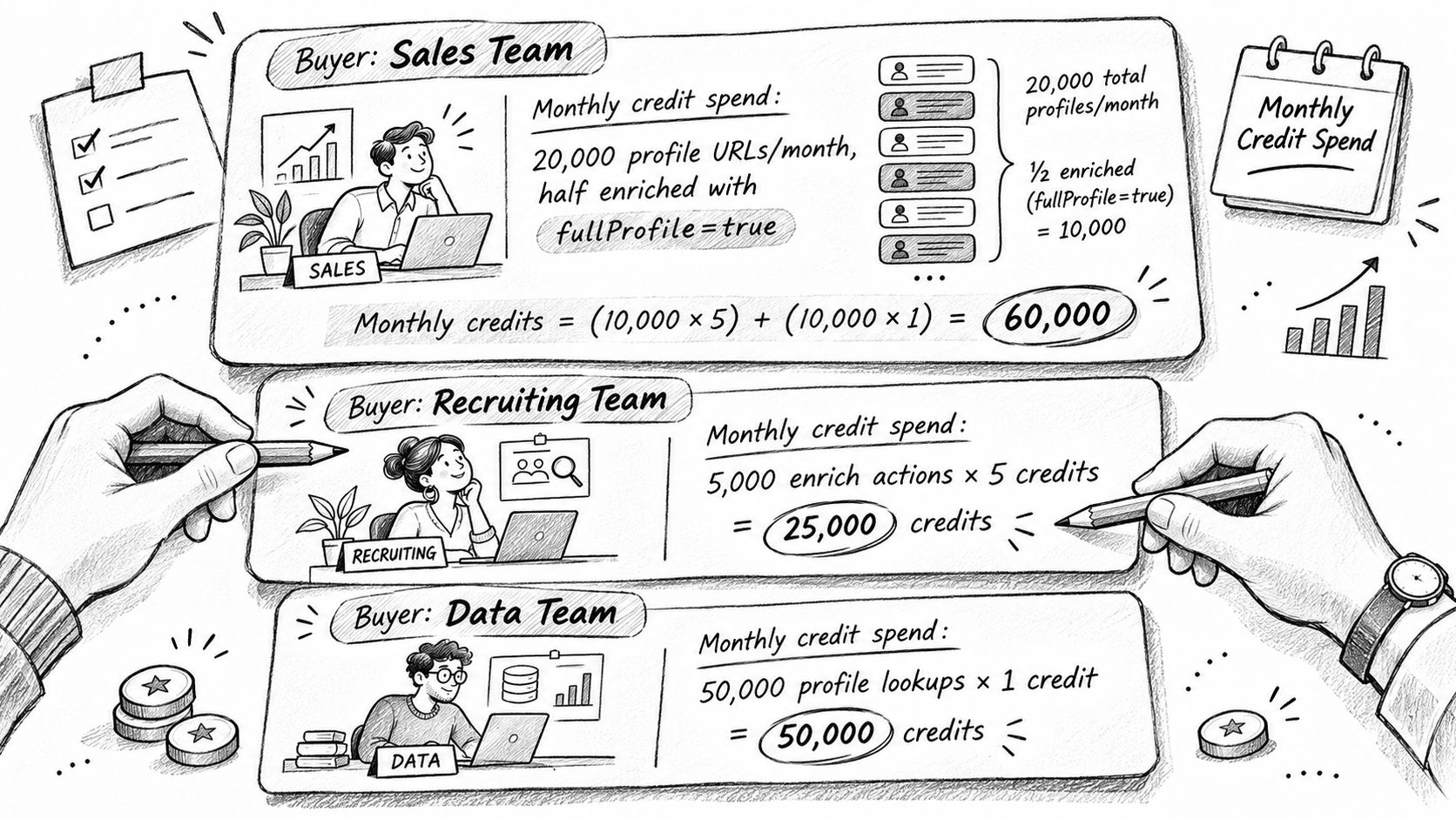
Sales team, 20,000 professional profile URLs a month. Half are fetched with fullProfile=true, half with the default. That's 10,000 calls at one credit plus 10,000 at two, or 30,000 credits for the month. On the 50K plan at $50, that leaves 20,000 credits, 40% of the allocation, for re-checks, list cleanup and ad hoc lookups.
Recruiting platform, company batches. Two hundred batch calls a month at 50 companies each returns 10,000 company records, and billing is per company returned, so the month costs 10,000 credits. Batch size changes the number of round trips, not the credit count.
If you'd rather follow the mechanics in a video walkthrough, this covers the same ground.
AI agent team, unpredictable spikes. A normal month runs 20,000 credits. One month it hits 60,000 against a 50K plan. The 10,000-credit overflow can't be bought in that size, because pay as you go starts at $75 for 50,000 credits, five times the gap. Taking that route costs $75 and leaves 40,000 credits to burn or expire. The 100K subscription covers the month for $100, against $125 for a 50K plan stacked with a pay as you go block. At the small end of the ladder, upgrading a tier costs less than buying overflow.
Hybrid arrangements are the norm among AI builders, not the exception. In 2025, 38% of surveyed AI-company leaders reported using pure usage-based pricing, while 56% reported using hybrid pricing, according to Stripe figures covered in Orb's analysis of AI companies migrating from monthly subscriptions. The hybrid majority keeps a subscription floor and buys overflow, which makes overflow pricing, not the headline rate, the number that decides their bill.
The lesson in all three cases is the same: plan choice depends on forecasting peaks, not average monthly use.
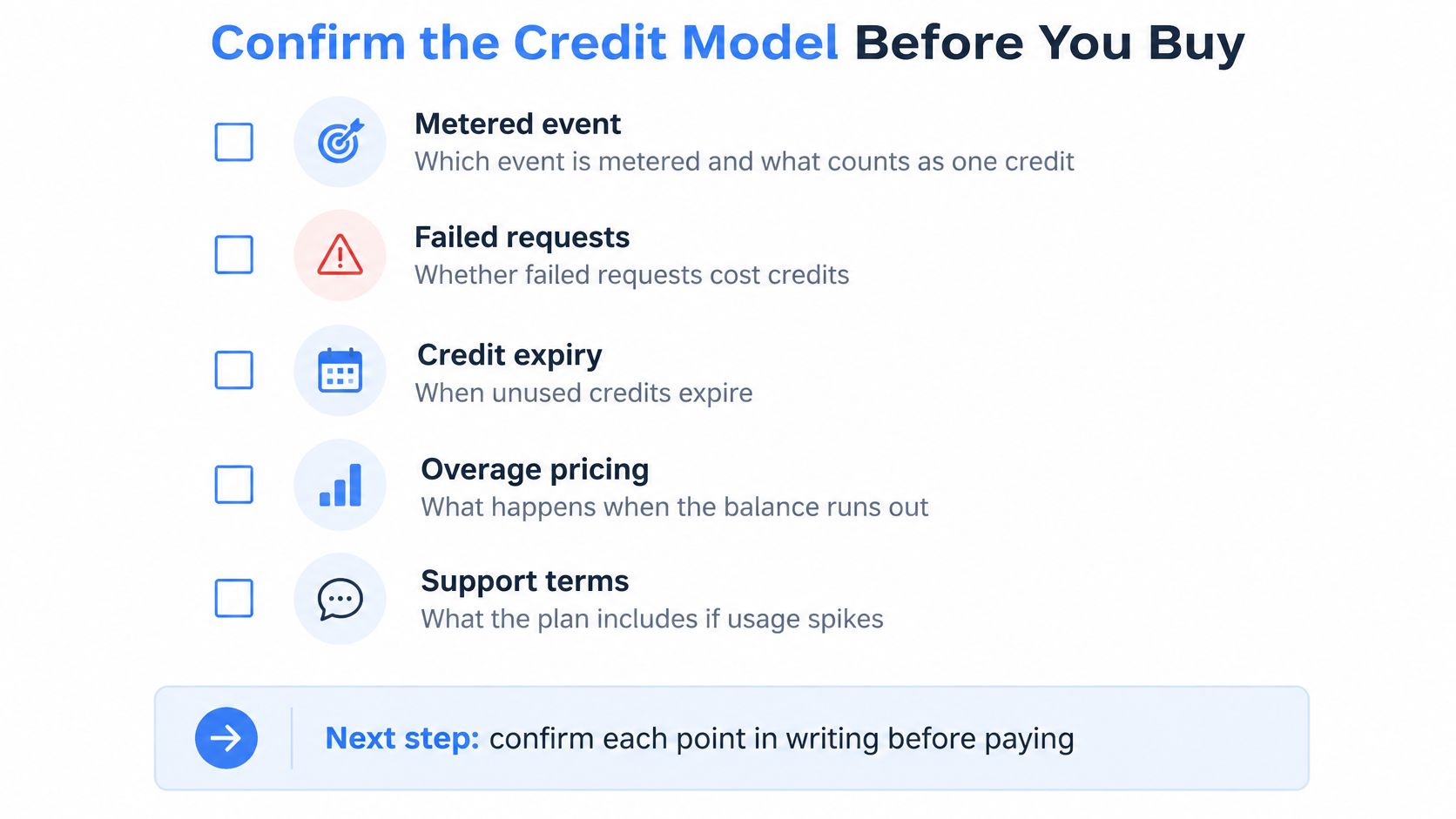
Confirm the Credit Model Before You Buy
Nine questions separate a credit model you can forecast from one you can't. Each has a decision attached.
- Which event is metered? Insist on the named action and its credit cost, not a description of the balance.
- Do failures cost credits? Errors aren't billed, so a 500 or a timeout is free; budget for successes only.
- Does a not-found result cost a credit? It does, one credit, because a live fetch ran and returned nothing.
- Is the balance checked live or invoiced at period end? Live deduction caps your downside; invoice-time reconciliation can carry you past the balance.
- When does each pay as you go purchase expire? Twelve months from purchase, tracked per block.
- What happens at zero? Calls stop with a clear error, and no overage is billed unless auto top-up is on.
- Does auto top-up have a monthly cap? Set one up to $5,000 and confirm it's enforced.
- What's the request rate? Five requests per second on every self-serve volume, so plan batch timing around throughput, not credits alone.
- Is every request logged with ID, endpoint and credits charged? Without that ledger you can't reconcile the invoice to usage.
Then estimate: multiply planned calls by credits per action, add a buffer for retries and peak weeks, and run the actual workload on the free 1,000-credit tier before committing to a tier sized on a spreadsheet. Independent pricing guidance recommends testing the complete journey, purchase, promotional credits, ordinary consumption, retry, refund, top-up and renewal, and checking that the balance is clear after every step, which is the cheapest audit available before you pay (Coommit's credit-based pricing guide).
Fetchin shows subscription and pay as you go balances separately, so both numbers are visible before a run starts rather than after a failed one. Where a pipeline spans profile and company data, this guide to company data enrichment APIs covers how the endpoints combine.
The decision comes down to two variables: your effective cost per credit at the volume you expect, and the expiry terms on the balance you'd hold. Everything else is arithmetic you can now run before the invoice arrives.
Fetchin turns professional profile and company URLs into structured JSON, prices most calls at one credit per returned record, and bills nothing for failed requests. The free tier includes 1,000 credits, which is enough to measure your real credit cost per workflow before you choose a subscription tier or a pay as you go block. Visit Fetchin to see the full plan ladder, the per-endpoint credit costs and the rate limits side by side.