Three weeks after you shipped the company endpoint, a customer's integration starts failing on records your own tests call valid. The payload looks right. The JSON parses cleanly. Their Python service rejects it with a message about an unexpected property, and yours accepts the same document without complaint.
Nothing is wrong with the data. Two different contracts are reading it. One schema was written against an older draft, the other expects the current one. One checks URL format, the other treats format as a comment. One closes the object to unknown fields, the other lets anything through.
The fix isn't a longer error message. It's a schema you can read keyword by keyword, a set of test payloads that shows which keyword decides each result, and a release check that catches the divergence before a customer does. Start with a complete example you can adapt.
Table of Contents
- A Complete JSON Schema Example You Can Adapt
- What JSON Schema Is and Which Draft to Declare
- Building a Schema One Keyword at a Time
- Which Keywords Reject Data and Why Validators Disagree
- Validating Untrusted Input Without Slowing Your Pipeline
- Confirm Your Schema Against Real Payloads Before Release
A Complete JSON Schema Example You Can Adapt
Here's a schema for the company record your API returns. Save it as company.schema.json.
{
  "$schema": "https://json-schema.org/draft/2020-12/schema",
  "$id": "https://api.example.com/schemas/company.json",
  "title": "Company",
  "description": "A company record returned by the company endpoint.",
  "type": "object",
  "properties": {
    "company_id": {
      "title": "Company ID",
      "description": "Stable identifier for the company.",
      "type": "string"
    },
    "name": {
      "title": "Name",
      "description": "Trading name of the company.",
      "type": "string",
      "minLength": 1
    },
    "status": {
      "title": "Status",
      "description": "Review state of the company record.",
      "type": "string",
      "enum": ["approved", "pending", "suspended"]
    },
    "founded_year": {
      "title": "Founded year",
      "description": "Calendar year the company was founded.",
      "type": "integer",
      "minimum": 1800,
      "maximum": 2026
    },
    "employee_count": {
      "title": "Employee count",
      "description": "Headcount at the last refresh.",
      "type": "integer",
      "minimum": 0
    },
    "website": {
      "title": "Website",
      "description": "Public homepage URL.",
      "type": "string",
      "format": "uri"
    },
    "tags": {
      "title": "Tags",
      "description": "Free-form labels used for segmentation.",
      "type": "array",
      "items": { "type": "string" },
      "maxItems": 20,
      "uniqueItems": true
    }
  },
  "required": ["company_id", "name", "status"],
  "additionalProperties": false
}
The $schema keyword pins the dialect to Draft 2020-12. The $id gives the document a stable address that validators, caches and teammates can key on. And additionalProperties: false closes the object, so a field nobody agreed to cannot appear in production and go unnoticed.
Three properties are required: company_id, name and status. The rest are optional on purpose. founded_year, employee_count, website and tags are useful when present, and a record shouldn't be rejected just because a young company has no founding year yet. Every property carries a title and a description, which document the payload and never reject anything on their own.
Test instances and their validation results
| Test instance | Result | Keyword that decides |
|---|---|---|
| Complete valid company record | Valid | none |
company_id sent as a number |
Invalid | type |
status set to archived |
Invalid | enum |
| Twenty-five tags | Invalid | maxItems |
Extra field fax in the record |
Invalid | additionalProperties |
website set to not a url |
Valid unless format checking is on | format |
type catches the most common integration bug, an identifier sent as a number. company_id is a string by design, because real identifiers mix digits, prefixes and UUIDs, and a JSON number won't survive a round trip through a 64-bit float in every client. enum catches the second most common bug, a status the API never returns. additionalProperties catches the third, a client that adds a field and assumes the server will drop it.
The website row is the one that surprises people. A value like not a url passes unless the validator has format assertion switched on, so a broken homepage URL can travel through a pipeline for months without a complaint.
Save the file, write all six instances to a fixtures file, and run them before you change a single keyword. The same discipline applied to request and response shapes is covered in this API design example.
What JSON Schema Is and Which Draft to Declare
A schema is a form with rules printed on it. Fill in a required field and the form goes through. Leave it blank and the clerk hands it back. The difference from paper is that the schema lives in its own file, separate from the document it checks, so one file can govern thousands of responses.
Keep the pair small. A schema with "type": "object", a name property of type string and "required": ["name"] accepts {"name": "Northwind"} and rejects {"company_id": "c_8812"} because the required field is missing. That's the whole mechanism. Everything else is keywords layered on top.
The language itself has been refined through a series of drafts since 2009, and the official specification archive records each one. Draft 4 landed on 31 January 2013 and became a major early milestone. Draft 6, Draft 7, Draft 2019-09 and Draft 2020-12 followed, with 2020-12 the current version. Keywords changed between them. A schema written for Draft 7 can mean something different under 2020-12, which is why the first line of any schema should say which rules apply:
"$schema": "https://json-schema.org/draft/2020-12/schema"
Add a stable $id too, so a validator can cache the compiled form and a colleague can find the file everyone is arguing about.
Don't confuse JSON Schema with JSON Type Definition. The IETF published JTD as Experimental RFC 8927 in November 2020, and it deliberately limits itself to the type systems of mainstream programming languages so that code generation stays simple. JSON Schema goes further, with patterns, numeric limits, array bounds and conditional rules.
The decision rule is short. Choose the newest draft your validator fully supports, then write that dialect into the schema so the choice is visible to everyone who reads it.
Building a Schema One Keyword at a Time
Start from the empty schema {}, which has no constraints and accepts any valid JSON instance. Every keyword you add removes documents from the accepted set. That framing makes the build order obvious.
Here's the path from flexible to precise.
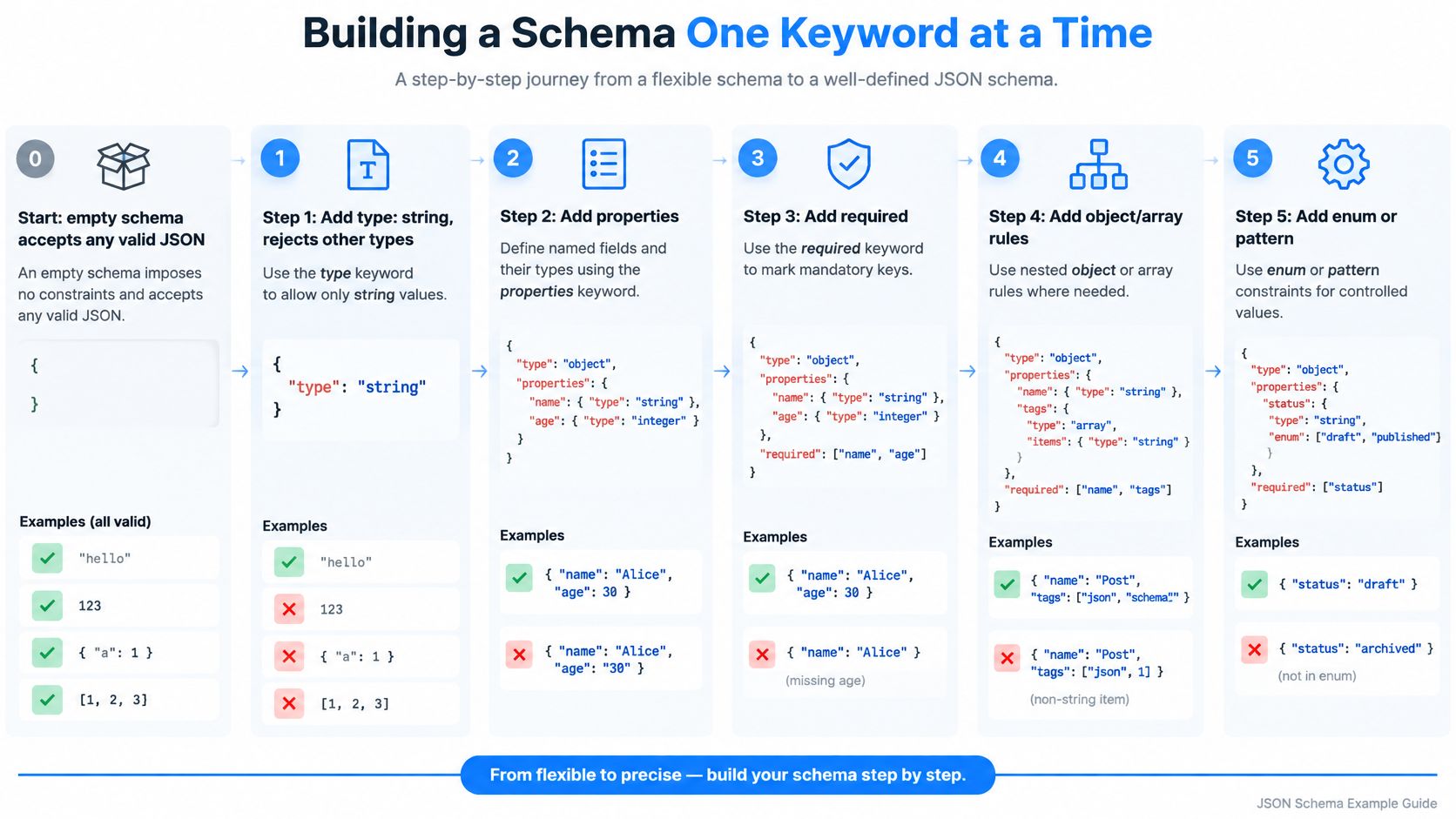
- Add a type.
{"type": "string"}accepts"approved"and rejects42. A basic schema can constrain a value to one of six fundamental JSON data types, object, array, string, number, boolean or null, and the official getting-started material identifiestypeas the first constraint most schemas get. - Name the fields you expect.
propertiesmaps each key to its own subschema:{"properties": {"status": {"type": "string"}}}. Addrequiredfor the keys that must exist,"required": ["status"], and an empty object starts failing. - Close the object.
additionalProperties: falseturns{"status": "pending", "fax": "555"}into a failure, which is what you want when the contract is explicit. - Factor out repetition. An address block used in three places moves into
$defsonce and gets referenced with{"$ref": "#/$defs/address"}. Change the shape in one spot and every reference follows. - Constrain arrays.
items,minItemsandmaxItemsbound a tags list. When the first positions carry fixed types, such as a coordinates pair, useprefixItemsand letitemshandle whatever follows. - Add conditions.
if,thenandelselet one field depend on another. Whenstatusis"approved", requireregistration_number; otherwise leave it optional.
Three patterns cover most of what people ask about after the steps. A nullable field uses a type array, "type": ["string", "null"], rather than an empty string. A single fixed value uses const. A closed set of choices uses enum.
After each step, run the schema against one valid and one invalid payload before adding the next rule. Save the schema as a file and validate both payloads with a 2020-12 library, the jsonschema package for Python or Ajv for JavaScript, printing pass or fail and the name of the failing keyword. The failing keyword is the useful half of that output.
Which Keywords Reject Data and Why Validators Disagree
Every keyword in the company schema plays exactly one of four roles, and knowing which role a keyword holds tells you whether it can reject a document.
- Identifiers give a schema a name.
$idand$schemaare identifiers, and they change how a document is resolved, not whether an instance passes. - Annotations document a field.
title,descriptionandexamplesmake a schema readable for humans and for tooling, and they reject nothing. - Applicators pass checking down to subschemas.
properties,items,allOfandifdon't decide anything themselves; they hand the work to the schemas nested inside them. - Assertions decide pass or fail.
type,enum,required,minimum,maxItemsandadditionalPropertiesare the keywords that hand a record back.
The 2020-12 specification keeps these roles separate because the difference has operational weight. A failing nested field fails the whole record, and the error path tells you which subschema rejected it. The title above that subschema, meanwhile, never rejected anything in its life.
format is the case study everyone trips over. With "format": "uri" on website, a validator in annotation mode records that the string looks like a URI and lets it through regardless. A validator in assertion mode rejects the same value. Same schema, same payload, opposite outcomes.
A keyword that documents a field without constraining it is a comment, not a rule.
Where two validators disagree
Beginner examples show one validator and stop, which is why the question "why does this pass in Ajv and fail in my Python service" gets asked so often. Draft 2020-12 splits keywords into vocabularies and separates the format-annotation and format-assertion vocabularies, which is a formal way of saying that two tools can implement the same draft and still disagree about URLs and email addresses.
Two more traps are worth naming. An unrecognized keyword is usually ignored without warning, so a misspelled maxLenght disables a constraint instead of erroring. And the older tuple form of items plus additionalItems is replaced by prefixItems plus items in 2020-12, so positional rules can behave differently across versions.
The Draft 2020-12 documentation is the reference to settle these arguments, and it's worth reading the vocabulary section once rather than guessing.
Compatibility checks before relying on a schema
| Check | What to declare or test | Risk if skipped |
|---|---|---|
| Dialect | Declare the 2020-12 $schema keyword and confirm each validator supports it |
Validator applies another draft and different rules |
format keyword |
Confirm whether format is annotation-only or enforced in each validator |
Invalid emails and URIs pass silently |
| Array positions | Use prefixItems with items, not the older tuple form |
Positional rules apply differently across tools |
| Unknown keyword | Test a misspelled keyword and record how the validator reacts | Typos are ignored and constraints never run |
| References | Test $ref and dynamic reference resolution in each language |
Remote references fail in some SDKs |
| Error output | Compare error messages and paths across validators | Client code parses errors differently |
A syntactically valid schema is not automatically a portable contract. Portability depends on the validator's dialect, vocabularies, formats, reference resolution and error behavior. Build a minimal cross-validator suite of five to ten payloads, including one bad email format and one misspelled keyword, run it through each SDK, and compare the results side by side.
Validating Untrusted Input Without Slowing Your Pipeline
A public form posts { "employee_count": "50-200" } where your schema expects an integer. That payload reaches your validator before any business code sees it, so validation is a security step as much as a correctness check, and the two goals pull against each other. Stricter checks catch more, and each one costs time on every request.
The JSON Schema validation specification warns that regular expressions may have incompatible implementations and can be crafted for catastrophic backtracking, so a pattern you accept from an untrusted schema author can stall a worker. The same document notes that implementations must not automatically decode or recursively validate embedded content by default, for both security and performance reasons. Runtime or external validation layers can also add noticeable latency per payload, which is the difference between a responsive endpoint and a timeout, so a time budget belongs in the design from the start.
Limits to set before you accept a single payload
- Payload size. Reject anything above the largest record your contract can legitimately describe.
- Nesting depth. Cap recursion so a heavily nested object can't exhaust the stack.
- Time per validation. A hard timeout on the validation call itself, not just on the request.
- Reported errors. Cap the error count, because building a thousand error objects costs far more than building two.
- Retry budget. Decide in advance how many times a failed validation may be retried, and log every retry.
That retry budget matters most in AI pipelines. A model that keeps producing a malformed employee_count gets retried three times, and the third call costs the same as the first while adding nothing. Constrained generation helps, but a model can still refuse or hit a token limit, so validation stays in the loop.
Validate the stable envelope first, meaning object type, required identifiers, array bounds and scalar limits, then let business rules run. Cache compiled validators keyed by $id and draft version so the compile cost is paid once instead of on every payload. For an endpoint that resolves a company URL into firmographics, the same envelope-first pattern shows up in this contact enrichment API walkthrough.
When failures cluster around the same handful of fields, the root cause usually sits upstream in data quality rather than in the schema. Setting up a data quality pipeline covers the checks worth running before validation, so your validator isn't repeating work that belongs earlier.
A schema is a contract, not a complete security boundary. Pair it with limits, timeouts, logging and a recovery path, and treat the validation call as one stage in a pipeline rather than the whole defense.
Confirm Your Schema Against Real Payloads Before Release
Before the schema ships, run it through a checklist. Each item takes minutes and prevents a different class of failure.
Here's the checklist itself, in the order to work through it.
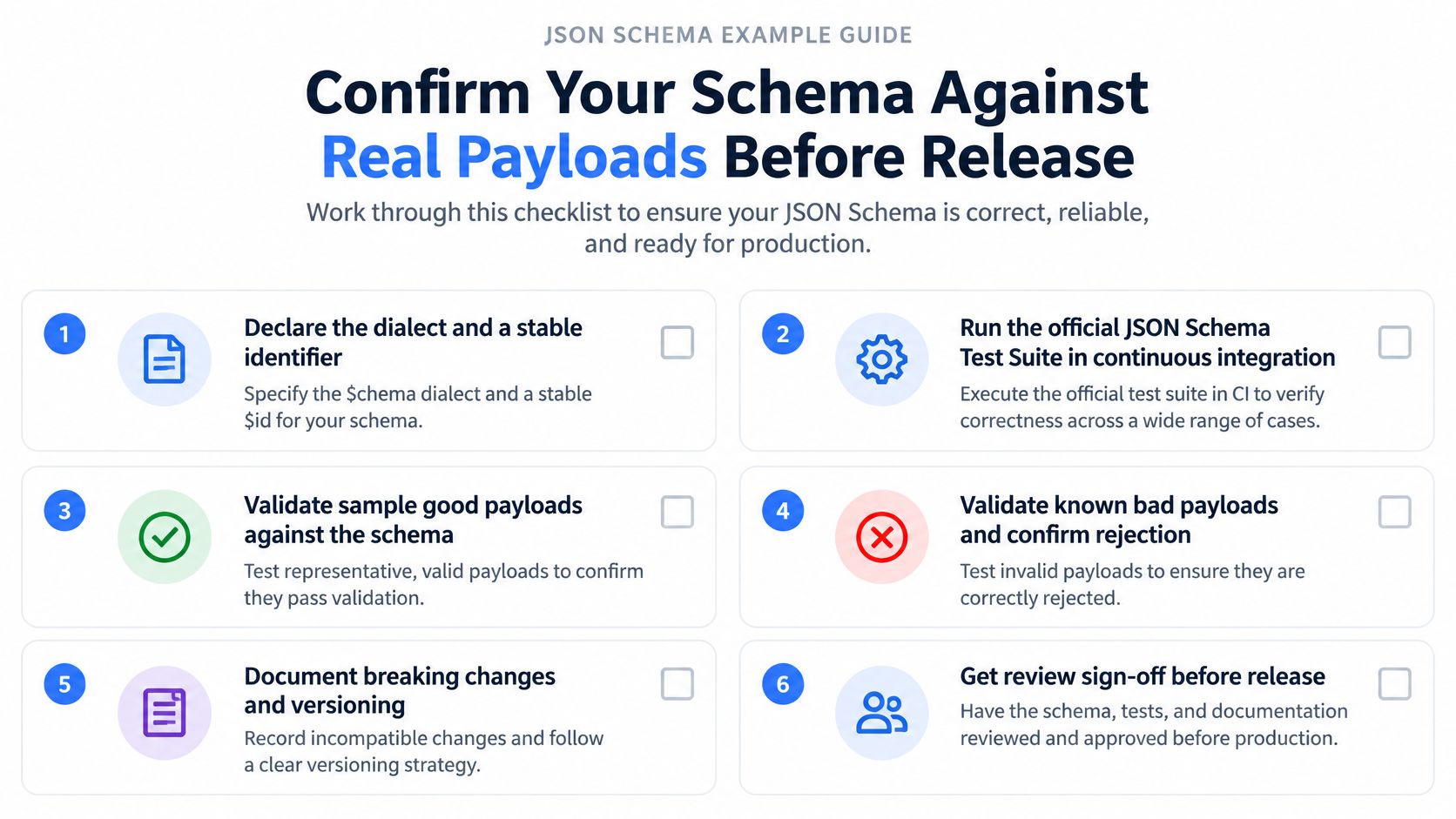
- Declare the dialect and identifier.
$schemaset to 2020-12,$idpointing at the canonical location. - Run the official JSON Schema Test Suite in continuous integration. It exercises a broad range of specification behavior and exposes dialect and implementation gaps before deployment.
- Validate the stable envelope first, covering object type, required identifiers and array bounds, then let business rules run.
- Check every format assertion in each target validator. A
formatkeyword that's annotation-only gives you nothing. - Replay real payloads, both valid and invalid ones, from your own logs.
- Record the draft version with each release, so a rollback restores a known contract.
Apply it to the company record. Confirm that company_id, name and status are the required three and that nothing else has crept in. Decide deliberately whether website may be null, and if so, express it as "type": ["string", "null"] rather than an empty string that passes a URI check by accident. Then rerun all six test instances from the opening example in every validator the system uses and confirm each one still produces its expected result.
Nullability is where most contract drift starts. A field that begins as optional becomes a habit, a client sends null, and a later minLength or format constraint turns a working integration into a 500. Write the null case into the test fixtures now, while it's cheap.
Our own endpoints return well-defined shapes, and each post from the Posts API includes content, date, postType, shareUrl, shareUrn and resharedPostUrn, while profile enrichment turns a profile URL into 100+ structured attributes. With that many fields in play, the schema you publish will be read by validators you don't operate, which is exactly why the test instances matter more than the prose description.
For teams already running an older dialect, the migration path in this guide to JSON Schema backward compatibility covers what breaks and what doesn't. If you'd rather check your implementation in code than in a validator CLI, validating JSON with Python schemas walks through the library calls step by step.
The next step is small and specific. Create the schema file this week, add the six test instances as fixtures, and wire a CI job that fails the build whenever a fixture changes its result. That job will catch more real bugs than any review of the schema by eye.
Fetchin is a B2B data API that returns structured JSON for professional profile and company URLs, so every response can be checked against a schema you control. If you're building enrichment or agent workflows that consume external records, start with our company and profile endpoints and run your own test instances against the actual payloads before you ship.