
It's Friday at 4:10 pm. A VP of Operations submits your demo form with a work email and company domain. Your team either receives a usable record and responds within minutes, or the inquiry sits in a shared inbox until Monday. The form worked in both cases. The difference is the system behind it.
Table of Contents
- What a Lead Generation System Does and Why Speed Matters
- Core Components From Source to Routed Lead
- Response Speed Targets and the Latency Budget
- Architecture Patterns Compared From Batch to Live
- Signal Evidence and Account-Level Targeting
- Privacy and Compliance Boundaries to Design Around
- Integrating Live Enrichment Without Breaking Workflows
- Data Quality Gates and the KPIs That Prove Them
- Plan Your Migration and First Pilot
What a Lead Generation System Does and Why Speed Matters
A lead generation system connects a signal to a useful next action. Signals can include demo requests, replies, page visits, or job changes at a target account. Each calls for different handling, but the system should preserve where the signal came from and what happened next.
A form collects information; the system coordinates what follows. It can check whether the person already exists in the CRM, identify missing details, assess fit, and direct the record to an owner. For the Friday inquiry, the goal is to get a clear next step to the right person while the request is still fresh.
Speed is measurable. A 2011 study by James Oldroyd, Kristina McElheran, and David Elkington, summarized by Grou Global, examined web inquiries at 2,241 U.S. companies. Only 37% responded within one hour, while 23% never responded. Faster contact is associated with higher qualification rates, which makes response time a practical design input, not just a sales metric.
Lead handling works like triage: intake captures the case, assessment sets its priority, and an owner takes responsibility for the next action. The analogy has limits. A lead score is an estimate based on available evidence, not a guarantee that someone will buy. If weak signals drive aggressive outreach, adding more data can worsen targeting rather than improve it.
For smaller teams connecting acquisition tactics to follow-up, SMB lead strategies from AI Optimization Services offer a planning companion.
Practical rule: A captured record isn't an operational lead until someone knows what to do with it.
Every system needs clear answers to four questions:
- Origin: Where did this record come from?
- Gaps: What information is missing?
- Priority: How strong is the evidence of fit?
- Ownership: Who acts, and how soon?
Core Components From Source to Routed Lead
The VP's work email and company domain are enough to start processing, but not enough to make every decision. Keep the components separate so a failure in enrichment doesn't look like a routing problem.
Core components, their inputs and outputs
| Component | Question it answers | Typical input | Typical output | Failure when missing |
|---|---|---|---|---|
| Data sources | Who showed interest? | Form fills, page visits, replies, post reactions, job changes | Raw event with timestamp and source | Orphaned events with no identity key |
| Enrichment | What else do we know? | Work email, name, company URL or domain | Title, seniority, employer, firmographics | Records with only an email and a name |
| Scoring | How well does this fit? | Enriched fields checked against the ideal customer profile | Score band with reason codes | Sales works leads in arrival order |
| Routing | Who acts, and by when? | Score, segment, territory, response deadline rules | Owner, task and SLA deadline | Leads wait in a shared queue |
The flow below separates event capture and identity matching before ownership is assigned.
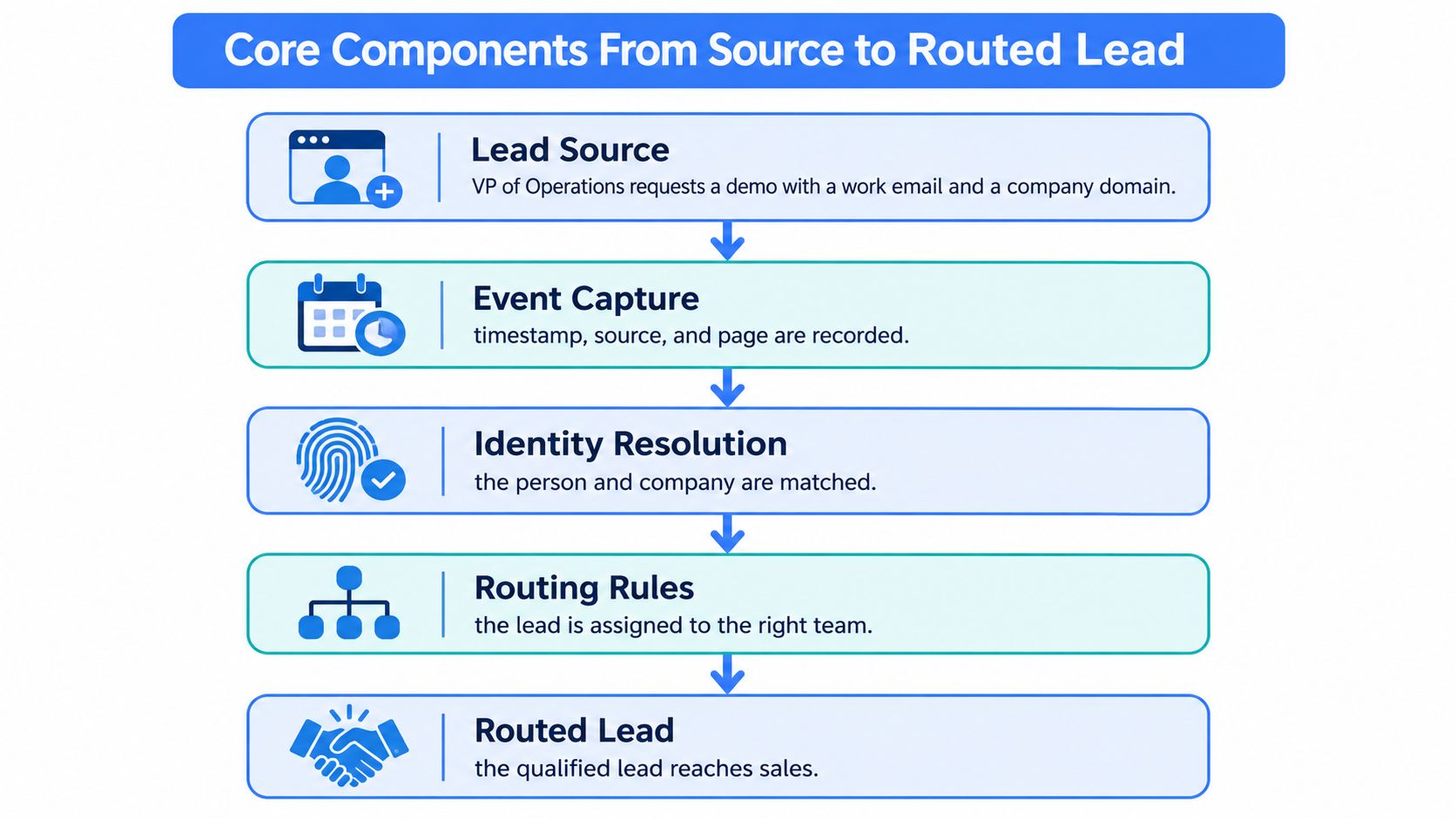
Capture the event and resolve identity
Record the submission time, originating page, campaign context, and source system. Generate an event identifier, then match the person and company to existing CRM records using stable identifiers.
Don't confuse event identity with person identity. The same person can request a demo after attending a webinar. Those are separate events attached to the same contact, not separate contacts that should receive competing sequences.
Preserve the original submission alongside normalized fields. If someone questions an assignment, you need to distinguish what the prospect entered from what an enrichment service returned.
Enrich, explain, and assign
Enrichment supplies decision-relevant context: current title, seniority, employer, and company characteristics such as headcount. If the employer differs from the submitted domain, flag the conflict rather than replacing the prospect's answer without notice.
Scoring checks those fields against your ideal customer profile, or ICP. For example, an illustrative scale from 0 to 100 can prioritize the VP, but the output should also explain why: target industry, appropriate seniority, supported territory. A score isn't a probability of purchase unless you've calibrated it that way.
Routing then creates an owner, a task, and a response deadline. Define a fallback owner for missing territories or unavailable representatives. A record shouldn't become unassigned just because a rule can't find a perfect match.
Use the lead scoring and routing workflow to connect enrichment fields to assignment decisions. For the wider relationship between acquisition and handoff, Rebus's guidance can help you optimize your lead generation funnel.
Every component should write its output with a timestamp. The next component needs to know not just what the value is, but when it became available.
Response Speed Targets and the Latency Budget
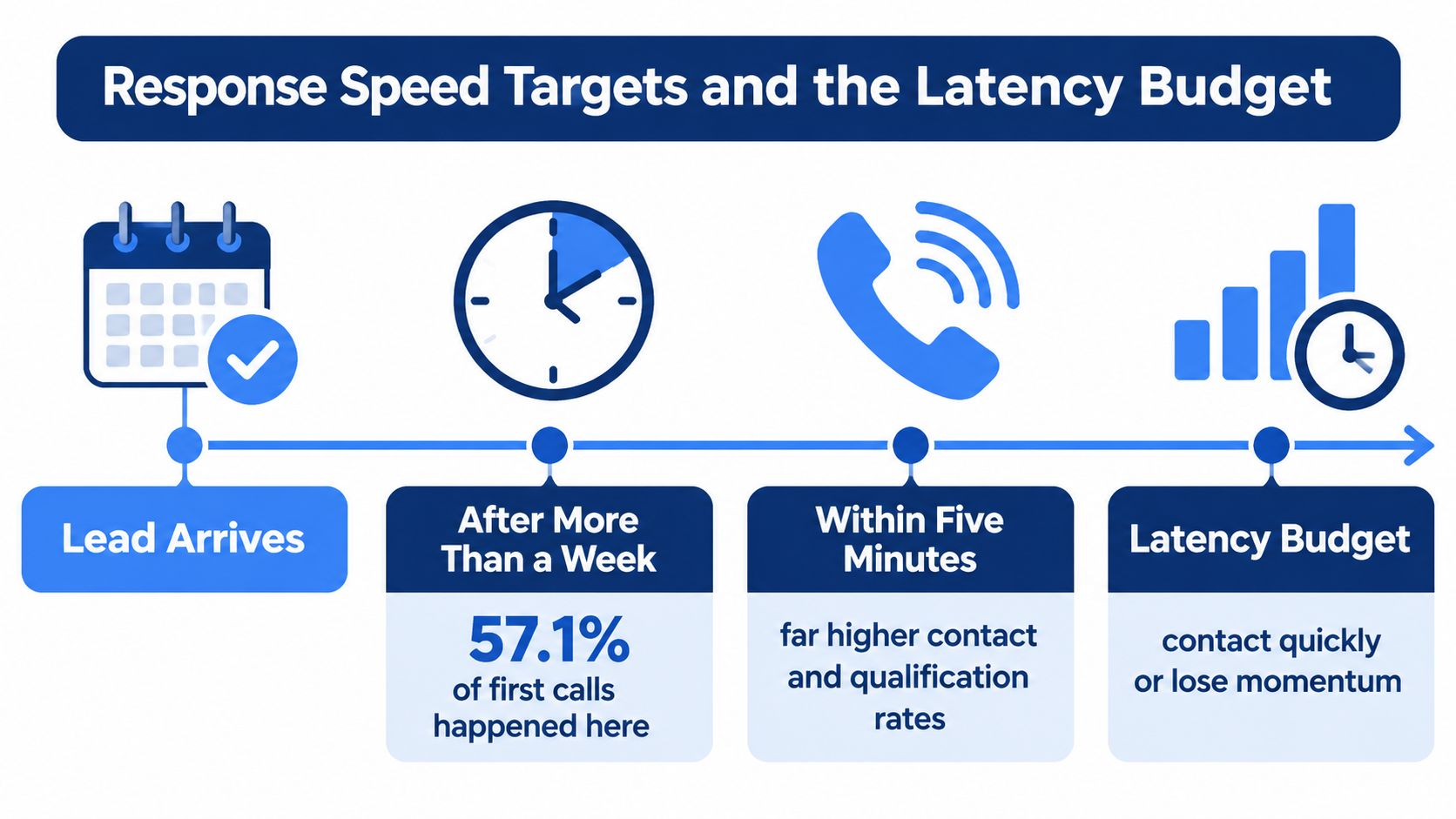
For high-intent inbound inquiries, aim to initiate the first action within five minutes. Treat that as an operating target to test, not a promise that every prospect will answer.
The MIT and InsideSales findings summarized by MarketSplash associated contact within five minutes, rather than 30 minutes, with approximately 100 times higher odds of contact and 21 times higher odds of qualification. Those multipliers are directional, not universally causal: channel, industry, offer, and buyer intent change the effect size.
Execution often falls far behind that ambition. A 2021 InsideSales analysis, summarized by Rankplan, found that 57.1% of first-call attempts occurred more than one week after a lead arrived.
The timeline makes the operational gap visible.
Instrument the handoffs
Stage timestamps and latency targets
| Stage | Target | What is measured |
|---|---|---|
| 1. Capture | Timestamped at the event | Event time and source recorded |
| 2. Enrichment completion | Within seconds | Median and P95 from capture |
| 3. Assignment | Within seconds | Median and P95 from enrichment completion |
| 4. First attempt | Within five minutes | Share of leads with first touch under five minutes |
| 5. Meaningful conversation | Set from local baseline | Time from capture to first qualified exchange |
Keep these events separate. Creating a CRM task isn't a contact attempt, and sending an automated receipt isn't a meaningful conversation. Otherwise, a dashboard can show success while the prospect is still waiting.
Use the median to describe the typical experience and P95 to expose the slower tail. Break down elapsed time by vendor call, queue wait, assignment logic, and representative action. That turns a complaint about slow leads into a specific bottleneck.
Protect the critical path
Keep required validation and routing on the immediate processing path. Use synchronous enrichment where the result is necessary to proceed; move optional firmographic backfills into asynchronous work so they don't block contact.
A latency budget is an allocation of allowable delay, not merely an API benchmark. The latency and response-time guide helps distinguish request performance from workflow performance, while the Sprints & Sneakers pipeline guide provides context for connecting the initial response to subsequent sales stages.
Test your targets against local conversion and staffing patterns. An unstaffed evening queue needs a coverage decision, not just faster software.
Architecture Patterns Compared From Batch to Live
Lead system architecture patterns
| Pattern | How data arrives | Typical first-touch delay | Data freshness | Best fit | Main risk |
|---|---|---|---|---|---|
| Periodic batch sync | Nightly or hourly job reads a file or database | Hours to a day | Snapshot from the last run | Low-volume lists and planning reports | Stale records at routing time |
| Event-driven pipeline | Form submit or webhook starts the chain | Seconds to minutes | Fresh at capture, aging afterwards | Inbound demos and signups | Duplicate events from retries |
| Event-driven with live enrichment | Each event triggers an on-demand call to a live data API | Around one second per lookup, vendor-reported median, not total first-touch time | Current at call time | SaaS signup flows and recruiting re-checks | Rate limits and per-call cost |
| Hybrid cache plus live refresh | Cache for stable firmographics, live call for role and employer | Milliseconds on cache hit, live call on refresh | Mixed, labeled per field | Most mid-size B2B stacks | Cache policy complexity |
These are design expectations, not guaranteed end-to-end response times. A fast lookup can still feed a slow human queue.
Choose what must be current
Periodic batch sync is straightforward to operate. A scheduled job reads records, transforms fields, and updates the CRM. It suits planning reports and low-urgency lists because nobody needs the result immediately.
Its weakness is the snapshot boundary. A record can be technically processed correctly but operationally wrong if the person changed employers after the last refresh. Avoid using an old snapshot as unquestioned authority for current role-based assignment.
An event-driven pipeline starts when an event arrives. Webhooks or form submissions trigger the next action without waiting for a scheduled run. However, delivery retries can repeat the same event, so consumers must recognize an event they've already processed.
Pay for freshness where it changes a decision
Live enrichment retrieves public professional data when the event occurs. Fetchin fits this pattern as a B2B data API that fetches profile and company information on demand; its vendor-reported lookup timing is represented in the table.
Current at call time means the returned fields reflect the public page state then. It doesn't guarantee that the person has updated their profile or that every published field is correct. Treat retrieval freshness and factual correctness as separate properties.
A hybrid architecture caches relatively stable firmographics, such as industry and headquarters, while refreshing role, seniority, and employer when needed. This reduces unnecessary calls, but you must define expiration and refresh rules at field level.
Don't buy freshness for every field. Buy it where an outdated value would change the next action.
Label each field as cached or live, with its retrieval time. When sources disagree, retain the conflict and apply a documented precedence rule instead of letting the last arriving response overwrite everything.
Signal Evidence and Account-Level Targeting
A visit to a company's pricing page can help prioritize that account, but it does not identify the visitor. Keep account-level clues separate from evidence tied to a named person.
- First-party engagement: A form fill, reply, or demo request records a direct interaction.
- Public company changes: Leadership moves, funding announcements, and office openings add context about an account.
- Role or hiring signals: A named contact's new position or a relevant vacancy can support a hypothesis about the account's needs.
- Anonymous page activity: Use it to prioritize accounts, not to claim that a particular person visited.
Store each signal with its source, timestamp, and confidence. A reaction to a professional-network post can mean curiosity, disagreement, or professional courtesy. Adding more signals can make targeting worse when scoring rules treat every activity as purchase intent.
Keep account evidence separate from contact permission
Inferred intent does not establish a person's identity or permission to contact them. As a conservative operating policy, reserve personal sequences for identified contacts with relevant first-party engagement, subject to applicable permission requirements. Use account signals to prompt research, review, or audience planning.
Demandbase's 2025 State of B2B Marketing report discusses measurement at both lead and account levels, unified account views, and data confidence. Track qualified accounts alongside individual responses, without claiming visibility into private conversations or unobserved research.
Measure your own data error rate. For example, check whether sampled records have the correct role and employer, then use the results to assess how much confidence your targeting rules deserve.
Before outreach, ask: Is this evidence strong enough to justify contact, or should the system wait?
Privacy and Compliance Boundaries to Design Around
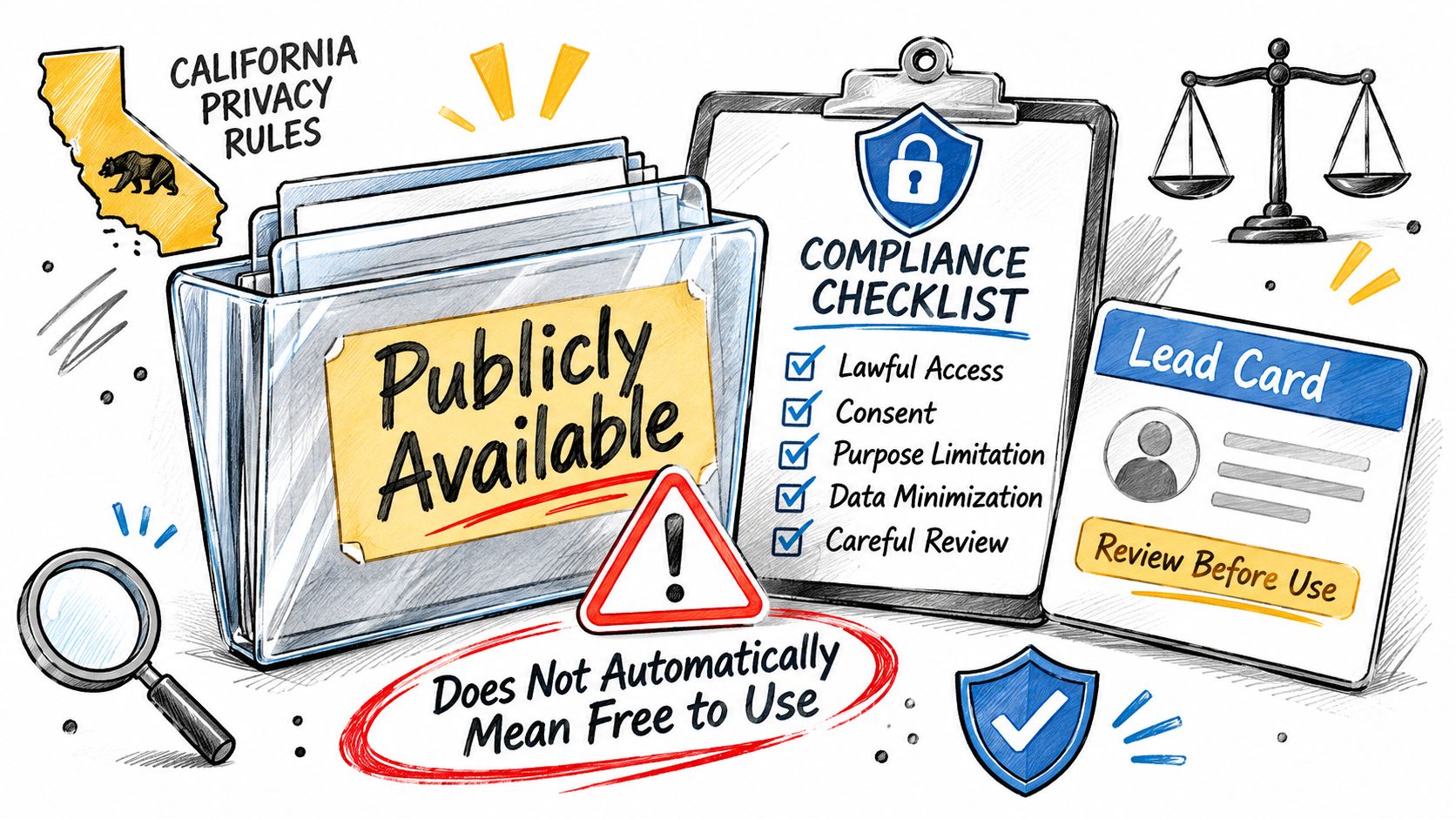
Publicly visible doesn't mean unrestricted use. The California Attorney General's CCPA guidance describes publicly available information, including information lawfully made public, and the reasonable basis a business needs for believing it was lawfully available.
Use a compliance review to distinguish availability from permitted processing.
The European Commission's GDPR principles require data minimisation: personal data must be adequate, relevant, and limited to the stated purpose. If routing requires employer and seniority, don't automatically copy unrelated profile attributes into downstream systems.
Assign responsibility before processing
The controller determines the purposes and means of processing; a processor handles data on its behalf. We act as a data processor for data clients submit through our APIs. A Data Processing Agreement can be requested by contacting Fetchin when we process personal data on a customer's behalf as controller under GDPR, CCPA, or similar laws.
Our users may not use the data for unsolicited bulk communications, harassment, discrimination, or any unlawful purpose. The CCPA and GDPR compliance overview provides additional operational context.
Use the accompanying video alongside your workflow review.
Before launch:
- Document purpose: Explain why each workflow needs its selected fields.
- Limit retention: Define deletion or review rules.
- Honor opt-outs: Apply suppression lists before downstream action.
- Record lawful basis: Have the responsible team document the applicable justification.
This is an orientation, not legal advice. Applicable obligations depend on jurisdiction, data, and intended use.
Integrating Live Enrichment Without Breaking Workflows
An enrichment dependency shouldn't make your signup flow fragile. Build the failure behavior before increasing traffic.
Protect requests and downstream writes
Prevent burst throttling. Set a per-second request budget below the provider's published limit. Use a shared limiter across workers, not separate limits that accidentally multiply your total traffic. Reserve headroom for interactive requests when backfills run.
Prevent dropped work after throttling. When a server returns HTTP 429, inspect
Retry-Afterif present and delay or queue the request. MDN's HTTP 429 documentation explains that the response indicates too many requests and may specify how long to wait. Don't immediately retry every queued job together.Prevent duplicate CRM records. Set explicit connection and response timeouts, then make retries idempotent. Key each operation to the record identifier and event identifier, and use an upsert rather than an unconditional create. A timeout means you didn't receive confirmation, not necessarily that the operation failed.
Control payloads and delivery mode
Prevent oversized payloads and stale routing fields. Request only attributes the workflow uses. Cache stable firmographics longer than role or employer fields, and define what happens when a required field can't be refreshed. Don't let a missing optional attribute block a person who's waiting.
Prevent untraceable decisions. Store the source, fetch timestamp, and validation state for every decision-relevant field. Keep an audit trail when a refreshed value changes the assigned owner. That lets an operations lead explain why the CRM moved a contact between teams.
Prevent background work from blocking interactive flows. Use synchronous calls when a signup or form decision needs the result immediately. Use asynchronous processing for batch backfills and noncritical updates. Persist job status so a worker restart doesn't lose the remaining work.
Failure-design test: Disconnect the enrichment dependency during a controlled test. Your team should know which records wait, which proceed with limited context, and which require review.
Monitor queue age as well as request failures. A successful request that starts too late can still miss your operational deadline. HTTP throttling is standard behavior, so the same backoff design applies across providers, even though their limits and response details differ.
Data Quality Gates and the KPIs That Prove Them
Run a validation gate before sequencing or a final routing decision. Normalize names and company domains, deduplicate against stable identifiers, verify contactability, classify role and firmographic fit, and preserve provenance and validation timestamps.
A single quality flag hides the action required. Use explicit states: valid can proceed, unverifiable needs review, suppressed must not enter outreach, and stale needs refresh. A record can have every field filled and still belong in the stale state.
The capacity cost can be substantial. Leadscale describes an audit of approximately 840,000 leads from UK B2B SaaS demand-generation programs, of which 37% were unserviceable when outreach was attempted.
Measure usable capacity, not database size
KPIs for lead system quality and speed
| KPI | Definition | Target approach | Why it matters |
|---|---|---|---|
| Valid-record rate | Share of records in the valid state after the gate | Set from first-month baseline | Shows how much capacity is usable |
| Duplicate rate | Share of records matching an existing identity key | Set from baseline, reduce each quarter | Prevents double outreach and split history |
| Field-level completeness | Share with role, seniority and employer filled | Track per field, not overall | Routing depends on these fields |
| Bounce rate | Share of outbound messages that fail delivery | Keep at or below your sending policy | Protects deliverability |
| Speed to first touch | Share with a first attempt within five minutes of capture | Set from stage latency targets | Shows whether the response target holds |
| Refresh coverage | Share verified within the set window | Set window per field type | Separates fresh records from aging ones |
| MQL-to-SQL by data-quality cohort | Conversion split by valid, unverifiable and stale states | Compare cohorts, not averages | Tests whether better data improves qualification |
| Revenue per validated account | Revenue divided by accounts in the valid state | Track quarterly | Links quality to pipeline value |
Treat the first month as a proposed baseline period, not an industry benchmark. Add enrichment latency, failure rate, and time-to-refresh to the operational dashboard. Inspect completeness by field so a well-populated company name doesn't conceal missing seniority.
Test whether quality changes outcomes
An MQL is a marketing-qualified lead; an SQL is a sales-qualified lead. Agree on those definitions before comparing conversion rates, and preserve the quality state that existed at qualification rather than replacing history with today's state.
Compare cohorts with similar sources, segments, and offers. Otherwise, you might credit cleaner data for an improvement caused by a different campaign or sales team.
A smaller pipeline with explicit uncertainty can outperform a larger one built on stale, complete-looking records. Prove it through qualification and account revenue, not just fewer blank fields.
Plan Your Migration and First Pilot
Start with a workflow whose owner, traffic, and outcome you can identify. An inbound demo form is a better pilot than replacing every CRM process at once.
Use the migration flow to keep scope controlled.
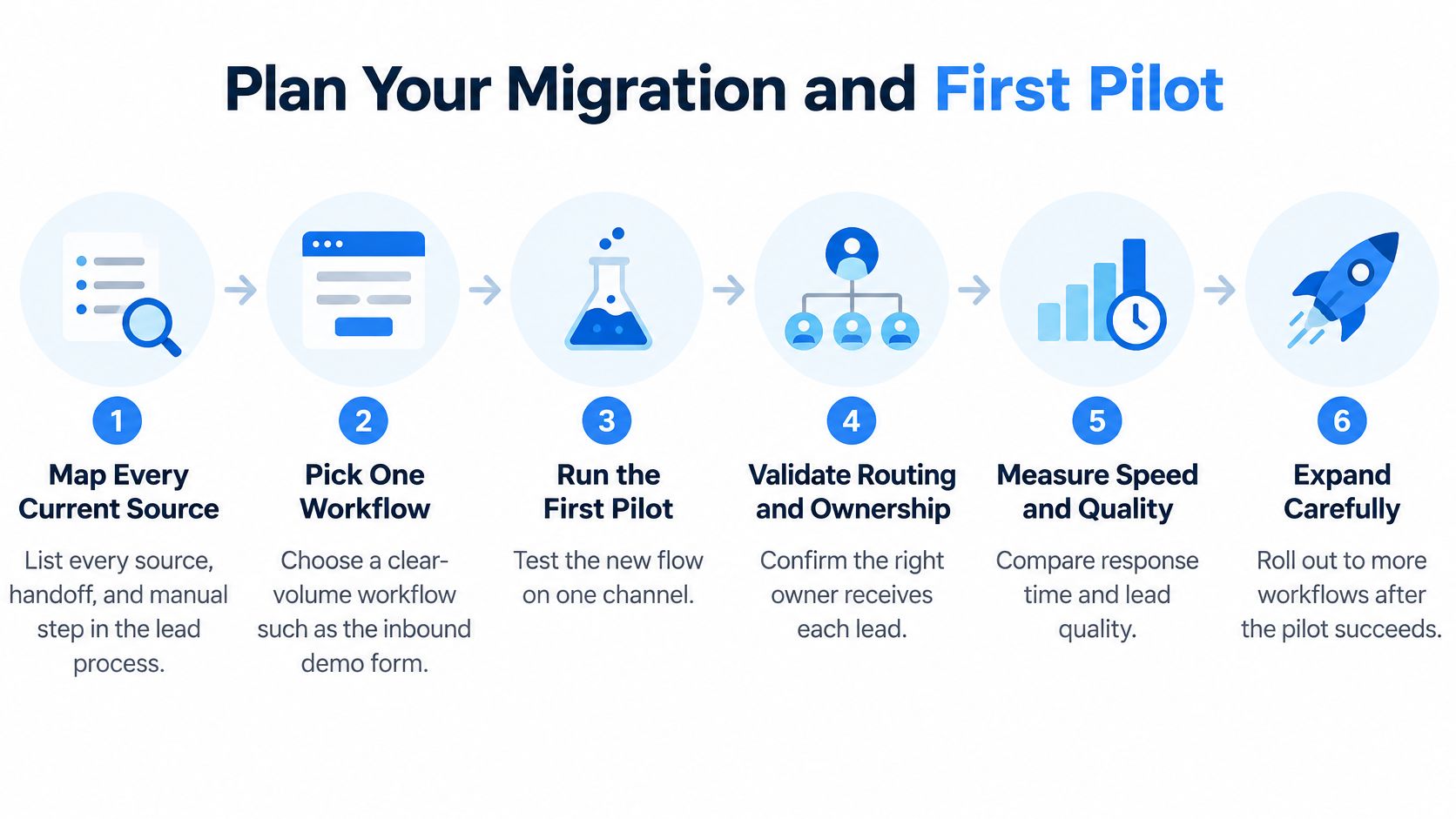
- Map the current process. List every source, handoff, manual lookup, and destination.
- Pick one workflow. Choose a clearly bounded stream, such as demo requests.
- Run parallel paths. As a proposed pilot window, allow two to four weeks to compare speed to first touch and valid-record rate. Keep the new path in shadow mode where needed to prevent duplicate outreach.
- Cut over gradually. Move one segment or territory, then verify ownership and fallback handling.
- Set operational alerts. Monitor P95 latency, HTTP 429 rate, and failed enrichment.
- Review monthly. Retire manual steps only after the operating measures remain stable.
Budget for actual demand
Our median response time is 1 second and P95 is 1.5 seconds, allowing API processing inside a signup flow, provided the rest of your application respects its own timeout budget. A profile call with fullProfile=true and a post engagement call each cost two credits; a hypothetical pilot using both once per lead therefore requires four credits per lead for those calls.
Dedicated capacity starts at $2,000 per month for 10 req/s, $5,000 for 20 req/s, $10,000 for 50 req/s, $15,000 for 75 req/s, and $20,000 for 100 req/s. Measure sustained demand and bursts before committing: request rate, not monthly lead count alone, determines the capacity you need.
Fetchin offers a real-time B2B data API for turning professional profile and company URLs into structured records for enrichment, qualification, and routing. Visit Fetchin to evaluate a focused pilot, then measure whether current data reaches the right owner quickly enough to change the outcome.