A people enrichment API takes something you already have, a profile URL, an email address, or another identifier, and hands you back structured information about that person. Fetchin does this as a real-time B2B data API, pulling publicly available professional details on demand and returning JSON in about a second.
Table of Contents
- Understanding People Enrichment APIs
- What a People Enrichment API Actually Returns
- Why Freshness Makes a Real Difference
- How Live Fetching Works
- Choosing the Right Model
- A People Enrichment API Becomes Easier to Evaluate When You Look at What It Actually Returns
- Map Profile Fields to Product Features
- Connect People, Companies, and Engagement
- Match Latency to the User Experience
- Compare Cost Before You Scale
- Check Vendor Safeguards
- Build Compliance Into the Workflow
- Choose the Right Request Pattern
- Design for Missing Data
- How Does Live Fetching Differ From Traditional Providers?
- What Happens When a Profile URL Is Invalid?
- Do Partial Responses Consume Credits?
- Can Engagement Data Support Outreach Automation?
Understanding People Enrichment APIs
Think about the difference between a live translator and a printed phrasebook. A phrasebook might give you decent answers, but it won't know about new slang, new names, or anything that changed since it went to print. A live translator listens to what's actually being said right now and responds accordingly. A people enrichment API operates the same way: it fetches professional data at the moment you ask, instead of leaning on whatever was sitting in a database six months ago.
A typical request starts with a professional profile URL. The API responds with a structured profile, current role, past positions, education, skills, location, and whatever contact fields are publicly available and permitted. The fields stay consistent across responses, so your application can read the result directly. No custom parsing hacks or brittle extraction code to maintain.
It's worth being clear about what the API is and isn't. It's a retrieval layer, not a system of record. Your product decides what to do with the data: display it, match it to an existing user, store selected fields, or pass approved information downstream to another tool.
The core idea is straightforward: hand over a partial identifier, get back useful professional context, and let your own application figure out what to do with it.
What a People Enrichment API Actually Returns
The response varies based on the endpoint you call, how much signal your input carries, and what public data exists for that individual. Fetchin's profile endpoint covers 100+ attributes, and its company endpoint resolves firmographic details tied to the person's organization.
| Capability | Typical Result |
|---|---|
| Attribute coverage | 100+ profile fields |
| Response format | Structured JSON |
| Delivery | Synchronous by default, asynchronous when needed |
| Typical speed | Around one second median |
| Credit handling | Failed requests do not consume credits |
The kinds of attributes you can expect to see:
- Identity details: name, headline, and current position.
- Career history: employers, titles, and date ranges where that information is publicly listed.
- Professional context: education, skills, languages, and location.
- Contact fields: returned only when available and permitted by the source platform's data policies.
- Company connections: industry, headcount, headquarters location, founding year, and verified domain.
That range of coverage is what makes these APIs practical across a number of SaaS workflows, including lead qualification, recruiting platforms, account mapping, and AI agent pipelines. One concrete example: a signup form that asks for just a professional email address, enriches the record server-side, and routes the user into a more relevant onboarding path without making them fill out a fifteen-field form.
Why Freshness Makes a Real Difference
Professional data moves around constantly. Someone changes companies, picks up a new title, or updates their skills after a course, all of which can make a stored record stale pretty quickly. On-demand enrichment lowers the risk of sending a lead to the wrong sales rep or displaying a job title that hasn't been accurate for a year.
That said, treat enrichment output as context, not gospel. Match identities deliberately, request only the fields your feature actually needs, and set a clear retention policy for anything sensitive.
For SaaS teams building people-focused features, the combination of fresh extraction, predictable JSON, and flexible delivery removes a surprising amount of complexity, and it does so without pretending the data is something it isn't.
Think of a people enrichment API like the choice between watching a live stream or downloading a saved file. When you send a request, a live provider reaches out and gets the current state of a public professional profile at that moment. An indexed provider, by contrast, hands you a snapshot it captured and stored during an earlier collection process.
That gap matters because people move around. Someone switches jobs, picks up a new title, or adds a skill after that indexed snapshot was taken. With live retrieval, your application checks the source at the moment of the request rather than trusting that yesterday's record still holds up.
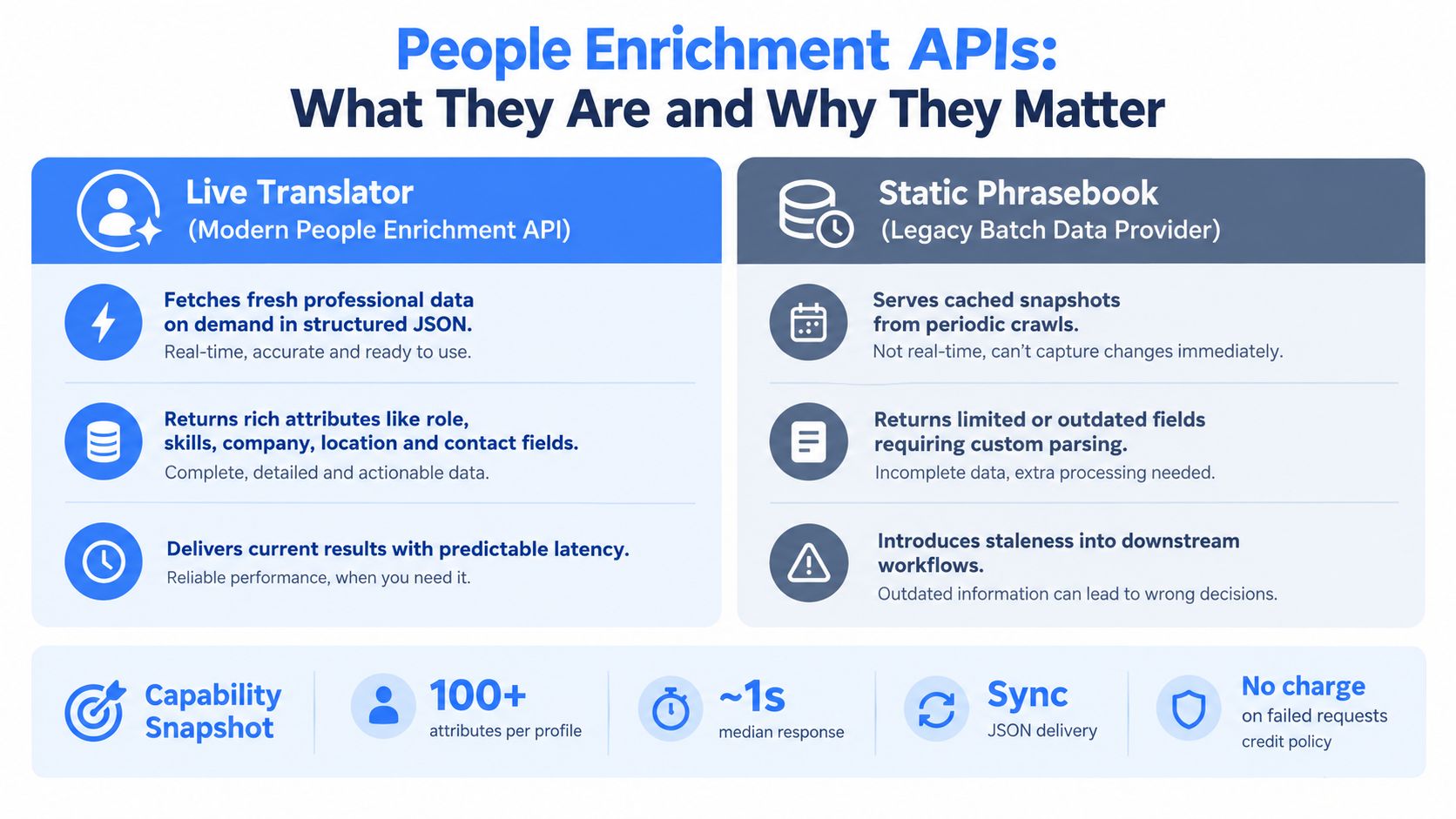
The chart above lays out where the two approaches diverge across freshness, field coverage, delivery speed, and how each one eats into your credit budget. The takeaway is straightforward: live extraction makes sense when the decision depends on up-to-the-minute identity or role data, whereas indexed records handle large, less time-sensitive operations well.
How Live Fetching Works
A live professional data API takes an input like a profile URL, pulls whatever public data is currently available, and maps it back as structured JSON. The response can cover the person's current role, employer, location, education, skills, and any contact fields that are permitted for use.
It works a bit like asking a translator to interpret a sentence as someone speaks it. You get an answer grounded in the most recent context available, though the result still depends on what the source publishes and whether the identity match actually holds.
Indexed systems follow a different path. They collect and normalize records on a schedule, then serve those records from an internal database. Response times tend to come out consistent, but you might be looking at a profile state that's weeks or months old.
Freshness is an architectural choice, not a label. The real question is whether each request fetches live data or reads from a stored snapshot.
| Factor | Live Fetching | Indexed Data |
|---|---|---|
| Freshness | Current at request time | Depends on update schedule |
| Latency | Predictable in general, with some source-side variability | Often highly consistent |
| Cost | Reflects work done per request | Usually more efficient for repeated bulk access |
| Coverage | Can reach fields that exist right now | Limited to whatever was indexed |
| Best fit | Matching and real-time decisions | Cleaning and historical analysis |
Choosing the Right Model
Live retrieval tends to be the stronger call for identity matching, lead qualification, recruiting workflows, and AI agents. When an agent suggests an account owner or drafts context for a sales conversation, a stale title can steer the whole interaction in the wrong direction.
It also fits naturally into signup flows. A SaaS product can take a professional email or profile URL, enrich the user during onboarding, and personalize their routing without maintaining a massive database of aging records.
Indexed data holds its own for bulk list cleaning, quarterly reviews, and historical analysis. If you're comparing old customer segments or standardizing thousands of existing rows overnight, chasing immediate freshness rarely justifies the cost of live calls.
For implementation details, take a look at this guide to Fetchin's data enrichment API for SaaS products. The rule of thumb: reach for live fetching when timing changes the decision, and lean on indexed data when scale and historical consistency carry more weight.
A People Enrichment API Becomes Easier to Evaluate When You Look at What It Actually Returns
Forget the marketing label for a moment. What really matters is the payload. Fetchin profile endpoints can return 100+ attributes, current and past positions, education history, skills, locations, and permitted contact fields. Every response comes back as structured JSON, which means your application works with clean, predictable objects instead of wrestling with unstructured web pages that need custom parsing.

Map Profile Fields to Product Features
Think of the schema like a row of labeled filing drawers. Your product opens only the drawers it actually needs, then plugs each value into a specific workflow.
- Identity fields drive matching and duplicate detection.
- Career fields feed lead scoring, territory routing, and recruiting searches.
- Education and skills power recommendations and candidate filters.
- Location fields handle territory assignment, localization, and account mapping.
- Contact fields support approved outreach workflows, but only when the data is publicly available and permitted.
Here's a concrete example: a SaaS signup flow accepts a professional profile URL, requests the person's current position and company, then routes the account to the right onboarding path. Your application reads stable field names directly, with zero fragile parsing logic to maintain.
A useful schema isn't just rich, it is predictable. Consistent field names and data types make enrichment far easier to test, monitor, and update over time.
Connect People, Companies, and Engagement
Company endpoints add the organizational layer behind an individual. You'll typically get industry, headcount, headquarters, founding year, and verified domain. Pairing person and company data lets a sales tool score both the buyer and the account simultaneously.
Engagement endpoints push the model further into activity signals. Depending on access and permissions, posts, comments, and reactions provide context for research, prioritization, or approved automation.
The addressable market is genuinely international. Platforms reported roughly 1.20 billion registered members worldwide in January 2025, spread across major commercial regions rather than concentrated in a single country. See the full breakdown of global professional identity statistics.
For hands-on implementation guidance, this guide to people data APIs for SaaS products is worth reading. Before you integrate, confirm which fields are guaranteed, which may be absent, and whether slower attributes need explicit selection. That discipline keeps every response useful without bloating your request payload.
A people enrichment API can look great in a demo but still disappoint when you plug it into a real production SaaS workflow. What actually matters is whether it delivers the fields you need quickly, handles your request volume without choking, and keeps costs predictable when traffic climbs.
For synchronous features, the benchmarks I find most useful are a median response time near one second and P95 latency around 1.5 seconds. Median tells you what the typical user sees; P95 tells you what the slowest users will experience. Those two numbers together give you a clear signal about whether enrichment can run during signup, lead capture, or identity matching without making the interface feel sluggish.
Match Latency to the User Experience
Not every field needs to live in the same request. Current role and company might be essential before you route a lead, while a full work history or engagement timeline can wait for background processing.
A practical setup separates calls by urgency:
- Synchronous fields power real-time decisions like account routing or onboarding.
- Asynchronous fields feed dashboards, reports, and internal records once the user has moved on.
- Cached application results avoid repeat calls when the same context is still relevant.
Fast enrichment isn't just about sending fewer requests. It's about reserving live calls for the decisions that genuinely need current data.
Throughput introduces another constraint. Self-serve plans often start at 5 requests per second, while dedicated capacity can scale up to 100 requests per second. Higher sustained limits typically take 2 to 5 business days to provision, so sort that out before a campaign or product launch, not after queues start building.
| Requirement | Practical Approach |
|---|---|
| Interactive signup | Use synchronous core fields |
| Large database refresh | Queue asynchronous jobs |
| Traffic spikes | Add backoff and retry controls |
| High sustained volume | Plan dedicated capacity early |
Compare Cost Before You Scale
Pricing often blends a 1,000-credit free tier, monthly credit bundles, pay-as-you-go usage, and enterprise terms. The right model depends on whether your volume is steady, seasonal, or still being figured out. Pay-as-you-go works well for a proof of concept, while monthly credits tend to make recurring workloads easier to forecast.
Also pay attention to how failed requests are handled. If invalid or unavailable inputs don't burn credits, error handling becomes cheaper and safer to test. This matters when retry logic, partial matches, or temporary source outages create unsuccessful calls.
The bigger picture is encouraging: forecasts place the global data enrichment solutions market at roughly $7.55 billion in 2026 and $16.72 billion by 2034, as enrichment shifts from batch database fills into active product workflows. Learn more about data enrichment market findings.
Before settling on a plan, model three scenarios: normal traffic, peak traffic, and retry traffic. Then compare response targets, credits consumed, and the cost of dedicated capacity. Explore Fetchin to review live pricing and configure an enrichment setup that matches your product's actual workload.
A people enrichment API can cut down on hours of manual research, but it doesn't hand you a free pass on data compliance. The smartest place to begin is a provider that pulls only public professional data, is upfront about where that data comes from, and serves everything through secured API connections.
Just because something is publicly available doesn't mean you can use it however you want. Your team still needs to answer the hard questions: why are you processing this information, which fields are actually necessary, how long are you keeping them, and how can someone ask for corrections or removal?
Check Vendor Safeguards
A solid professional data API should come with privacy controls built in, not leave every customer to figure it out from scratch. You want documented handling of consent signals, opt-out requests, retention policies, and access controls.
Before you integrate anything, put these questions to the vendor:
- What is the data provenance? Can they point to the specific public sources behind each field?
- How are opt-outs handled? Is there a straightforward process for removing someone from future results?
- Which fields are optional? Can you leave out contact details or sensitive attributes your feature doesn't actually need?
- How is data protected? Dig into encryption standards, access permissions, logging practices, and where processing happens geographically.
- What happens after a failed match? The API shouldn't nudge you toward guessing or stitching together weak signals into a shaky identity.
Good enrichment adds context without turning uncertainty into fact.
Data minimization should drive how you design your requests. If a routing feature only needs someone's current role and company, don't pull their entire work history or personal contact information. Store what your product genuinely requires, and write down the reason for keeping each field.
For a deeper dive, check out this guide on first-party and third-party data, then review the Openbase privacy overview when you're comparing vendor policies side by side.
Build Compliance Into the Workflow
Fetchin describes its sourcing as limited to publicly available information and its secured delivery as aligned with CCPA and GDPR expectations. That's a useful signal from a vendor, but it's not a replacement for your own legal review, a documented lawful basis, or internal governance.
Before you launch, set up a straightforward control path:
- Validate the input and match identity conservatively.
- Request only the attributes you need.
- Filter out restricted fields before anything flows downstream.
- Record where the data came from and why you're keeping it.
- Handle correction and opt-out requests without delay.
A trustworthy people enrichment API should make these controls practical, transparent, and easy to audit. Ask for documentation, test the deletion workflows yourself, and get responsibilities spelled out in the contract before enriched data ever reaches customer-facing features.
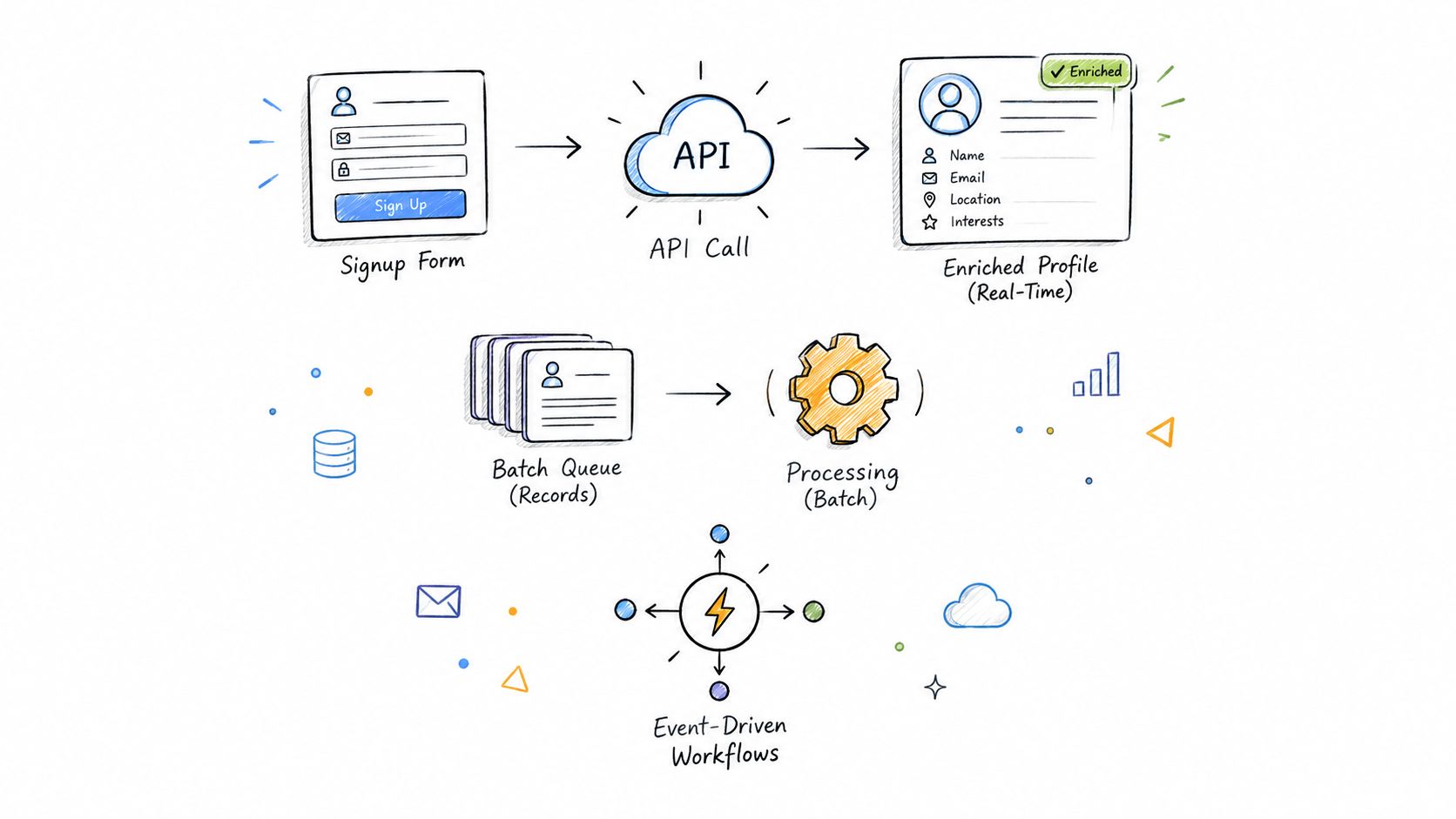
The smartest people enrichment API integrations don't treat every request the same way, they match data freshness to what the user is actually doing at that moment. Real-time calls make sense during signup, lead capture, and identity matching, where someone's waiting for an immediate result. Background batch jobs, on the other hand, handle the unglamorous but essential work of database maintenance without blocking the user experience.
Choose the Right Request Pattern
For an interactive flow, say a sales rep pasting a profile URL into your app, send that URL to an enrichment provider like Fetchin, ask for only the fields you actually need, and return the result as structured JSON. Keep the interface snappy: surface the core result first, then load slower attributes asynchronously so the user doesn't stare at a blank screen.
Here's a practical sequence that works:
- Validate the identifier before making any API call, it saves credits and avoids noise.
- Request only what you need for immediate routing: current role, company, and location.
- Cache non-sensitive results briefly to prevent duplicate lookups on the same profile.
- Store only the fields your feature genuinely needs, nothing more.
For database hygiene, queue records and process them in batches. If you're on a self-serve plan, you'll hit the 5 requests per second rate limit fairly quickly during bulk updates. Implement exponential backoff when you do. Before sustained demand arrives, negotiate dedicated capacity, most providers scale up to 100 requests per second for committed tiers.
Use live extraction for decisions that happen in the moment, and background processing for everything that keeps the database clean.
Design for Missing Data
An unavailable profile shouldn't derail onboarding. If a request fails, fall back to the original user input, mark enrichment as pending, and retry only when the error looks temporary, a 503, not a 404. One practical upside: most providers don't consume credits on failed requests, so testing your fallback paths doesn't blow your budget.
Event-driven workflows are especially useful when AI agents are in the loop. When a new lead arrives, publish an event, enrich it asynchronously, filter the returned fields against your privacy policy, and pass only the approved context to the agent. The agent never sees raw data it shouldn't.
Ethical sourcing deserves attention too. Before committing to an upstream data provider, review their provenance, opt-out mechanisms, and retention policies alongside technical considerations like Stella Proxies best practices.
Finally, keep an eye on match rate, latency, retry volume, cache hits, and credit usage. These five metrics tell you whether enrichment is genuinely improving your product or quietly adding cost and friction. Start with one narrow workflow, measure its real impact, and expand only after your fallback logic and compliance controls hold up under actual usage.
How Does Live Fetching Differ From Traditional Providers?
A live people enrichment API checks publicly available professional data at the exact moment you send a request. Traditional providers often return an indexed snapshot pulled hours, days, or weeks earlier, which means role, employer, or location details may already be stale.
Fetchin delivers structured JSON synchronously by default, with a median response time around one second. That speed makes live fetching practical for signup flows, lead qualification, and identity matching, where timing directly affects conversion and user experience.
Live data gives you better context, but it does not replace deliberate identity matching or your own system of record.
What Happens When a Profile URL Is Invalid?
When a submitted URL is invalid or unreachable, the API returns a clear unsuccessful response instead of fabricating a match. Your application can keep the submitted profile URL in place, flag enrichment as unavailable, and surface a manual completion path for the user.
Restricted or incomplete profiles often produce partial results. Treat each field independently, display only the attributes the API actually returns, and avoid reading missing data as a negative signal about the person.
Do Partial Responses Consume Credits?
Credit behavior varies by provider. Fetchin does not charge credits for failed requests, which helps protect your budget when an input is invalid, restricted, or temporarily unavailable.
Even a partial response can carry valuable fields, such as a current company or job title. Monitor which attributes come back and request only the fields your specific feature depends on, especially since some slower fields can increase overall latency.
Can Engagement Data Support Outreach Automation?
Posts, comments, and reactions can sharpen research, prioritization, and approved workflow automation. But engagement signals should not automatically trigger unrestricted outreach.
Apply consent checks, purpose limitation, opt-out handling, and data minimization before routing results into an outreach system. Use engagement data to inform a review or a permission-based action, not to assume someone has agreed to be contacted.
Fetchin helps SaaS teams retrieve live, public professional data through one real-time B2B data API.